 PmaControl
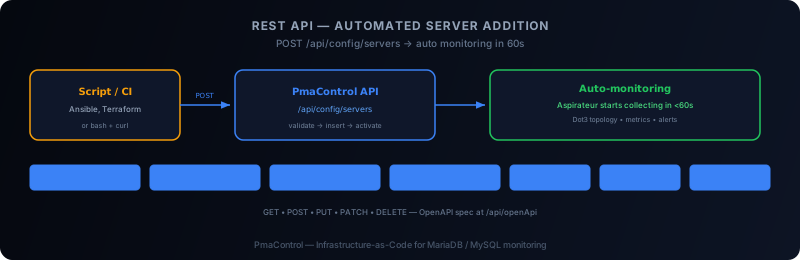
Why automate server addition
When you're monitoring 5 MariaDB / MySQL servers, adding them manually to PmaControl is fine. At 50 or 200 servers, it no longer is.
PmaControl's REST API enables you to industrialise this process: a script, a CI/CD pipeline, or an orchestration tool (Ansible, Terraform) can create a monitored server in a single HTTP request.
Prerequisites
- An active webservice account in PmaControl (created during installation via
config.json) - Your PmaControl instance URL
- Target client and environment must exist (create them first via the API if needed)
Main endpoint
POST /fr/api/config/servers
Content-Type: application/json
Authentication via the webservice account configured in configuration/webservice.config.php.
Payload for adding a server
{
  "id_client": 1,
  "id_environment": 1,
  "name": "prod-db-01",
  "display_name": "Production DB 01",
  "ip": "10.68.68.100",
  "hostname": "prod-db-01.internal",
  "login": "pmacontrol",
  "passwd": "SecurePassword123",
  "database": "information_schema",
  "port": 3306,
  "is_ssl": 0,
  "ssh_port": 22,
  "ssh_login": "pmacontrol",
  "is_sudo": 1,
  "is_root": 0,
  "is_monitored": 1,
  "is_proxy": 0,
  "is_vip": 0
}
Key fields
| Field | Description |
|---|---|
id_client |
Client (organisation) identifier |
id_environment |
Environment identifier (Production, Staging, etc.) |
ip |
MySQL server access IP address |
port |
MySQL port (3306 by default) |
login / passwd |
MySQL credentials for data collection |
is_monitored |
1 = active monitoring, 0 = disabled |
is_proxy |
1 if ProxySQL/MaxScale (tests connection differently) |
is_vip |
1 if VIP/DNS entry (no direct connection, tracks redirection) |
Create dependencies first
Before adding a server, the client and environment must exist.
Create a client
curl -s -X POST http://pmacontrol.local/fr/api/config/clients \
  -H "Content-Type: application/json" \
  -d '{"name": "68Koncept", "description": "Production infrastructure"}'
Create an environment
curl -s -X POST http://pmacontrol.local/fr/api/config/environments \
  -H "Content-Type: application/json" \
  -d '{"name": "Production", "description": "Live servers"}'
Add an SSH key
curl -s -X POST http://pmacontrol.local/fr/api/config/ssh-keys \
  -H "Content-Type: application/json" \
  -d '{"name": "deploy-key", "private_key": "-----BEGIN RSA PRIVATE KEY-----\n..."}'
Bulk addition script
#!/bin/bash
PMAC="http://pmacontrol.local"
CLIENT_ID=1
ENV_ID=1

SERVERS=(
  "prod-db-01:10.68.68.100:3306"
  "prod-db-02:10.68.68.101:3306"
  "prod-db-03:10.68.68.102:3306"
  "prod-proxy-01:10.68.68.200:6033"
)

for entry in "${SERVERS[@]}"; do
  IFS=: read -r name ip port <<< "$entry"
  is_proxy=0
  [[ "$name" == *proxy* ]] && is_proxy=1

  curl -s -X POST "$PMAC/fr/api/config/servers" \
    -H "Content-Type: application/json" \
    -d "{
      \"id_client\": $CLIENT_ID,
      \"id_environment\": $ENV_ID,
      \"name\": \"$name\",
      \"display_name\": \"$name\",
      \"ip\": \"$ip\",
      \"port\": $port,
      \"login\": \"pmacontrol\",
      \"passwd\": \"PmacMonitor2026\",
      \"database\": \"information_schema\",
      \"is_monitored\": 1,
      \"is_proxy\": $is_proxy,
      \"ssh_port\": 22,
      \"ssh_login\": \"pmacontrol\"
    }"
  echo " → $name added"
done
List existing servers
curl -s http://pmacontrol.local/fr/api/config/servers | jq '.[] | {id, name, ip, is_monitored}'Update a server
PUT /fr/api/config/servers/{id}curl -s -X PUT http://pmacontrol.local/fr/api/config/servers/5 \
-H "Content-Type: application/json" \
-d '{"is_monitored": 0}'Delete a server
Deletion is a soft delete (is_deleted = 1). The server disappears from the interface but stays in the database:
curl -s -X DELETE http://pmacontrol.local/fr/api/config/servers/5Tags for organising servers
Tags let you categorise servers (datacenter, role, version):
curl -s -X POST http://pmacontrol.local/fr/api/config/tags \
  -H "Content-Type: application/json" \
  -d '{"name": "dc-paris", "description": "Paris datacenter"}'
Verification after addition
After addition, PmaControl automatically starts collection if is_monitored = 1. Check in the interface:
- The server appears in
Server > Main - The Dot3 topology updates on the next cycle
- First metrics arrive within 60 seconds
OpenAPI specification
PmaControl exposes its full OpenAPI spec:
GET /fr/api/openApiUsable with Swagger UI or to auto-generate SDK clients.
Conclusion
PmaControl's REST API turns server addition from a manual task into a scriptable, repeatable operation. Combined with Ansible or Terraform, it enables an Infrastructure-as-Code approach to MariaDB / MySQL monitoring.
Comments (0)
No comments yet.
Leave a comment