 PmaControl
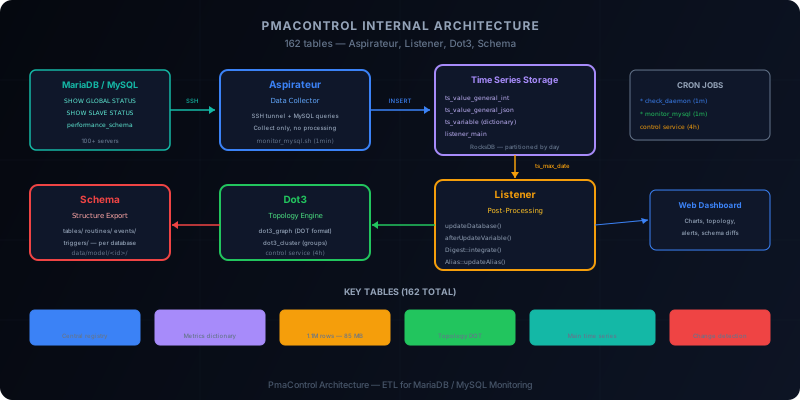
162 Tables, Not One Too Many
PmaControl is not a simple dashboard. It is a distributed system that collects, stores, transforms, and exposes metrics from hundreds of MariaDB / MySQL servers in real time. The internal database contains 162 tables — each with a precise role in the data pipeline.
This article details the internal architecture: the four main components (Aspirateur, Listener, Dot3, Schema), the end-to-end data flow, the cron jobs that orchestrate everything, and the key tables you need to know for debugging or extending the system.
The Four Pillars
Aspirateur: The Data Collector
The Aspirateur is the component that fetches metrics from each monitored server. Its operation is simple but effective:
- It connects to the server via SSH (tunnel) then opens a local MySQL connection
- It executes a series of queries:
SHOW GLOBAL STATUS,SHOW GLOBAL VARIABLES,SHOW SLAVE STATUS,SHOW PROCESSLIST,performance_schemaqueries, etc. - It writes the results to the
ts_value_*(time series) tables in the PmaControl database
The ts_ prefix is ubiquitous: it stands for time series. Each metric is timestamped and stored with the source server identifier.
Aspirateur → SSH tunnel → local MySQL
           → SHOW GLOBAL STATUS
           → SHOW SLAVE STATUS
           → performance_schema queries
           → INSERT INTO ts_value_general_int (...)
           → INSERT INTO ts_value_general_json (...)
The Aspirateur does no processing. It collects and writes. This is a fundamental design principle: separate collection from processing so they can be scaled independently.
Listener: The Post-Processing Engine
The Listener is PmaControl's brain. It monitors time series tables and triggers actions when new data arrives. Its mechanism relies on a pivot table: listener_main.
The listener_main table contains:
| Column | Role |
|---|---|
ts_file |
The data source file |
ts_max_date |
The last processed timestamp |
ts_date_by_server |
The last timestamp per server |
The Listener runs in a continuous loop. On each iteration, it compares the recorded ts_max_date with the most recent timestamp in the ts_value_* tables. If a difference is detected, it means the Aspirateur has written new data — the Listener then triggers the post-processing chain:
Listener loop:
  1. Check ts_max_date vs actual max(timestamp)
  2. If changed → trigger pipeline:
     a. updateDatabase()      — updates server metadata
     b. afterUpdateVariable() — triggers conditional rules
     c. Digest::integrate()   — aggregates performance_schema metrics
     d. Alias::updateAlias()  — refreshes DNS aliases
updateDatabase() synchronizes basic information: server version, replication status, database sizes, active connection count.
afterUpdateVariable() is the rule engine. It compares new values against configured thresholds and generates alerts if necessary. For example, if Seconds_Behind_Master exceeds 60, a Warning alert is created.
Digest::integrate() processes performance_schema data. It aggregates query statistics (execution time, rows examined, frequency) and stores them in PmaControl's digest tables. This feeds the performance dashboards.
Alias::updateAlias() maintains the alias_dns table, which maps friendly names to actual IP addresses. This table is one of the largest: 1.1 million rows, 85 MB of data. Aliases are used throughout the interface to display readable names instead of IP addresses.
Dot3: Real-Time Topology
Dot3 is the topology mapping component. It analyzes replication relationships between servers and generates a directed graph in DOT format (Graphviz).
The process:
- Dot3 reads each server's replication metadata (master/slave, GTID, channel)
- It builds a dependency graph: who is master of whom, who is slave of whom
- It generates a visual representation with clusters (groups of related servers)
The tables involved:
dot3_graph: the complete DOT graph, ready to be rendereddot3_cluster: server clusters (a cluster = a replication group)
Dot3 is particularly useful for detecting broken topologies: a slave pointing to a nonexistent server, an unexpected circular replication loop, or an isolated server that should be part of a cluster.
Schema: Structure Export
The Schema component exports the complete structure of each monitored database. For each server, it creates a file tree:
data/model/<server_id>/databases/<db_name>/
├── schema/
│   └── tables/
│       ├── users.sql
│       ├── orders.sql
│       └── ...
├── routines/
│   ├── calculate_total.sql
│   └── ...
├── events/
│   ├── daily_cleanup.sql
│   └── ...
└── triggers/
    ├── before_insert_users.sql
    └── ...
Each file contains the corresponding CREATE TABLE, CREATE PROCEDURE, CREATE EVENT or CREATE TRIGGER. This enables:
- Versioning the structure in Git (diff between two exports)
- Comparing structure between production and staging
- Detecting schema drift (an index manually added in production, a column modified without a migration)
The Glial CLI
PmaControl is built on the Glial framework, which provides a standardized command-line interface:
./glial <controller> <action> [params]Concrete examples:
# Check daemon status
./glial agent check_daemon

# Force a collection cycle
./glial control service

# Export a server's schema
./glial schema export 42

# Regenerate topology
./glial dot3 generate
The CLI is used both manually (debugging, maintenance) and by cron jobs for automatic orchestration.
Cron Jobs: The Orchestration
Three essential cron jobs keep PmaControl running:
1. ./glial agent check_daemon — Every Minute
This is the most frequent cron job. It checks that all agent processes are alive and restarts them if needed. A dead agent means a gap in data — this cron ensures collection continuity.
* * * * * cd /srv/www/pmacontrol && ./glial agent check_daemon >> /tmp/pmacontrol_agent.log 2>&1If an agent does not respond after 3 attempts, a Telegram alert is sent.
2. ./glial control service — Every 4 Hours
This cron performs heavy maintenance tasks:
- Recalculation of daily aggregations
- Cleanup of expired data (configurable retention)
- Regeneration of Dot3 topology
- Server metadata synchronization
- Consistency checks between tables
Four hours is a good tradeoff between freshness and load: these operations are expensive and do not need to be real-time.
0 */4 * * * cd /srv/www/pmacontrol && ./glial control service >> /tmp/pmacontrol_control.log 2>&13. ./monitor_mysql.sh — Every Minute
This script is the Aspirateur's entry point. It triggers a complete collection cycle:
* * * * * cd /srv/www/pmacontrol && ./monitor_mysql.sh >> /tmp/pmacontrol_monitor.log 2>&1The script handles parallelization: if you are monitoring 200 servers, it does not contact them sequentially. It distributes work in parallel batches, with a configurable number of workers.
Key Tables
Here are the most important tables to know for understanding or debugging PmaControl:
mysql_server
The central table. Each row represents a monitored instance — not just MariaDB / MySQL servers, but also:
- MariaDB / MySQL servers (the primary use case)
- Proxies: MaxScale, ProxySQL, HAProxy
- VIPs (Virtual IPs)
The is_proxy and is_vip columns distinguish the types:
is_proxy |
is_vip |
Type |
|---|---|---|
| 0 | 0 | Regular MariaDB / MySQL server |
| 1 | 0 | Proxy (MaxScale, ProxySQL, HAProxy) |
| 0 | 1 | VIP (Virtual IP) |
-- MariaDB/MySQL servers only
SELECT id, ip, port, name, display_name, id_environment
FROM mysql_server
WHERE is_deleted = 0 AND is_proxy = 0 AND is_vip = 0;

-- Proxies (MaxScale, ProxySQL, HAProxy)
SELECT id, ip, port, name, display_name
FROM mysql_server
WHERE is_deleted = 0 AND is_proxy = 1;

-- VIPs
SELECT id, ip, port, name, display_name
FROM mysql_server
WHERE is_deleted = 0 AND is_vip = 1;
Proxies and VIPs are stored in the same table as MySQL servers to simplify joins and topology. Dot3 uses them to draw connections between network layers (VIP → Proxy → Master → Slave). The timeout column is dynamically computed: 11 seconds for proxies (which respond more slowly to checks), 1 second for regular servers.
Dedicated tables complement proxy-specific details:
maxscale_server/maxscale_server__mysql_server— MaxScale configuration and its backendsproxysql_server— ProxySQL configurationhaproxy_main/haproxy_main_input/haproxy_main_output/link__haproxy_main_output__mysql_server— HAProxy configuration (listeners, frontends, backends)vip_server— VIP details
ts_variable
The metrics dictionary. Each collected variable (for example Threads_connected, Innodb_buffer_pool_pages_data) has an entry in this table with its numeric identifier.
SELECT id, name, source
FROM ts_variable
WHERE name LIKE 'Innodb%';
ts_value_general_int
The main storage for numeric metrics. This is the largest table — it receives thousands of inserts per second, and can reach several billion rows per day on the largest PmaControl installations.
SELECT server_id, variable_id, value, timestamp
FROM ts_value_general_int
WHERE server_id = 42
  AND variable_id = 107  -- Threads_connected
  AND timestamp > NOW() - INTERVAL 1 HOUR;
This table is partitioned by day to allow fast cleanup of old data (ALTER TABLE ... DROP PARTITION).
ts_value_general_json
For complex metrics that do not fit in an integer: SHOW PROCESSLIST results, performance_schema tables (query digests, locks, table I/O), SHOW ENGINE INNODB STATUS, etc. The JSON format allows storing arbitrary structures. Replication metrics (SHOW SLAVE STATUS) have their own dedicated tables (ts_value_slave_*).
alias_dns
The DNS alias table — 1.1 million rows, 85 MB. It maps IP addresses to readable names and is used throughout the interface.
SELECT ip, alias, source, updated_at
FROM alias_dns
WHERE ip = '10.0.1.42';
dot3_graph and dot3_cluster
The topology tables. dot3_graph contains the complete DOT graph, dot3_cluster the logical server groups.
The Complete Data Flow
Let us recap the journey of a metric, from source to screen:
| Step | Component | Action |
|---|---|---|
| 1 | CRON monitor_mysql.sh (every minute) |
Launches Aspirateur |
| 2 | ASPIRATEUR | SSH tunnel → MySQL → SHOW GLOBAL STATUS |
Writes to ts_value_general_int / ts_value_general_json |
||
| 3 | LISTENER (detects ts_max_date changed) |
updateDatabase() — updates server metadata |
afterUpdateVariable() — alerts if thresholds exceeded |
||
Digest::integrate() — aggregates performance_schema |
||
Alias::updateAlias() — refreshes alias_dns |
||
| 4 | DOT3 (loops every ~3s) | Regenerates replication topology in real time |
| 5 | CRON control service (every 4h) |
Daily cleanup and aggregation |
| 6 | WEB INTERFACE | Reads aggregated tables → dashboards, charts, topology |
Sizing
For a typical deployment of 100 MariaDB / MySQL servers:
- PmaControl database: approximately 15 GB of data (dominated by
ts_value_*tables) - CPU: 2-4 cores are sufficient (the Listener is the most demanding)
- RAM: 4 GB minimum, 8 GB recommended (for the buffer pool of the PmaControl database itself)
- Disk: SSD mandatory — time series tables generate heavy random I/O
The recommended storage engine for ts_value_* tables is RocksDB (via MyRocks): better compression, better sequential write performance, and native partitioning by day.
Debugging
When something is not working, here is the checklist:
- Are agents running?
./glial agent check_daemon— if an agent is dead, data is no longer being collected for the servers it manages - Is the Listener running? Check
ts_max_dateinlistener_main— if it is no longer progressing, the Listener is stuck - Are cron jobs executing? Check
/tmp/pmacontrol_*.logfor errors - Is SSH connectivity OK? Manually test
ssh -p <port> <user>@<host>with the configured key - Is the PmaControl database healthy? Check disk space, locks, slow queries on the PmaControl database itself
Conclusion
PmaControl's architecture follows a classic ETL (Extract-Transform-Load) model adapted for monitoring:
- Extract: the Aspirateur collects without transforming
- Transform: the Listener applies rules and aggregates
- Load: dashboards read the transformed data
The 162 tables are not an accident of complexity — they reflect the richness of data collected on each MariaDB / MySQL server. Understanding this architecture is essential for anyone who wants to debug a collection problem, extend PmaControl with a new metric type, or optimize the performance of the monitoring system itself.
Comments (0)
No comments yet.
Leave a comment