 PmaControl
Beyond the Fundamentals
Round 1 of MariaDB / MySQL security covers the basics: strong passwords, minimal users, TLS enabled, firewall configured. Round 2 goes further. We are entering advanced hardening territory — techniques that few DBAs implement but that make the difference against a determined attacker.
init_file: The Silent Script
The MariaDB / MySQL init_file variable allows specifying a SQL file that will be executed automatically at server startup. It is a powerful hardening tool:
[mysqld]
init_file = /etc/mysql/conf.d/init_security.sql
The init_security.sql file can contain:
-- Disable default accounts
ALTER USER 'root'@'localhost' ACCOUNT LOCK;

-- Revoke excessive privileges
REVOKE ALL PRIVILEGES ON *.* FROM 'app_user'@'%';
GRANT SELECT, INSERT, UPDATE, DELETE ON app_db.* TO 'app_user'@'%';

-- Drop test databases
DROP DATABASE IF EXISTS test;

-- Enable auditing
INSTALL SONAME 'server_audit';
SET GLOBAL server_audit_logging = ON;
The advantage: even if an attacker modifies the database during an intrusion, restarting the server automatically restores the secure configuration.
LUKS: Filesystem Encryption
MariaDB data at rest must be encrypted. InnoDB supports native tablespace encryption, but LUKS (Linux Unified Key Setup) offers more complete protection: it encrypts the entire filesystem, including logs, temporary files, and configuration files.
# Create a LUKS encrypted volume for the datadir
cryptsetup luksFormat /dev/sdb1
cryptsetup luksOpen /dev/sdb1 mariadb_data
mkfs.ext4 /dev/mapper/mariadb_data
mount /dev/mapper/mariadb_data /var/lib/mysql
The LUKS key must never be stored on the same disk as the data. Use a TPM module, a USB token, or an external key management service (Vault, AWS KMS).
systemd: defaults-file and PrivateMounts
The MariaDB systemd unit file can be hardened in several ways:
Explicit --defaults-file
[Service]
ExecStart=/usr/sbin/mariadbd --defaults-file=/etc/mysql/mariadb.cnf
Specifying --defaults-file prevents MariaDB from reading other configuration files (such as a malicious ~/.my.cnf dropped by an attacker).
PrivateMounts and namespaces
[Service]
PrivateMounts=yes
ProtectHome=yes
ProtectSystem=strict
ReadWritePaths=/var/lib/mysql /var/run/mysqld /tmp
NoNewPrivileges=yes
PrivateTmp=yes- PrivateMounts=yes: MariaDB sees its own mount namespace. Mount changes made by other processes are not visible.
- ProtectHome=yes: The /home directory is inaccessible.
- ProtectSystem=strict: The filesystem is read-only except for explicitly allowed paths.
- NoNewPrivileges=yes: The MariaDB process cannot acquire new privileges (no setuid).
- PrivateTmp=yes: MariaDB has its own isolated /tmp.
chattr: Immutability
The ext4 filesystem +i (immutable) attribute prevents file modification, even by root:
# Make the configuration file immutable
chattr +i /etc/mysql/mariadb.cnf
chattr +i /etc/mysql/conf.d/init_security.sql

# Verify
lsattr /etc/mysql/mariadb.cnf
# ----i--------e-- /etc/mysql/mariadb.cnf
An attacker who gains root access cannot modify the MariaDB configuration without first removing the immutable attribute — which leaves traces in the audit logs.
To legitimately modify the file:
chattr -i /etc/mysql/mariadb.cnf
# ... modify the file ...
chattr +i /etc/mysql/mariadb.cnf
systemctl restart mariadb
SELinux: Custom Policies
SELinux in enforcing mode is the most powerful and most neglected security layer. MariaDB ships with a default SELinux policy, but a custom policy can go much further.
Create a custom SELinux type
# Define a type for sensitive configuration files
semanage fcontext -a -t sec_custom_path_t "/etc/mysql/conf.d(/.*)?"
restorecon -Rv /etc/mysql/conf.d/
Custom module policy
Create a .te (Type Enforcement) file that restricts MariaDB access:
# mariadb_custom.te
module mariadb_custom 1.0;

require {
    type mysqld_t;
    type sec_custom_path_t;
    class file { read open getattr };
}

# MariaDB can read configs but not modify them
allow mysqld_t sec_custom_path_t:file { read open getattr };
# No write access allowed on configs
Compile and install:
checkmodule -M -m -o mariadb_custom.mod mariadb_custom.te
semodule_package -o mariadb_custom.pp -m mariadb_custom.mod
semodule -i mariadb_custom.pp
With this policy, even if an attacker compromises the MariaDB process, they cannot modify the configuration files — SELinux blocks access at the kernel level.
Layered Defense
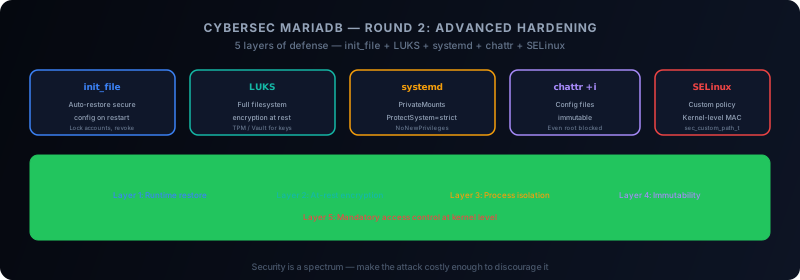
Each technique presented here is a layer of defense. None is sufficient on its own. Together, they form significant armor:
| Layer | Protection | Against |
|---|---|---|
| init_file | Automatic restoration | Runtime config modifications |
| LUKS | At-rest encryption | Physical disk theft |
| systemd namespaces | Process isolation | Privilege escalation |
| chattr +i | Config immutability | Modification by compromised root |
| SELinux | Mandatory access control | MariaDB process exploitation |
Conclusion
Advanced MariaDB hardening takes time and expertise. Each added layer makes attacks harder, slower, and more detectable.
Security is not a binary state — it is a spectrum. The goal is not to be invulnerable (that is impossible), but to make the attack costly enough that the attacker moves to an easier target.
This article was originally published on Medium.
Comments (0)
No comments yet.
Leave a comment