 PmaControl
Replication in 2026: Still the Foundation
Master/slave replication remains the fundamental building block of any production MariaDB / MySQL infrastructure. High availability, read distribution, hot backups — everything relies on it. And yet, most serious database incidents involve broken replication or undetected lag.
This article covers both sides of replication: how to set it up properly, then how to monitor it in PmaControl so you are never caught off guard.
Configuring Replication
Master Prerequisites
The master must have binlog enabled and a unique server-id:
[mysqld]
server-id = 1
log-bin = /var/log/mysql/mysql-bin
binlog-format = ROW
gtid_strict_mode = ON          # MariaDB
# enforce_gtid_consistency = ON  # MySQL
# gtid_mode = ON                 # MySQL
Create the replication user:
CREATE USER 'repl'@'10.0.1.%' IDENTIFIED BY 'secret_replication_password';
GRANT REPLICATION SLAVE ON *.* TO 'repl'@'10.0.1.%';
Slave Prerequisites
The slave needs its own server-id and relay log:
[mysqld]
server-id = 2
relay-log = /var/log/mysql/relay-bin
read-only = ON
log-slave-updates = ON
log-slave-updates is essential if you plan to chain slaves (slave of a slave) or use Galera.
Starting Replication
With GTID (Recommended)
On MariaDB:
CHANGE MASTER TO
  MASTER_HOST = '10.0.1.1',
  MASTER_USER = 'repl',
  MASTER_PASSWORD = 'secret_replication_password',
  MASTER_USE_GTID = slave_pos;

START SLAVE;
On MySQL 8.0+:
CHANGE REPLICATION SOURCE TO
  SOURCE_HOST = '10.0.1.1',
  SOURCE_USER = 'repl',
  SOURCE_PASSWORD = 'secret_replication_password',
  SOURCE_AUTO_POSITION = 1;

START REPLICA;
Without GTID (Classic Mode)
If GTID is not enabled, you need to note the master's binlog position:
-- On the master
SHOW MASTER STATUS;
-- File: mysql-bin.000042, Position: 154

-- On the slave
CHANGE MASTER TO
  MASTER_HOST = '10.0.1.1',
  MASTER_USER = 'repl',
  MASTER_PASSWORD = 'secret_replication_password',
  MASTER_LOG_FILE = 'mysql-bin.000042',
  MASTER_LOG_POS = 154;

START SLAVE;
Verifying It Works
SHOW SLAVE STATUS\GThe two key indicators:
Slave_IO_Running: Yes
Slave_SQL_Running: Yes
Seconds_Behind_Master: 0
If Slave_IO_Running is No, the slave cannot connect to the master (network, credentials, firewall). If Slave_SQL_Running is No, the slave cannot apply events (SQL error, constraint violation).
Adding Servers to PmaControl
Via the Web Interface
- Go to Servers -> Add a server
- Enter the IP, port (3306), SSH and MySQL credentials
- PmaControl automatically detects the role (master or slave) after the first collection cycle
Via the REST API
# Add the master
curl -X POST -H "Authorization: Bearer $TOKEN" \
  -H "Content-Type: application/json" \
  -d '{"ip": "10.0.1.1", "port": 3306, "name": "db-prod-master", "ssh_key_id": 1}' \
  https://pmacontrol.example.com/api/v1/servers

# Add the slave
curl -X POST -H "Authorization: Bearer $TOKEN" \
  -H "Content-Type: application/json" \
  -d '{"ip": "10.0.1.2", "port": 3306, "name": "db-prod-slave-01", "ssh_key_id": 1}' \
  https://pmacontrol.example.com/api/v1/servers
PmaControl launches a collection cycle within a minute. The slave then appears with a "Slave" badge in the dashboard.
The Slave Page in PmaControl
Replication monitoring is accessible via the route:
/{lang}/slave/show/{id}/{name}/For example: /en/slave/show/42/db-prod-slave-01/
The Slave.php controller exposes two main actions:
show(): the main page with current status and lag chartshowGraphDay(): AJAX data to load an additional day of chart data
Monitored Variables
PmaControl collects all variables from SHOW SLAVE STATUS and stores them in time series tables. The most critical:
| Variable | Meaning |
|---|---|
Slave_IO_Running |
Is the IO thread active (master connection) |
Slave_SQL_Running |
Is the SQL thread active (event application) |
Seconds_Behind_Master |
Lag in seconds |
Using_Gtid |
GTID mode used (MariaDB) |
Auto_Position |
GTID auto-position (MySQL) |
Last_SQL_Error |
Last SQL error encountered |
Relay_Log_Space |
Current relay log size |
For MySQL 8.0+, PmaControl also handles the renamed equivalents:
| Old Variable | New Variable (MySQL 8.0+) |
|---|---|
Slave_IO_Running |
Replica_IO_Running |
Slave_SQL_Running |
Replica_SQL_Running |
Seconds_Behind_Master |
Seconds_Behind_Source |
PmaControl automatically normalizes both names internally.
The Lag Chart
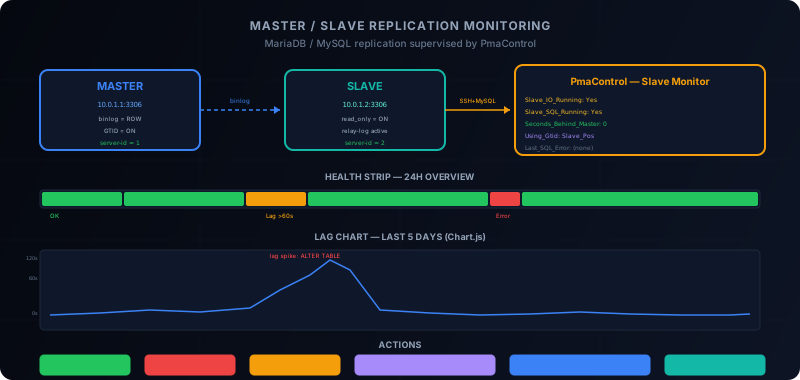
The lag chart is the heart of the slave page. It displays the last 5 days of Seconds_Behind_Master as a Chart.js curve.
Features:
- Resolution: one point per minute (1440 points per day)
- Progressive loading: the current day loads immediately, previous days via AJAX "Load previous day"
- Auto-scaling: the Y axis adapts to the maximum observed lag
- Green zone: < 10 seconds, normal operation
- Amber zone: 10-60 seconds, moderate lag
- Red zone: > 60 seconds, critical lag
The Health Strip
Above the chart, a horizontal strip summarizes the status of each minute over 24 hours with a color code:
| Color | Condition |
|---|---|
| Green | IO Running + SQL Running + lag < 60s |
| Amber | IO Running + SQL Running + lag > 60s |
| Red | IO or SQL stopped, or critical error |
This is an instant visual indicator: a single glance tells you whether the last 24 hours have been stable or chaotic.
Corrective Actions from PmaControl
The slave page is not limited to observation. PmaControl lets you act directly on replication.
START / STOP SLAVE
Two buttons to start or stop replication. STOP SLAVE is useful for:
- Performing maintenance on the slave (heavy ALTER TABLE)
- Taking a consistent backup (snapshot with replication stopped)
- Diagnosing a lag issue (stop to examine the binlog)
SKIP Error
When replication stops on a SQL error (duplicate constraint, missing table), PmaControl offers to skip the event:
SET GLOBAL sql_slave_skip_counter = 1;
START SLAVE;Warning: this action requires explicit confirmation. Skipping an event means accepting a divergence between master and slave. PmaControl logs the action with the user, date, and skipped error for traceability.
Parallel Workers
PmaControl provides a slider to adjust the number of parallel replication workers:
- Minimum: 1 (classic sequential replication)
- Maximum: 50 or CPU x 2 (whichever is smaller)
STOP SLAVE;
SET GLOBAL slave_parallel_workers = 8;
START SLAVE;
Increasing workers allows catching up on lag faster, as multiple transactions are applied in parallel. But be careful: this only works well with parallel replication by LOGICAL_CLOCK (MariaDB) or WRITESET (MySQL 8.0+).
Catch-Up ETA Algorithm
When a slave has lag, the immediate question is: how long to catch up?
PmaControl calculates an estimate (ETA) based on:
- Current lag in seconds
- Observed catch-up speed (lag variation over the last 10 minutes)
- Linear extrapolation
If lag goes from 3600s to 3000s in 10 minutes:
  Speed = 600s caught up / 10min = 60s/min
  ETA = 3000s / 60s/min = 50 minutes
The ETA is displayed at the top of the slave page with a progress bar. If the catch-up speed is zero or negative (lag is increasing), PmaControl displays "ETA: divergent" in red — a sign that intervention is needed.
GTID Support
PmaControl automatically detects the GTID mode:
- MariaDB: reads
Using_GtidfromSHOW SLAVE STATUS. Possible values:No,Slave_Pos,Current_Pos - MySQL: reads
Auto_PositionfromSHOW SLAVE STATUS. Possible values:0,1
When GTID is active, PmaControl displays additional information:
- The master's GTID set (
Gtid_Slave_PosorExecuted_Gtid_Set) - The slave's GTID set
- The delta between the two (number of transactions behind)
The GTID delta is often more meaningful than Seconds_Behind_Master: it gives the exact number of transactions to catch up, regardless of each transaction's duration.
Best Practices
1. Always Use GTID
Binlog position mode (file + position) is fragile: a file purged too early, a failover, and replication breaks. GTID is idempotent and survives failovers.
2. Enable read_only on Slaves
SET GLOBAL read_only = ON;
SET GLOBAL super_read_only = ON;  -- MySQL 5.7.8+ / MariaDB 10.3.16+
Without read_only, an accidental write on the slave causes a silent divergence.
3. Monitor Lag, Not Just Status
Slave_IO_Running: Yes and Slave_SQL_Running: Yes are not enough. A slave can be "running" but with 2 hours of lag. PmaControl monitors both: status AND lag.
4. Configure Alerts
In PmaControl, set up alert thresholds:
- Warning: lag > 60 seconds for 5 minutes
- Critical: lag > 300 seconds OR IO/SQL stopped
Alerts are sent via Telegram with the server name, current lag, and a direct link to the slave page.
5. Plan Heavy Operations
ALTER TABLE on large tables generates a temporary lag spike. Use pt-online-schema-change or gh-ost for DDL in production, and put the slave in maintenance mode in PmaControl to avoid false positives.
Conclusion
MariaDB / MySQL replication is simple to configure but hard to maintain over time. PmaControl bridges the gap between "replication is running" and "replication is healthy" by providing:
- A real-time lag view with 5-day history
- Integrated corrective actions (start/stop, skip, parallel workers)
- A catch-up estimate (ETA) for anticipation
- Automatic GTID detection
- Proactive Telegram alerts
The goal is not to replace the DBA — it is to give them the tools to react in minutes instead of hours.
Comments (0)
No comments yet.
Leave a comment