 PmaControl
The Problem: Invisible Topologies
You have 40 MariaDB / MySQL instances. Some use Master-Slave replication. Others run Master-Master. A 5-node Galera cluster. Two ProxySQL instances in peer-to-peer. A MaxScale for read routing. SSH tunnels for inter-DC access. DNS aliases masking real IPs.
Simple question: can you draw the complete architecture in under 5 minutes?
In most organizations, the answer is no. The topology lives in an outdated wiki, a Confluence page nobody updates, or in the head of the senior DBA who is on vacation.
Dot3 solves this problem.
What is Dot3?
Dot3 is PmaControl's built-in topology mapping engine. It uses Graphviz (the DOT language) to generate visual representations of database architectures.
The name "Dot3" comes from the third iteration of the engine. The first two versions used simplistic approaches (connection lists, static trees). Dot3 introduces dynamic endpoint resolution and contextual rendering.
Endpoint Resolution
The first step in Dot3 is understanding what hides behind each endpoint configured in PmaControl. An endpoint can be:
1. Direct MariaDB / MySQL Connection
The simplest case. Dot3 connects to port 3306 (or other), runs SHOW VARIABLES and SHOW SLAVE STATUS / SHOW REPLICA STATUS, and identifies the server role (master, slave, standalone).
2. ProxySQL
Dot3 detects ProxySQL by the presence of the admin port (6032 by default). By connecting to the admin port, it retrieves:
runtime_mysql_servers: list of backends with their hostgroupruntime_mysql_replication_hostgroups: writer/reader mappingproxysql_servers: ProxySQL peers (for clustering)
This allows tracing the links between ProxySQL and its backends, and between ProxySQL peers.
3. MaxScale
MaxScale is detected via its REST API (port 8989). Dot3 queries /v1/servers and /v1/services to reconstruct the backend topology and routing services.
4. VIPs and Floating Addresses
When an endpoint is a VIP (Virtual IP managed by keepalived or Pacemaker), Dot3 resolves the address to the active physical server. The VIP is represented as an intermediate node with a distinct visual style (diamond instead of rectangle).
5. SSH Tunnels
For multi-DC architectures with SSH tunnels, Dot3 traces the full path: client -> SSH tunnel -> real endpoint. The tunnel appears as a dashed connection in the graph.
6. DNS Aliases
Dot3 resolves DNS aliases (CNAMEs) and displays both the alias name and the real hostname, avoiding confusion when the same server is referenced by multiple names.
Rendering
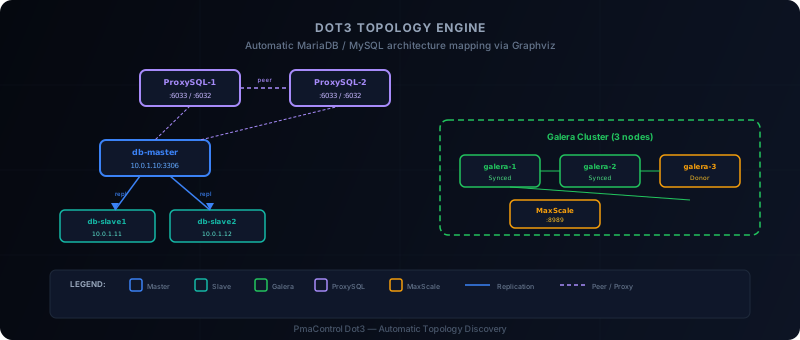
Once all endpoints are resolved, Dot3 generates a DOT graph that is compiled by Graphviz into SVG (or PNG). Here is how different topologies are represented.
Master-Slave Replication
Master [shape=box, color=blue, label="db-master\n10.0.1.10:3306"]
Slave1 [shape=box, color=green, label="db-slave1\n10.0.1.11:3306"]
Slave2 [shape=box, color=green, label="db-slave2\n10.0.1.12:3306"]
Master -> Slave1 [label="repl"]
Master -> Slave2 [label="repl"]
Replication arrows go from master to slaves (data flow direction). Replication lag is displayed on the edge when significant.
Master-Master Replication
Bidirectional replications are represented with double arrows. Dot3 detects this case when both servers identify each other as master via SHOW SLAVE STATUS.
Master1 -> Master2 [dir=both, label="M-M"]Galera Cluster
Galera nodes are grouped in a subgraph with a dashed border. Each node is colored according to its wsrep state:
- Synced: green
- Donor/Desynced: orange
- Joining: yellow
- Disconnected: red
subgraph cluster_galera_prod {
  label="Galera Prod (3 nodes)"
  style=dashed
  galera1 [color=green]
  galera2 [color=green]
  galera3 [color=green]
}
ProxySQL Peer-to-Peer
Links between ProxySQL peers are drawn with bidirectional dashed arrows, visually distinguished from MariaDB / MySQL replication links.
The PNG Icons in SVG Bug
During Dot3 development, we wanted to integrate icons to visually identify node types: a MariaDB icon, a ProxySQL icon, a MaxScale icon.
The first implementation used PNG icons embedded in SVG via <image> tags with base64 href. This worked in browsers but caused several issues:
- Graphviz does not correctly support embedded PNGs in its SVG output — positions were offset
- Rendering was blurry on Retina/HiDPI screens
- SVG file sizes exploded due to base64 encoding
The solution: replace all PNG icons with native SVG icons. We recreated proxysql.svg, maxscale.svg and others in pure vector SVG. The result:
- Sharp rendering at any resolution
- Correct positioning in Graphviz
- File sizes reduced by 5x
Concrete Example
Here is a real (anonymized) topology generated by Dot3 for an e-commerce client:
ProxySQL-1 ←→ ProxySQL-2          (peer-to-peer)
    ↓               ↓
  [HG10: Writer]  [HG20: Readers]
    ↓               ↓
  Master ──→ Slave-1              (replication)
    ↓        Slave-2
    ↓        Slave-3
    ↓
  ┌─────────────────────┐
  │ Galera Cluster       │
  │ Node-1  Node-2      │        (cluster)
  │ Node-3              │
  └─────────────────────┘
This diagram is generated automatically by Dot3. No manual layout configuration. Dot3 discovers the topology, resolves endpoints, and Graphviz handles placement.
Integration in PmaControl
In the PmaControl interface, the topology map is accessible via the Topology tab. It refreshes automatically and reflects real-time state:
- A slave with replication lag appears with a red edge
- A Galera node in
Donorstate changes color - A ProxySQL that loses a backend shows it grayed out
The generated SVG is interactive: clicking a node opens the server detail page in PmaControl.
Limitations and Planned Improvements
Dot3 works well for topologies of 1 to 100 nodes. Beyond that, the Graphviz layout can become confusing. Planned improvements include:
- Tag filtering: display only a subset of the topology (by environment, client, or DC)
- Diff mode: compare two topology snapshots to visualize changes
- Terraform export: generate an Infrastructure-as-Code description of the discovered topology
Conclusion
The topology of a MariaDB / MySQL infrastructure does not have to be a mystery documented in an expired wiki. Dot3 discovers it, resolves it, and draws it automatically.
That is the difference between "I think replication goes to that server" and "I see replication goes to that server, with 3 seconds of lag, for the past 14 days".
Comments (0)
No comments yet.
Leave a comment