 PmaControl
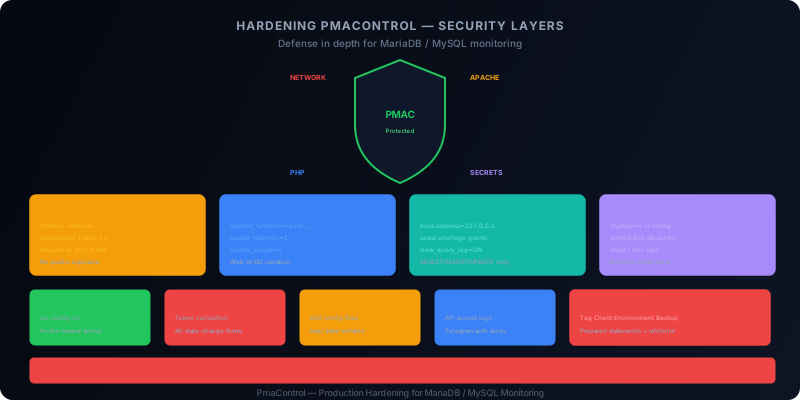
PmaControl Holds the Keys to the Kingdom
PmaControl monitors your production MariaDB / MySQL servers. It stores connection credentials, SSH keys, performance metrics, database structure. If an attacker compromises PmaControl, they potentially gain access to your entire database infrastructure.
This guide details the hardening measures to apply before putting PmaControl into production. It comes from an internal security audit and covers every layer: Apache, PHP, MariaDB, secrets, ACL, CSRF, file permissions, and monitoring.
Layer 1: Apache
Disable Directory Listing
By default, Apache can display directory contents when no index file exists. This is an information leak:
<Directory /srv/www/pmacontrol>
    Options -Indexes
    AllowOverride All
    Require all granted
</Directory>
The -Indexes is non-negotiable. Without it, an attacker can explore the project structure and find configuration files, logs, dumps.
Force HTTPS
PmaControl transmits credentials in plain text in HTTP requests. Without HTTPS, an attacker on the network can intercept them:
<VirtualHost *:80>
    ServerName pmacontrol.internal.company.com
    Redirect permanent / https://pmacontrol.internal.company.com/
</VirtualHost>

<VirtualHost *:443>
    ServerName pmacontrol.internal.company.com
    SSLEngine On
    SSLCertificateFile /etc/ssl/certs/pmacontrol.pem
    SSLCertificateKeyFile /etc/ssl/private/pmacontrol.key

    # Modern TLS only
    SSLProtocol -all +TLSv1.2 +TLSv1.3
    SSLCipherSuite HIGH:!aNULL:!MD5:!3DES

    DocumentRoot /srv/www/pmacontrol
</VirtualHost>
Restrict to Internal Network
PmaControl should never be exposed on the Internet. Limit access to the internal network:
<Location />
    Require ip 10.0.0.0/8
    Require ip 172.16.0.0/12
    Require ip 192.168.0.0/16
</Location>
Or even better: place PmaControl behind a VPN and do not expose it through public Apache at all.
Remove the Default Vhost
Apache's default vhost (000-default.conf) responds to any request on the server's IP. Remove it:
a2dissite 000-default.conf
systemctl reload apache2
Security Headers
Add HTTP security headers:
Header always set X-Content-Type-Options "nosniff"
Header always set X-Frame-Options "SAMEORIGIN"
Header always set X-XSS-Protection "1; mode=block"
Header always set Referrer-Policy "strict-origin-when-cross-origin"
Header always set Content-Security-Policy "default-src 'self'; script-src 'self' 'unsafe-inline'; style-src 'self' 'unsafe-inline'"
Layer 2: PHP
Disable Dangerous Functions
PmaControl uses exec() and shell_exec() for certain operations (SSH, collection). The solution is not to disable them globally, but to isolate the workers that need them.
For the web vhost (the interface):
; php.ini or .user.ini in the DocumentRoot
disable_functions = exec,shell_exec,system,passthru,popen,proc_open
expose_php = Off
For CLI workers (Aspirateur, Listener):
; php-cli.ini — these workers need shell_exec
disable_functions =
This separation ensures the web interface cannot execute system commands, even if an attacker finds a vulnerability.
Secure Sessions
session.cookie_httponly = 1
session.cookie_secure = 1
session.cookie_samesite = Strict
session.use_strict_mode = 1
session.name = PMACSESSID
cookie_httponly prevents JavaScript from accessing the session cookie (XSS protection). cookie_secure forces sending only over HTTPS. cookie_samesite = Strict protects against basic CSRF.
Limit Uploads and Execution
upload_max_filesize = 2M
post_max_size = 8M
max_execution_time = 30
max_input_time = 60
memory_limit = 256M
PmaControl does not need massive uploads. Limit to reduce the attack surface.
Hide PHP Version
expose_php = OffThis removes the X-Powered-By: PHP/8.x header from HTTP responses.
Layer 3: MariaDB
Restrict PmaControl User Privileges
After installation, the PmaControl user often has all privileges. Restrict them:
-- Revoke excessive privileges
REVOKE ALL PRIVILEGES ON *.* FROM 'pmacontrol'@'localhost';

-- Grant only what is needed
GRANT SELECT, INSERT, UPDATE, DELETE ON pmacontrol.* TO 'pmacontrol'@'localhost';
GRANT SELECT ON performance_schema.* TO 'pmacontrol'@'localhost';
GRANT REPLICATION CLIENT ON *.* TO 'pmacontrol'@'localhost';
GRANT PROCESS ON *.* TO 'pmacontrol'@'localhost';

FLUSH PRIVILEGES;
The principle of least privilege: PmaControl only needs to read metrics and write to its own database.
Bind to Localhost
The PmaControl database should listen only on the local interface:
[mysqld]
bind-address = 127.0.0.1
If PmaControl and its database are on the same server (typical configuration), there is no reason to listen on the network.
Enable Sensitive Query Logging
[mysqld]
general_log = OFF          # Too verbose for production
slow_query_log = ON
long_query_time = 1
log_error = /var/log/mysql/error.log
The slow query log helps detect abnormal queries that could indicate an exploited SQL injection.
Layer 4: Secrets
Encrypt Credentials
PmaControl stores connection credentials in db.config.ini.php. This file supports encryption:
; configuration/db.config.ini.php
[default]
driver = mysql
host = 127.0.0.1
port = 3306
login = pmacontrol
password = "ENCRYPTED_VALUE_HERE"
database = pmacontrol
crypted = 1
The crypted=1 flag tells PmaControl to decrypt the password at runtime. The encryption key is separate from the configuration file.
Use an External Secret Store
For critical production deployments, externalize secrets:
- Vault (HashiCorp): PmaControl can read secrets via the API
- AWS Secrets Manager or GCP Secret Manager: for cloud deployments
- Environment variables: the minimum viable option, better than plain text
# Example with environment variables
export PMAC_DB_PASSWORD="secret_value"
export PMAC_SSH_PASSPHRASE="ssh_secret"
Protect Configuration Files
# Owner: www-data (the Apache user)
chown root:www-data /srv/www/pmacontrol/configuration/*.php

# Permissions: read for group, nothing for others
chmod 640 /srv/www/pmacontrol/configuration/*.php

# The credentials file should only be readable by www-data
chmod 600 /srv/www/pmacontrol/configuration/db.config.ini.php
Layer 5: ACL (Access Control Lists)
Review acl.config.ini
PmaControl has a profile-based ACL system. The acl.config.ini file defines which profile can access which controller.
; configuration/acl.config.ini
[admin]
* = allow

[dba]
Slave = allow
Server = allow
Dashboard = allow
Backup = deny
Config = deny

[readonly]
Slave = allow
Server = allow(show)
Dashboard = allow
* = deny
Essential rules:
- Restrict sensitive controllers:
Config,Backup,Install,Apishould only be accessible to admins - Create a read-only profile: for developers who need to view without modifying
- Audit regularly: verify that newly added controllers are covered by ACLs
Protect Critical Endpoints
Some endpoints are particularly sensitive:
[admin]
Install = allow      ; Installation / reinstallation
Config = allow       ; Configuration modification
Api = allow          ; Full REST API
Backup = allow       ; Backup access (contains data)

[dba]
Install = deny       ; NEVER accessible to non-admins
Config = deny
Api = allow(read)    ; Read-only via API
Backup = deny
Layer 6: CSRF (Cross-Site Request Forgery)
Verify Token Presence
Every PmaControl form must include a CSRF token:
<form method="POST" action="/slave/start/42/">
    <input type="hidden" name="csrf_token" value="<?= $csrf_token ?>">
    <button type="submit">Start Slave</button>
</form>
On the server side, the controller must validate the token:
if ($_POST['csrf_token'] !== $_SESSION['csrf_token']) {
    throw new SecurityException('Invalid CSRF token');
}
Priority Actions to Protect
State-modifying actions are the most critical:
- START/STOP SLAVE
- SKIP error
- Server add/remove
- Configuration changes
- User creation/deletion
Without CSRF protection, an attacker could force a logged-in DBA to stop a production server's replication by sending them a malicious link.
Layer 7: File Permissions
Permission Tree
# Main directory: readable, not writable
chown -R root:www-data /srv/www/pmacontrol/
chmod -R 750 /srv/www/pmacontrol/

# Write directories: www-data owner
chown -R www-data:www-data /srv/www/pmacontrol/tmp/
chown -R www-data:www-data /srv/www/pmacontrol/data/

# PHP files: read-only for www-data
find /srv/www/pmacontrol/App/ -name "*.php" -exec chmod 640 {} \;

# Configuration: restrictive
chmod 640 /srv/www/pmacontrol/configuration/*.php
chmod 600 /srv/www/pmacontrol/configuration/db.config.ini.php
The principle: www-data can read code and write to tmp/ and data/. It cannot modify source code or configuration.
Layer 8: Security Monitoring
Log API Access
Every REST API call should be logged with:
- Timestamp
- Source IP
- User (token)
- Endpoint called
- Response code
// In the API middleware
$log = sprintf(
    "[%s] %s %s %s -> %d",
    date('Y-m-d H:i:s'),
    $_SERVER['REMOTE_ADDR'],
    $user->name,
    $_SERVER['REQUEST_URI'],
    http_response_code()
);
file_put_contents('/var/log/pmacontrol/api.log', $log . "\n", FILE_APPEND);
Telegram Alerts on Authentication Failures
Configure a Telegram alert for every login failure:
if (!$auth->isValid()) {
    Telegram::send(
        "Auth failure on PmaControl\n" .
        "IP: " . $_SERVER['REMOTE_ADDR'] . "\n" .
        "User: " . $_POST['login'] . "\n" .
        "Time: " . date('Y-m-d H:i:s')
    );
}
Three failures from the same IP within 5 minutes should trigger a temporary block.
Monitor Configuration Files
Use inotifywait or a similar tool to detect unauthorized modifications:
inotifywait -m -r /srv/www/pmacontrol/configuration/ -e modify,create,delete |
while read path action file; do
    echo "[$action] $path$file" >> /var/log/pmacontrol/config_changes.log
    # Send Telegram alert
done
Layer 9: Network
Firewall Rules
# Allow HTTP/HTTPS only from internal network
iptables -A INPUT -p tcp --dport 80  -s 10.0.0.0/8 -j ACCEPT
iptables -A INPUT -p tcp --dport 443 -s 10.0.0.0/8 -j ACCEPT
iptables -A INPUT -p tcp --dport 80  -j DROP
iptables -A INPUT -p tcp --dport 443 -j DROP

# Allow MySQL only on localhost
iptables -A INPUT -p tcp --dport 3306 -s 127.0.0.1 -j ACCEPT
iptables -A INPUT -p tcp --dport 3306 -j DROP
No Public Exposure
PmaControl should never be accessible from the Internet. Even with authentication, the attack surface is too large:
- Monitored server credentials are stored
- SSH keys are stored
- The interface allows executing actions on production servers
If remote access is needed, use a VPN (WireGuard, OpenVPN) or an SSH tunnel.
Layer 10: SQL Injections — Remediation
Our internal audit identified SQL injection risks in four controllers:
| Controller | Risk | Remediation |
|---|---|---|
Tag.php |
Dynamic WHERE clause building | Prepared statements |
Client.php |
Concatenation in filters | Prepared statements |
Environment.php |
Variable interpolation in ORDER BY | Column whitelist |
Backup.php |
Unescaped parameter in LIKE | Prepared statements |
Before (Vulnerable):
// Tag.php — VULNERABLE
$sql = "SELECT * FROM tags WHERE name LIKE '%" . $_GET['search'] . "%'";
$results = $db->query($sql);
After (Secure):
// Tag.php — SECURE
$sql = "SELECT * FROM tags WHERE name LIKE ?";
$results = $db->query($sql, ['%' . $_GET['search'] . '%']);
For ORDER BY clauses, whitelisting is the only safe solution:
$allowed_columns = ['name', 'created_at', 'id'];
$sort = in_array($_GET['sort'], $allowed_columns) ? $_GET['sort'] : 'name';
$sql = "SELECT * FROM tags ORDER BY " . $sort;
Hardening Checklist
Before putting PmaControl into production, validate each point:
- [ ] Apache:
-Indexesenabled - [ ] Apache: HTTPS enforced
- [ ] Apache: access restricted to internal network
- [ ] Apache: default vhost removed
- [ ] PHP: dangerous functions disabled on web vhost
- [ ] PHP:
session.cookie_httponly = 1 - [ ] PHP:
session.cookie_secure = 1 - [ ] PHP:
expose_php = Off - [ ] MariaDB: user with minimal privileges
- [ ] MariaDB:
bind-address = 127.0.0.1 - [ ] Secrets: encrypted credentials (
crypted=1) - [ ] Config files: permissions 640
- [ ] ACL: sensitive controllers restricted
- [ ] CSRF: tokens on all action forms
- [ ] Permissions:
tmp/anddata/are the only writable directories - [ ] Monitoring: API access logging
- [ ] Monitoring: alerts on authentication failures
- [ ] Network: firewall in place
- [ ] Network: no public exposure
- [ ] SQL: prepared statements in Tag, Client, Environment, Backup
Conclusion
Securing PmaControl is not a luxury — it is an obligation. The tool has access to your production MariaDB / MySQL servers, stores credentials, and can execute commands via SSH.
Hardening is done in layers: each layer (Apache, PHP, MariaDB, secrets, ACL, CSRF, permissions, network) adds a barrier. If one layer is breached, the others slow down the attacker.
The good news: all these measures are standard and can be applied in a single working day. The cost is negligible compared to the risk of your database infrastructure being compromised.
Comments (0)
No comments yet.
Leave a comment