 PmaControl
The Fundamental Problem
In a Galera cluster, all nodes must apply the same writesets in the same order to maintain consistency. But not all nodes are equal: some are faster (recent hardware, light load), others slower (older hardware, heavy queries).
What happens when a slow node cannot keep up with the write pace? Writesets accumulate in its receive queue (recv queue). If nothing is done, this queue grows indefinitely, consuming all memory, and the node eventually crashes or diverges from the cluster.
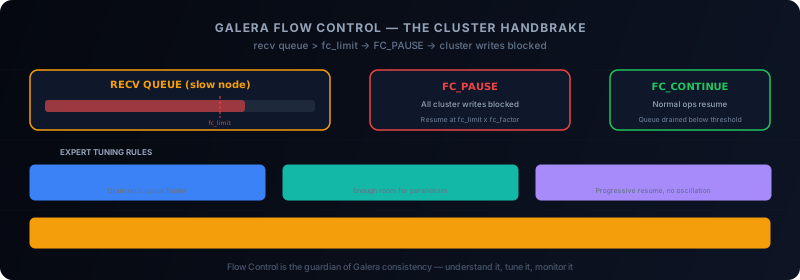
Flow Control is the mechanism that prevents this situation. It is the cluster's handbrake: when a node is overwhelmed, it asks the others to slow down.
How Flow Control Works
Flow Control relies on a simple threshold: gcs.fc_limit.
Each Galera node maintains a receive queue (recv queue) storing writesets waiting to be applied. When this queue size exceeds gcs.fc_limit, the node sends an FC_PAUSE message to all other cluster nodes.
Upon receiving FC_PAUSE, other nodes stop sending new writesets to the slow node. Writes across the entire cluster are blocked — that is the price of synchronous consistency.
When the slow node's recv queue drops below gcs.fc_limit * gcs.fc_factor, the node sends an FC_CONTINUE message and the cluster resumes normal operation.
The 5 Critical wsrep Variables
To monitor Flow Control, five status variables are essential:
SHOW GLOBAL STATUS WHERE Variable_name IN (
    'wsrep_local_recv_queue',
    'wsrep_local_recv_queue_avg',
    'wsrep_flow_control_paused',
    'wsrep_flow_control_paused_ns',
    'wsrep_flow_control_sent'
);
wsrep_local_recv_queue
Current recv queue size. In normal operation, this should be close to 0. If it regularly rises above gcs.fc_limit, the node is struggling.
wsrep_local_recv_queue_avg
Moving average of the recv queue. The most reliable indicator for detecting trends. An average above 0.5 deserves investigation.
wsrep_flow_control_paused
Fraction of time spent in Flow Control (between 0 and 1). If this exceeds 0.1 (10% of time), the cluster has a serious performance problem.
wsrep_flow_control_paused_ns
Total time in Flow Control in nanoseconds. Useful for calculating absolute pause time over a period.
wsrep_flow_control_sent
Number of FC_PAUSE messages sent by this node. If a single node sends the majority of FC_PAUSE messages, it is the bottleneck to address.
The 6 Tuning Parameters
gcs.fc_limit
The Flow Control trigger threshold. Default: 16. Increasing this value tolerates more lag before triggering the brake, but increases memory consumption.
gcs.fc_factor
The resume coefficient. Default: 0.5. When the recv queue drops to fc_limit * fc_factor, Flow Control is released. With fc_limit=100 and fc_factor=0.8, FC releases at 80 writesets.
wsrep_slave_threads
Number of writeset application threads. More threads = faster writeset application = recv queue drains faster. Recommendation: 2 x CPU core count.
wsrep_cert_deps_distance
Average certification distance between transactions. Indicates potential parallelism. If high, increasing wsrep_slave_threads will have a positive impact.
gcs.recv_q_hard_limit
Absolute recv queue limit in bytes. If exceeded, the node is aborted. Last resort to avoid OOM. Recommendation: half of RAM + swap.
gcs.max_throttle
Minimum guaranteed throughput even during Flow Control (between 0 and 1). Default 0.25 means even during FC, 25% of normal throughput is maintained. Set to 0 for complete stop during FC.
Expert Recommendations
After years of managing Galera clusters in production, here are consolidated recommendations:
Slave Thread Sizing
wsrep_slave_threads = 2 * CPU_CORESIf your server has 8 cores, start with wsrep_slave_threads = 16. Monitor wsrep_cert_deps_distance — if it is lower than the slave thread count, reduce.
fc_limit Based on Slave Threads
gcs.fc_limit = 5 * wsrep_slave_threadsWith 16 slave threads, gcs.fc_limit = 80. This gives threads enough room to work in parallel without triggering FC too early.
fc_factor for Progressive Resume
gcs.fc_factor = 0.8An fc_factor of 0.8 (instead of the default 0.5) allows more progressive traffic resumption, avoiding FC_PAUSE / FC_CONTINUE oscillations.
Hard Limit for Safety
gcs.recv_q_hard_limit = HALF_RAM_PLUS_SWAPOn a server with 32 GB RAM and 16 GB swap, set gcs.recv_q_hard_limit = 24G. This is the safety net against OOM.
Identifying the Problematic Node
When Flow Control triggers frequently, you need to identify the slow node:
-- On each node
SELECT @@hostname,
       VARIABLE_VALUE AS fc_sent
FROM information_schema.GLOBAL_STATUS
WHERE VARIABLE_NAME = 'wsrep_flow_control_sent';
The node sending the most FC_PAUSE is the bottleneck. Common causes:
- Inferior hardware: slower disks, less RAM
- Heavy queries: an ALTER TABLE or massive SELECT monopolizing resources
- Backup in progress: mariabackup/xtrabackup consuming heavy I/O
- Unbalanced application load: too many reads on a node that must also apply writesets
Conclusion
Flow Control is the guardian of consistency in Galera. Understanding how it works and its parameters is essential for maintaining a performant cluster.
Golden rules: slave_threads = 2 * CPU, fc_limit = 5 * threads, fc_factor = 0.8, hard limit = half RAM + swap. Monitor wsrep_flow_control_paused and react as soon as it exceeds 10%.
This article was originally published on Medium.
Comments (0)
No comments yet.
Leave a comment