 PmaControl
Goal
This article explains how to install PmaControl on Debian 12 using the project's official sources, while addressing an important practical point:
- the Debian 12 wiki points to
install/debian12.sh - this script clones the default
PmaControlrepository - if you explicitly want the
commercialbranch, you need to adapt the cloning step or checkout right after
The idea is to keep the project's official logic while making it cleanly usable for a current Debian 12 installation.
Sources used:
- GitHub wiki
PmaControl/PmaControl - repository
PmaControl/PmaControl, branchcommercial - script
install/debian12.sh - root script
install.sh - documentation from the
commercialbranch
What the official installation does
According to the Debian 12 wiki, the standard installation is:
apt-get install curl
curl -o install-pmacontrol https://raw.githubusercontent.com/PmaControl/PmaControl/master/install/debian12.sh
chmod +x install-pmacontrol
./install-pmacontrol
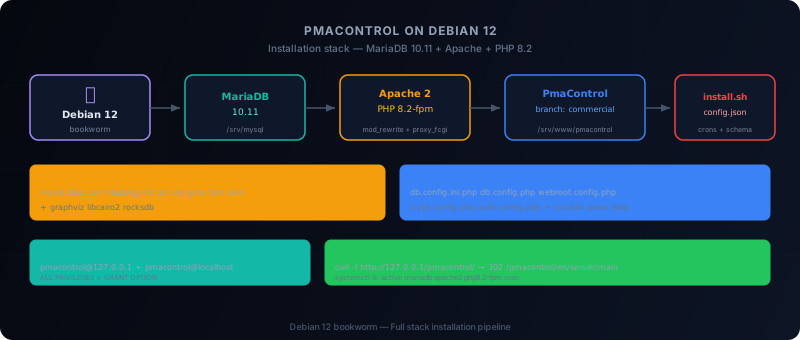
The install/debian12.sh script from the commercial branch then mainly:
- updates the system
- installs base tools
- installs MariaDB
10.11 - installs Apache, PHP
8.2, Composer, Graphviz and some dependencies - clones the PmaControl repository into
/srv/www/pmacontrol - runs
composer installaswww-data - creates a local MySQL account
pmacontrol@127.0.0.1 - generates a temporary
config.json - runs
./install.sh -c /tmp/config.json - displays the generated credentials
Versions and components observed in sources
The Debian 12 script from the commercial branch targets this stack:
- MariaDB
10.11 - Apache 2
- PHP
8.2 - Composer
- Graphviz
- RocksDB plugin for MariaDB
PHP packages explicitly installed:
php8.2,php8.2-mysql,php8.2-ldap,php-json,php8.2-curlphp8.2-cli,php8.2-mbstring,php8.2-intl,php8.2-fpmlibapache2-mod-php8.2,php8.2-gd,php8.2-xml,php8.2-gmp
Recommended prerequisites
Before starting the installation, prepare:
- a clean Debian 12
- root access
- working DNS and outbound network
- at least 4 GB of RAM
- enough disk space for MariaDB,
/srv/www/pmacontroland Composer dependencies
I also recommend preparing:
- a proper hostname
- a static IP
- a consistent timezone
- dedicated storage for MariaDB if the machine will monitor many servers
Important note about the commercial branch
The Debian 12 wiki is minimalistic. It points to the install/debian12.sh script, but this script simply clones the main repository without explicitly running:
git checkout commercialIf your target is indeed the commercial branch, do this instead:
apt-get update
apt-get install -y curl git
cd /tmp
curl -o install-pmacontrol https://raw.githubusercontent.com/PmaControl/PmaControl/commercial/install/debian12.sh
chmod +x install-pmacontrol
Then, before the composer install phase, replace the cloning part with:
mkdir -p /srv/www
cd /srv/www
git clone --branch commercial --single-branch https://github.com/PmaControl/PmaControl.git pmacontrol
cd /srv/www/pmacontrol
This is the cleanest approach if you actually want to install the commercial code.
Recommended procedure
1. Prepare Debian 12
apt-get update
apt-get -y upgrade
apt-get install -y curl git sudo lsb-release unzip zip wget gnupg gnupg2 net-tools dnsutils jq bc composer cron
timedatectl set-timezone Europe/Paris
Why cron explicitly: install.sh uses crontab. On a minimal Debian machine, the absence of cron can break the end of installation. This point is not explicitly addressed in install/debian12.sh, but it comes from the logic of install.sh.
2. Install MariaDB 10.11
The official Debian 12 script configures the MariaDB repository then calls Toolkit/install-mariadb.sh:
cd /tmp
git clone https://github.com/PmaControl/Toolkit.git
cd Toolkit
chmod +x install-mariadb.sh
curl -LsS https://r.mariadb.com/downloads/mariadb_repo_setup | bash -s -- --mariadb-server-version="mariadb-10.11"
./install-mariadb.sh -v 10.11 -p '<root_sql_password>' -d /srv/mysql -r
Key points:
- the datadir is set to
/srv/mysql - the script uses MariaDB, not MySQL
- the service is then restarted
3. Install Apache, PHP 8.2 and dependencies
Still according to install/debian12.sh:
apt-get install -y \
  php8.2 apache2 php8.2-mysql php8.2-ldap php-json php8.2-curl \
  php8.2-cli php8.2-mbstring php8.2-intl php8.2-fpm \
  libapache2-mod-php8.2 php8.2-gd php8.2-xml php8.2-gmp

apt-get install -y graphviz libcairo2 mariadb-plugin-rocksdb
Then:
mysql -e "INSTALL SONAME 'ha_rocksdb'"
a2enmod proxy_fcgi setenvif
a2enconf php8.2-fpm
a2enmod rewrite
PHP timezone setting:
sed -i 's#;date.timezone =#date.timezone = Europe/Paris#g' /etc/php/8.2/fpm/php.ini
sed -i 's#;date.timezone =#date.timezone = Europe/Paris#g' /etc/php/8.2/apache2/php.ini
sed -i 's#;date.timezone =#date.timezone = Europe/Paris#g' /etc/php/8.2/cli/php.ini
4. Configure Apache for /srv/www
The Debian 12 script replaces the standard Apache webroot with /srv/www:
sed -i 's#/var/www#/srv/www#g' /etc/apache2/apache2.conf
sed -i 's#/var/www/html#/srv/www#g' /etc/apache2/sites-enabled/000-default.conf
awk '/AllowOverride/ && ++i==3 {sub(/None/,"All")}1' /etc/apache2/apache2.conf > /tmp/xfgh
mv /tmp/xfgh /etc/apache2/apache2.conf
Then:
mkdir -p /srv/www
systemctl restart apache2
The key point here: PmaControl expects to be served under /srv/www/pmacontrol and the webroot generated by the project will be /pmacontrol/.
5. Clone PmaControl on the commercial branch
mkdir -p /srv/www
cd /srv/www
git clone --branch commercial --single-branch https://github.com/PmaControl/PmaControl.git pmacontrol
cd /srv/www/pmacontrol
chown -R www-data:www-data /srv/www/pmacontrol
chown -R www-data:www-data /var/www
sudo -u www-data composer install
Why I prefer this sequence:
- it targets the intended branch
- it avoids installing another state of the repository by default
- it remains compatible with the flow expected by
install.sh
6. Create the local MySQL account for PmaControl
The official script creates:
GRANT ALL ON *.* TO pmacontrol@'127.0.0.1' IDENTIFIED BY '<password>' WITH GRANT OPTION;I recommend also adding localhost to avoid surprises depending on the connection mode:
CREATE OR REPLACE USER 'pmacontrol'@'127.0.0.1' IDENTIFIED BY '<password>';
CREATE OR REPLACE USER 'pmacontrol'@'localhost' IDENTIFIED BY '<password>';
GRANT ALL PRIVILEGES ON *.* TO 'pmacontrol'@'127.0.0.1' WITH GRANT OPTION;
GRANT ALL PRIVILEGES ON *.* TO 'pmacontrol'@'localhost' WITH GRANT OPTION;
FLUSH PRIVILEGES;
7. Prepare the config.json file
The install/debian12.sh script generates a temporary config.json. Its structure is important because install.sh uses it to define the database, create the organisation, administrator account, webservice account, and configure the webroot.
Working example:
{
  "mysql": {
    "ip": "127.0.0.1",
    "port": 3306,
    "user": "pmacontrol",
    "password": "CHANGE_ME_DB_PASSWORD",
    "database": "pmacontrol"
  },
  "organization": ["68Koncept"],
  "webroot": "/pmacontrol/",
  "ldap": { "enabled": false },
  "user": {
    "Member": null,
    "Administrator": null,
    "Super administrator": [{
      "email": "admin@example.net",
      "firstname": "Admin",
      "lastname": "PmaControl",
      "country": "France",
      "city": "Paris",
      "login": "admin",
      "password": "CHANGE_ME_ADMIN_PASSWORD"
    }]
  },
  "webservice": [{
    "user": "webservice",
    "host": "%",
    "password": "CHANGE_ME_WEBSERVICE_PASSWORD",
    "organization": "68Koncept"
  }]
}
I recommend not reusing the ssh block injected in some historical scripts, unless you have an explicit need and a controlled key.
8. Run the application installation
From the cloned repository:
cd /srv/www/pmacontrol
./install.sh -c /tmp/config.json
According to install.sh, this command then:
- generates
configuration/webroot.config.php - initialises the database
- creates the organisation
- creates the super administrator
- integrates LDAP if enabled
- creates the webservice account
- creates TS tables
- updates the server list
- generates the model and caches
- sets up system crons
9. Understand what install.sh modifies
The root script is important because it does more than just "install". It:
- copies files from
config_sample/toconfiguration/ - generates
configuration/db.config.ini.php - generates
configuration/db.config.php - generates
configuration/webroot.config.php - sets permissions on
tmp/anddata/ - installs a crontab for
www-data - installs a crontab for
root - runs
composer installif needed
Examples of cron tasks added:
* * * * * cd /srv/www/pmacontrol && ./glial agent check_daemon
05 */4 * * * cd /srv/www/pmacontrol && ./glial control service
* * * * * cd /srv/www/pmacontrol/script && ./monitor_mysql.sh
10. Verify the installation is healthy
Services:
systemctl is-active mariadb
systemctl is-active apache2
systemctl is-active php8.2-fpm
systemctl is-active cron
Versions:
php -v
mysql -Nse "SELECT VERSION()"
apache2 -v
HTTP:
curl -I http://127.0.0.1/pmacontrol/You should get a responding front controller, usually with a redirect to:
/pmacontrol/en/server/mainExpected config files:
configuration/db.config.ini.phpconfiguration/db.config.phpconfiguration/webroot.config.phpconfiguration/crypt.config.phpconfiguration/auth.config.php
11. Verify the database configuration
The installation controller writes a file like this in configuration/db.config.ini.php:
[pmacontrol]
driver=mysql
hostname=127.0.0.1
user=pmacontrol
password='...'
crypted='1'
database=pmacontrol
ssl=0
This is important: the connection name used by the framework is pmacontrol. If this file is empty or broken, the application won't start correctly.
12. Points to watch
1. The Debian 12 wiki is intentionally very short. It provides the entry point, not the detail of every component. You need to read the install/debian12.sh and install.sh scripts to understand what is actually installed.
2. The commercial branch is not automatically guaranteed by the wiki shortcut. If you want the commercial branch, clone it explicitly.
3. cron must be present. It's a practical requirement of install.sh. I consider it a real prerequisite, even though the Debian 12 script doesn't install it explicitly.
4. Apache is rewritten to /srv/www. If the machine already has existing hosting, this change is potentially intrusive.
5. The SQL account pmacontrol receives ALL PRIVILEGES. This is the script's behaviour. If you want to harden it later, do so after installation, once you know the exact scope of the application's needs.
Compact procedure
Short and clean version for a quick installation:
apt-get update && apt-get -y upgrade
apt-get install -y curl git sudo composer cron

cd /tmp
git clone https://github.com/PmaControl/Toolkit.git
cd Toolkit
curl -LsS https://r.mariadb.com/downloads/mariadb_repo_setup | bash -s -- --mariadb-server-version="mariadb-10.11"
./install-mariadb.sh -v 10.11 -p 'RootDbStrongPassword' -d /srv/mysql -r

apt-get install -y \
  apache2 php8.2 php8.2-fpm libapache2-mod-php8.2 \
  php8.2-mysql php8.2-ldap php8.2-curl php8.2-cli \
  php8.2-mbstring php8.2-intl php8.2-gd php8.2-xml php8.2-gmp \
  graphviz libcairo2 mariadb-plugin-rocksdb

mysql -e "INSTALL SONAME 'ha_rocksdb'"
a2enmod proxy_fcgi setenvif rewrite
a2enconf php8.2-fpm

sed -i 's#/var/www#/srv/www#g' /etc/apache2/apache2.conf
sed -i 's#/var/www/html#/srv/www#g' /etc/apache2/sites-enabled/000-default.conf
mkdir -p /srv/www
systemctl restart apache2

cd /srv/www
git clone --branch commercial --single-branch https://github.com/PmaControl/PmaControl.git pmacontrol
cd /srv/www/pmacontrol
chown -R www-data:www-data /srv/www/pmacontrol
sudo -u www-data composer install

mysql <<'SQL'
CREATE OR REPLACE USER 'pmacontrol'@'127.0.0.1' IDENTIFIED BY 'ChangeMeDbPassword';
CREATE OR REPLACE USER 'pmacontrol'@'localhost' IDENTIFIED BY 'ChangeMeDbPassword';
GRANT ALL PRIVILEGES ON *.* TO 'pmacontrol'@'127.0.0.1' WITH GRANT OPTION;
GRANT ALL PRIVILEGES ON *.* TO 'pmacontrol'@'localhost' WITH GRANT OPTION;
FLUSH PRIVILEGES;
SQL

cat >/tmp/config.json <<'JSON'
{
  "mysql": {
    "ip": "127.0.0.1",
    "port": 3306,
    "user": "pmacontrol",
    "password": "ChangeMeDbPassword",
    "database": "pmacontrol"
  },
  "organization": ["68Koncept"],
  "webroot": "/pmacontrol/",
  "ldap": { "enabled": false },
  "user": {
    "Member": null,
    "Administrator": null,
    "Super administrator": [{
      "email": "admin@example.net",
      "firstname": "Admin",
      "lastname": "PmaControl",
      "country": "France",
      "city": "Paris",
      "login": "admin",
      "password": "ChangeMeAdminPassword"
    }]
  },
  "webservice": [{
    "user": "webservice",
    "host": "%",
    "password": "ChangeMeWebservicePassword",
    "organization": "68Koncept"
  }]
}
JSON

./install.sh -c /tmp/config.json
Conclusion
For Debian 12, the official PmaControl documentation base is sufficient if you read together the Debian 12 wiki, install/debian12.sh, install.sh and the documentation from the commercial branch.
The actual installation logic is simple:
- MariaDB
10.11 - Apache + PHP
8.2 - PmaControl repository under
/srv/www/pmacontrol composer install- local SQL account
pmacontrol config.json./install.sh -c ...
If the target is the commercial branch, the most important point is to explicitly force the cloning of this branch instead of blindly following the wiki shortcut.
Comments (0)
No comments yet.
Leave a comment