 PmaControl
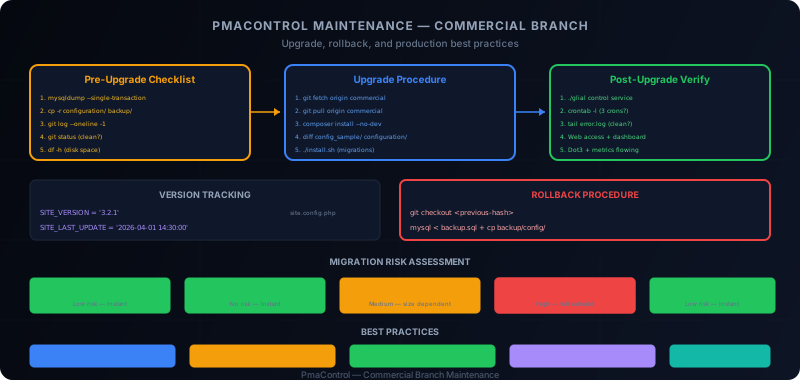
PmaControl Is a Git-Based Deployment
PmaControl is not distributed as a .deb or .rpm package. It is a Git-based deployment: you clone the repository, install Composer dependencies, run the installation script, and it is in production.
git clone -b commercial https://github.com/pmacontrol/pmacontrol.git /srv/www/pmacontrol
cd /srv/www/pmacontrol
composer install --no-dev
./install.sh
This model has advantages (fast updates, easy rollback, no package manager) and drawbacks (no automatic management of system dependencies, no standardized post-install scripts). This guide covers day-to-day maintenance.
Version Tracking
PmaControl stores its version in the site configuration file:
// configuration/site.config.php
define('SITE_VERSION', '3.2.1');
define('SITE_LAST_UPDATE', '2026-04-01 14:30:00');
These constants are updated automatically during installation (install.sh). You can check them:
- Via the web interface: "About" page or footer
- Via CLI:
grep SITE_VERSION configuration/site.config.php - Via API:
GET /api/v1/statusreturns the version
Before any update, note the current version:
cd /srv/www/pmacontrol
grep -E 'SITE_VERSION|SITE_LAST_UPDATE' configuration/site.config.php
Pre-Upgrade Checklist
Before launching the update, run this complete checklist:
1. Back Up the Database
mysqldump --single-transaction --routines --triggers \
  -u pmacontrol -p pmacontrol > /backup/pmacontrol_$(date +%Y%m%d_%H%M%S).sql
The --single-transaction flag is essential: it guarantees a consistent backup without locking tables (InnoDB/RocksDB).
Verify the dump size:
ls -lh /backup/pmacontrol_*.sqlAn empty or abnormally small dump indicates a problem.
2. Back Up the Configuration
cp -r /srv/www/pmacontrol/configuration/ /backup/pmacontrol_config_$(date +%Y%m%d)/Configuration files are the most critical: db.config.ini.php (credentials), telegram.php, acl.config.ini, site.config.php. An upgrade should not modify them, but human error happens fast.
3. Note the Current Version and Commit
cd /srv/www/pmacontrol
git log --oneline -1
# fe0911d (HEAD -> commercial) Fix: replication display for MySQL 8.4

grep SITE_VERSION configuration/site.config.php
# define('SITE_VERSION', '3.2.1');
Keep the commit hash (here fe0911d) -- this is your rollback point.
4. Check Git Status
git statusIf there are uncommitted local modifications, decide now: commit them, stash them, or discard them. A git pull with local modifications can generate conflicts.
# If modifications should be kept
git stash save "pre-upgrade $(date +%Y%m%d)"

# If they should be discarded
git checkout -- .
5. Check Disk Space
df -h /srv/www/pmacontrol/
df -h /var/lib/mysql/
The upgrade and migrations may need temporary space. Make sure you have at least 20% free space on both partitions.
Upgrade Procedure
Step 1: Fetch Changes
cd /srv/www/pmacontrol
git fetch origin commercial
Before merging, examine what has changed:
git log --oneline HEAD..origin/commercialThis lists all commits between your version and the latest. Read the commit messages to identify:
- Database schema changes
- Configuration modifications
- Added or modified Composer dependencies
- Flagged breaking changes
Step 2: Apply the Update
git pull origin commercialIf conflicts appear, they are almost always in configuration files. Never resolve a conflict by blindly accepting "theirs" -- verify manually.
Step 3: Update Dependencies
composer install --no-devcomposer install (without update) uses the repository's composer.lock, which guarantees the same versions as the development team. Never use composer update in production -- it could pull untested versions.
Verify the installation succeeded:
# Check for errors
echo $?
# Should return 0

# Check vendor directory
ls -la vendor/autoload.php
Step 4: Check Configuration Changes
Compare sample files with your current configuration:
diff -r config_sample/ configuration/ --briefIf new files appear in config_sample/ that do not exist in configuration/, these are new configurations to integrate:
# List new files in config_sample
for f in config_sample/*; do
    base=$(basename "$f")
    if [ ! -f "configuration/$base" ]; then
        echo "NEW: $base — needs to be copied and configured"
    fi
done
For each new file:
cp config_sample/new_config.php configuration/new_config.php
# Edit and adapt values to your environment
Step 5: Run Migrations
./install.shThe install.sh script handles database schema migrations. It:
- Detects the current schema version
- Applies missing migrations in order
- Updates
SITE_VERSIONandSITE_LAST_UPDATE
Manual review recommended: before running install.sh, examine the migrations:
# List migration files
ls -la data/migrations/ 2>/dev/null || ls -la install/migrations/ 2>/dev/null
If a migration contains ALTER TABLE on large tables (like ts_value_general_int), plan for a longer maintenance window.
Post-Upgrade Checklist
1. Restart Services
./glial control serviceThis command restarts the collection and processing cycle. Verify it does not return errors.
2. Verify Cron Jobs
crontab -l -u www-dataVerify the three essential cron jobs are present:
* * * * * cd /srv/www/pmacontrol && ./glial agent check_daemon >> /tmp/pmacontrol_agent.log 2>&1
* * * * * cd /srv/www/pmacontrol && ./monitor_mysql.sh >> /tmp/pmacontrol_monitor.log 2>&1
0 */4 * * * cd /srv/www/pmacontrol && ./glial control service >> /tmp/pmacontrol_control.log 2>&1
3. Check Error Logs
# PHP logs
tail -20 /var/log/apache2/error.log

# PmaControl logs
tail -20 /tmp/pmacontrol_agent.log
tail -20 /tmp/pmacontrol_monitor.log
tail -20 /tmp/pmacontrol_control.log
Look for fatal errors, missing class warnings, database errors. A successful upgrade should generate no new errors.
4. Verify Web Access
Open PmaControl in the browser and verify:
- The login page works
- The main dashboard loads
- The server list displays
- An individual server is accessible
- The slave page works (if applicable)
- The Dot3 topology loads
5. Verify Metrics
Wait 5 minutes (a full collection cycle) then verify:
# Are agents collecting?
./glial agent check_daemon

# Is data arriving?
mysql -u pmacontrol -p pmacontrol -e "
SELECT server_id, MAX(timestamp) as last_data
FROM ts_value_general_int
GROUP BY server_id
HAVING last_data < NOW() - INTERVAL 5 MINUTE;
"
If this query returns results, some servers are no longer receiving data -- investigate.
6. Verify Dot3 and Topology
./glial dot3 generateVerify that the topology regenerates without errors and that the graph in the web interface is consistent.
Rollback Procedure
If something goes wrong, here is how to roll back.
Code Rollback
cd /srv/www/pmacontrol
git checkout <previous-commit-hash>
composer install --no-dev
For example, if the pre-upgrade commit was fe0911d:
git checkout fe0911d
composer install --no-dev
Database Rollback (If Schema Changed)
If install.sh modified the schema, you need to restore the backup:
mysql -u root -p pmacontrol < /backup/pmacontrol_20260413_143000.sqlWarning: this operation overwrites all data collected since the backup. If the upgrade happened 2 hours ago, you lose 2 hours of metrics. This is why the upgrade should be planned during a maintenance window.
Configuration Rollback
cp /backup/pmacontrol_config_20260413/* /srv/www/pmacontrol/configuration/After Rollback
./glial control service
# Check logs
tail -20 /tmp/pmacontrol_agent.log
# Verify web access
curl -s -o /dev/null -w "%{http_code}" https://pmacontrol.example.com/
# Should return 200
Composer Dependency Management
Understanding the Lock File
The composer.lock file is versioned in the repository. It guarantees that everyone uses exactly the same dependency versions. When composer.lock changes in a pull:
# See dependency changes
git diff HEAD~1 composer.lock | grep '"name"'
Check for Breaking Changes
If a major dependency changes (for example, Glial framework from 2.x to 3.x), this is a risky change. Check the dependency's CHANGELOG:
# List updated dependencies
composer show --latest --outdated
Never composer update in Production
# NO — pulls the latest possible versions
composer update

# YES — installs exactly the lock file versions
composer install --no-dev
Database Migrations
How They Work
install.sh executes migrations sequentially. Each migration is idempotent -- it first checks whether the modification has already been applied:
-- Typical migration example
-- Check if column exists before adding it
SET @exist := (SELECT COUNT(*) FROM information_schema.COLUMNS
               WHERE TABLE_SCHEMA = 'pmacontrol'
               AND TABLE_NAME = 'mysql_server'
               AND COLUMN_NAME = 'new_column');

SET @sql = IF(@exist = 0,
    'ALTER TABLE mysql_server ADD COLUMN new_column VARCHAR(255) DEFAULT NULL',
    'SELECT "Column already exists"');
PREPARE stmt FROM @sql;
EXECUTE stmt;
Risky Migrations
Some migrations are riskier than others:
| Type | Risk | Time |
|---|---|---|
| ADD COLUMN (nullable) | Low | Instant (MariaDB 10.0+) |
| ADD INDEX | Medium | Proportional to size |
| MODIFY COLUMN (type change) | High | Full table rebuild |
| DROP COLUMN | Low | Instant (MariaDB 10.4+) |
| ADD PARTITION | Low | Instant |
| New table | None | Instant |
For large tables (like ts_value_general_int which can be several GB), an ADD INDEX can take minutes or even hours. Plan accordingly.
Manual Review Recommended
Before running install.sh, read the migration files to understand what will be modified. If a migration seems risky (ALTER TABLE on a multi-GB table), test it first on a staging environment.
Best Practices
1. Staging Environment
Maintain a staging environment that replicates your production. The upgrade is tested there before being applied to production:
1. Staging: git pull -> composer install -> install.sh -> verification
2. Wait 24h — observe logs
3. Production: same procedure
Staging does not need to monitor as many servers as production. 5-10 MariaDB / MySQL servers are enough to validate proper functioning.
2. Planned Maintenance Window
Never upgrade on a Friday at 5 PM. Plan for:
- Tuesday or Wednesday: mid-week, the team is available
- Morning: to have the entire day to detect problems
- Off-peak: not during an application deployment or nightly batch
3. Communicate
Notify the team before the upgrade:
Subject: PmaControl Maintenance — Tue Apr 13 09:00-10:00

The PmaControl instance will be updated from version 3.2.1 to 3.3.0.
During maintenance (approximately 30 minutes):
- Dashboards may be temporarily unavailable
- Metric collection will be interrupted (automatic catch-up)
- Telegram alerts will be suspended then resumed

Contact: dba@company.com
4. Verify Dot3 + Metrics After Upgrade
This is the most important smoke test. If metrics are arriving and the topology is correct, the upgrade succeeded. If either does not work, there is a problem to investigate.
5. Keep an Upgrade History
Maintain a simple file listing performed upgrades:
2026-04-13 09:15 | 3.2.1 -> 3.3.0 | fe0911d -> a1b2c3d | OK
2026-03-15 10:00 | 3.1.0 -> 3.2.1 | 1234abc -> fe0911d | OK — slow ts_value migration (45min)
2026-02-01 08:30 | 3.0.5 -> 3.1.0 | 9876def -> 1234abc | ROLLBACK — bug #342 in Listener
6. Automate When Mature
Once you have done 5-10 manual upgrades without incident, you can automate with a script:
#!/bin/bash
# upgrade_pmacontrol.sh
set -euo pipefail

BACKUP_DIR="/backup/pmacontrol/$(date +%Y%m%d_%H%M%S)"
mkdir -p "$BACKUP_DIR"

# Backup
mysqldump --single-transaction -u pmacontrol -p"$DB_PASS" pmacontrol > "$BACKUP_DIR/db.sql"
cp -r /srv/www/pmacontrol/configuration/ "$BACKUP_DIR/config/"
git -C /srv/www/pmacontrol log --oneline -1 > "$BACKUP_DIR/version.txt"

# Upgrade
cd /srv/www/pmacontrol
git pull origin commercial
composer install --no-dev
./install.sh

# Verify
./glial control service
curl -s -o /dev/null -w "%{http_code}" https://pmacontrol.example.com/ | grep -q 200

echo "Upgrade successful"
But always keep the ability to do a manual rollback.
Common Errors
"Class not found" After Upgrade
Symptom: PHP error Class 'Xyz' not found in logs.
Cause: composer install was not run after the pull, or the autoloader was not regenerated.
Solution:
composer install --no-dev
composer dump-autoload
Migration Error "Table already exists"
Symptom: install.sh fails with Table 'xyz' already exists.
Cause: the migration is not idempotent (bug in the migration script).
Solution: manually check if the table/column exists and skip the migration if necessary. Report the bug to the PmaControl team.
Git Conflicts in Configuration
Symptom: git pull fails with conflicts in configuration/.
Cause: you modified a configuration file that was also modified upstream.
Solution:
# Save your version
cp configuration/problematic_file.php /tmp/

# Accept the upstream version
git checkout --theirs configuration/problematic_file.php
git add configuration/problematic_file.php

# Reapply your modifications manually
# Compare /tmp/problematic_file.php with the upstream version
Lost Stash
Symptom: you did git stash before the upgrade and cannot find your modifications.
Solution:
git stash list
# stash@{0}: On commercial: pre-upgrade 20260413

git stash pop stash@{0}
Conclusion
Maintaining PmaControl in production is a predictable process if you follow the procedure: backup, pull, composer install, install.sh, verification. The Git model makes upgrades and rollbacks fast, but requires rigor in configuration management and backups.
The keys to success: a staging environment, a planned maintenance window, clear communication with the team, and systematic verification after each upgrade. By following these practices, PmaControl upgrades become a routine operation -- not a source of stress.
Comments (0)
No comments yet.
Leave a comment