 PmaControl
The Query Cache Concept
The MariaDB / MySQL query cache is a mechanism built into the server that stores SELECT query results in memory. When an identical query is submitted again, the server returns the cached result directly without executing the query. It is simple, elegant, and potentially very effective.
The keyword here is "potentially." The query cache is one of the most misunderstood and misconfigured features of MariaDB / MySQL. Used correctly, it can divide response times by 10. Misconfigured, it can destroy performance.
The Three Modes
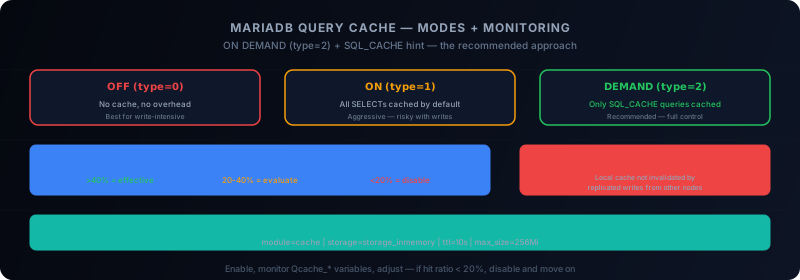
The query cache operates in three modes, controlled by the query_cache_type variable:
OFF (0)
The query cache is completely disabled. No queries are cached, no cache checks are performed. This is the safest option for write-intensive workloads.
ON (1)
All SELECT queries are cached by default, except those marked with the SQL_NO_CACHE hint. This is the most aggressive mode.
-- This query will be cached
SELECT * FROM products WHERE category_id = 5;

-- This query will NOT be cached
SELECT SQL_NO_CACHE * FROM products WHERE category_id = 5;
ON DEMAND (2)
No queries are cached by default. Only queries explicitly marked with SQL_CACHE are cached. This is the most controlled mode and often the most effective.
-- This query will NOT be cached (default behavior)
SELECT * FROM products WHERE category_id = 5;

-- This query WILL be cached
SELECT SQL_CACHE * FROM products WHERE category_id = 5;
The ON DEMAND mode is what I recommend in most cases. It forces you to think about which queries deserve to be cached, rather than caching everything blindly.
Invalidation: The Achilles' Heel
The query cache invalidates ALL cached entries for a table as soon as a write is performed on that table. Not just the affected rows — the entire table.
-- Suppose 1000 SELECTs on the 'products' table are cached
UPDATE products SET price = 19.99 WHERE product_id = 42;
-- → All 1000 cache entries for 'products' are invalidated
This is a brutal but necessary mechanism to guarantee consistency. The problem is that for frequently modified tables, the cache is constantly invalidated and rebuilt, consuming more resources than having no cache at all.
Sizing the Cache
The query cache size is controlled by query_cache_size:
[mysqld]
query_cache_type = 2
query_cache_size = 64M
query_cache_limit = 2M
query_cache_min_res_unit = 2048- query_cache_size: total cache size. Do not exceed 256 MB — beyond that, the global cache mutex becomes a bottleneck.
- query_cache_limit: maximum size of an individual result. Larger results are not cached.
- query_cache_min_res_unit: allocation block size. Reducing this value for small results reduces fragmentation.
Monitoring the Cache
The Qcache_* status variables are essential for evaluating effectiveness:
SHOW GLOBAL STATUS LIKE 'Qcache%';Key metrics:
| Variable | Description |
|---|---|
Qcache_hits |
Number of queries served from cache |
Qcache_inserts |
Number of queries added to cache |
Qcache_not_cached |
Queries not cached (too large, hints, etc.) |
Qcache_lowmem_prunes |
Evictions due to memory shortage |
Qcache_free_memory |
Free memory in the cache |
Qcache_total_blocks |
Total number of allocated blocks |
Qcache_free_blocks |
Free blocks (high = fragmentation) |
The Efficiency Ratio
The most important ratio is the hit ratio:
Hit ratio = Qcache_hits / (Qcache_hits + Com_select) * 100Interpretation:
- > 40%: the cache is effective, worth keeping enabled
- 20-40%: gray zone, evaluate case by case
- < 20%: the cache is not effective, consider disabling it
A second important ratio is the eviction ratio:
Eviction ratio = Qcache_lowmem_prunes / Qcache_inserts * 100If this ratio exceeds 10%, the cache is too small — increase query_cache_size or reduce what you cache.
The Concurrency Trap
The query cache uses a global mutex. This means only one thread can read or write to the cache at a time. On a server with 100 simultaneous connections, this mutex becomes a severe bottleneck.
This is why MySQL 8.0 removed the query cache entirely. The Oracle team determined that the mutex cost outweighs the cache benefits in modern workloads (high concurrency, frequent writes).
MariaDB chose to keep it, reasoning that it remains useful for specific use cases (read-heavy loads, low concurrency, rarely modified tables).
Query Cache and Galera: A Difficult Combination
Using the query cache in a Galera cluster is problematic. Galera replicates writes to all nodes, but the query cache is local to each node. Result:
- Node A receives a SELECT and caches the result
- Node B receives an UPDATE via Galera replication
- Node A's cache is NOT invalidated — it does not know the data changed
- The next SELECT on Node A returns stale data
The only safe way to use the query cache with Galera is with wsrep_causal_reads = ON, which forces a consistency check before each read. But this largely negates the cache benefit.
The Alternative: MaxScale Cache Filter
For architectures that need a distributed query cache, the MaxScale cache filter is a better approach:
[query-cache]
type = filter
module = cache
storage = storage_inmemory
ttl = 10s
max_size = 256Mi
The MaxScale cache is centralized (at the proxy level), which eliminates the inconsistency problem between Galera nodes. Additionally, MaxScale can invalidate the cache intelligently based on query type, not just on the modified table.
When to Enable the Query Cache
The query cache is relevant when:
- The workload is primarily reads (> 80% SELECTs)
- Tables are rarely modified (configuration tables, reference data)
- Concurrency is moderate (< 50 simultaneous connections)
- The same queries are repeated frequently (web applications with cache misses)
- You are on a standalone server, not a Galera cluster
The query cache is NOT relevant when:
- The workload is mixed read/write
- Tables are frequently modified (transactional tables)
- Concurrency is high (global mutex)
- You are on a Galera cluster (cache inconsistency)
Conclusion
MariaDB's query cache is a powerful but delicate tool. The ON DEMAND mode with the SQL_CACHE hint offers the best control. Monitoring via Qcache_* variables is essential for evaluating effectiveness. And for distributed architectures, the MaxScale cache filter is often a better choice.
Like any performance tool, the key is to measure. Enable, monitor, adjust. If the hit ratio stays below 20%, disable it and move on.
This article was originally published on Medium.
Comments (0)
No comments yet.
Leave a comment