 PmaControl
From Theory to Practice
In Part 1, we explored MaxScale's architectural capabilities: its protocols, routers, monitors, and filters. This second part is a practical guide: how to install, configure, and administer MaxScale on a daily basis.
Installation
MaxScale is available via the official MariaDB repository. On Debian/Ubuntu:
curl -LsS https://r.mariadb.com/downloads/mariadb_repo_setup \
  | sudo bash -s -- --mariadb-maxscale-version=24.02

sudo apt-get install maxscale
The main configuration file is located at /etc/maxscale.cnf. It is an INI-format file, organized into clearly defined sections.
Anatomy of the Configuration File
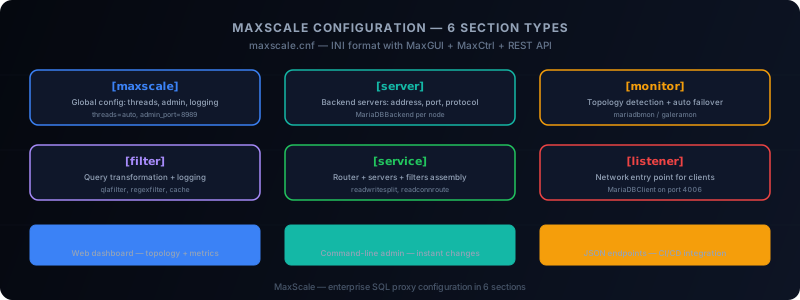
The maxscale.cnf file is organized into six types of sections, each identified by a bracketed header.
[maxscale] Section — Global Configuration
[maxscale]
threads        = auto
log_info       = false
admin_host     = 0.0.0.0
admin_port     = 8989
admin_secure_gui = true- threads=auto: MaxScale automatically detects the number of available CPU cores.
- admin_host/admin_port: Enables the MaxGUI web interface and REST API.
- admin_secure_gui: Enables HTTPS for the administration interface.
[server] Section — Server Definitions
Each MariaDB / MySQL backend server is declared individually:
[db-master]
type     = server
address  = 10.0.1.10
port     = 3306
protocol = MariaDBBackend

[db-slave1]
type     = server
address  = 10.0.1.11
port     = 3306
protocol = MariaDBBackend

[db-slave2]
type     = server
address  = 10.0.1.12
port     = 3306
protocol = MariaDBBackend
Each [server] section carries a logical name (here db-master, db-slave1, db-slave2) that will be referenced by monitors and services.
[monitor] Section — Topology Monitoring
The monitor is the component that automatically detects the replication topology and the state of each node:
[replication-monitor]
type            = monitor
module          = mariadbmon
servers         = db-master, db-slave1, db-slave2
user            = maxscale_monitor
password        = encrypted_password_here
monitor_interval = 2000
auto_failover    = true
auto_rejoin = true- mariadbmon: The standard monitor for MariaDB / MySQL master-slave topologies.
- auto_failover: If the master is lost, MaxScale automatically promotes a slave.
- auto_rejoin: A former master that comes back online is automatically reconfigured as a slave.
For Galera, you would use galeramon instead of mariadbmon.
[filter] Section — Query Transformation
Filters intercept and modify the SQL stream:
[query-log]
type   = filter
module = qlafilter
filebase = /var/log/maxscale/queries
flush   = true

[regex-rewrite]
type    = filter
module  = regexfilter
match   = SELECT.*FROM\s+legacy_table
replace = SELECT * FROM new_table
The qlafilter records all queries (useful for auditing). The regexfilter allows rewriting queries on the fly, without modifying the application.
[service] Section — Component Assembly
The service ties together servers, monitors, filters, and the router:
[rw-service]
type     = service
router   = readwritesplit
servers  = db-master, db-slave1, db-slave2
user     = maxscale_service
password = encrypted_password_here
filters  = query-log | regex-rewrite

max_slave_connections    = 100%
max_slave_replication_lag = 5s- readwritesplit: Writes go to the master, reads are distributed across slaves.
- max_slave_replication_lag: A slave lagging more than 5 seconds is temporarily excluded from routing.
- filters: Filters are chained with the pipe
|character.
[listener] Section — Network Entry Point
The listener exposes the service on a network port:
[rw-listener]
type     = listener
service  = rw-service
protocol = MariaDBClient
port     = 4006
address  = 0.0.0.0
The application connects to MaxScale on port 4006 as if it were a standard MariaDB / MySQL server. MaxScale is transparent from a protocol perspective.
MaxGUI: The Web Interface
Since MaxScale 2.5, the MaxGUI web interface provides a complete graphical view of the infrastructure. Accessible via https://maxscale-host:8989, it allows you to:
- Visualize the topology in real-time (master, slaves, connection state)
- View performance metrics (queries/second, latency, active connections)
- Manage servers (drain, maintenance, addition)
- Browse logs and alerts
MaxGUI is a monitoring tool, not a configuration tool. Configuration changes are made via the maxscale.cnf file or the REST API.
MaxCtrl: The Command Line Tool
MaxCtrl is MaxScale's official CLI. It communicates with the REST API and offers an intuitive syntax:
# List servers and their state
maxctrl list servers

# Put a server in maintenance
maxctrl set server db-slave1 maintenance

# Remove maintenance mode
maxctrl clear server db-slave1 maintenance

# List services and their statistics
maxctrl list services

# View replication topology
maxctrl show monitor replication-monitor

# Create a filter dynamically
maxctrl create filter my-filter regexfilter \
  match="SELECT 1" replace="SELECT 2"
The advantage of MaxCtrl over direct file editing is that changes take effect immediately, without restarting.
REST API: Automation
MaxScale's REST API is the foundation for automation. It exposes all functionality via HTTP/JSON endpoints:
# Get server list
curl -s -u admin:password https://maxscale:8989/v1/servers | jq

# Manual failover
curl -X POST -u admin:password \
  https://maxscale:8989/v1/monitors/replication-monitor/failover

# Get service metrics
curl -s -u admin:password \
  https://maxscale:8989/v1/services/rw-service | jq '.data.attributes.statistics'
The REST API enables integrating MaxScale into CI/CD pipelines, monitoring systems (Prometheus, Grafana), and orchestration tools (Ansible, Terraform).
Configuration Best Practices
Here are some recommendations from field experience:
-
Always use encrypted passwords in the configuration file. MaxScale provides the
maxkeystool to generate encryption keys. -
Enable automatic failover with
auto_failover=true, but test it regularly in pre-production environments. -
Size the threads according to load.
threads=autois a good default, but for very high volumes (>50,000 queries/second), manual tuning may be necessary. -
Monitor replication lag via
max_slave_replication_lag. A value that is too permissive sends reads to lagging slaves. A value that is too restrictive concentrates all reads on the master. -
Use filters sparingly. Each filter adds a processing layer. The
regexfilterin particular can have a significant performance impact if the regular expressions are complex.
Complete Sample Configuration
To summarize, here is a sample configuration file for a master + 2 slaves topology:
[maxscale]
threads = auto
admin_host = 0.0.0.0
admin_port = 8989

[db-master]
type = server
address = 10.0.1.10
port = 3306
protocol = MariaDBBackend

[db-slave1]
type = server
address = 10.0.1.11
port = 3306
protocol = MariaDBBackend

[db-slave2]
type = server
address = 10.0.1.12
port = 3306
protocol = MariaDBBackend

[replication-monitor]
type = monitor
module = mariadbmon
servers = db-master, db-slave1, db-slave2
user = maxscale_monitor
password = <encrypted>
monitor_interval = 2000
auto_failover = true
auto_rejoin = true

[rw-service]
type = service
router = readwritesplit
servers = db-master, db-slave1, db-slave2
user = maxscale_service
password = <encrypted>
max_slave_replication_lag = 5s

[rw-listener]
type = listener
service = rw-service
protocol = MariaDBClient
port = 4006
Conclusion
MaxScale is configured with a clear, structured INI file. Six types of sections are enough to describe a complete infrastructure: global configuration, servers, the monitor, filters, the service, and the listener.
Day-to-day administration relies on three complementary tools: MaxGUI for visual monitoring, MaxCtrl for command-line operations, and the REST API for automation. Together, they form a complete ecosystem for managing an enterprise-grade SQL proxy.
This article was originally published on Medium.
Comments (0)
No comments yet.
Leave a comment