 PmaControl
Introduction
MySQL 8.4's multi-source replication allows a single replica to receive transactions from multiple source servers in parallel. Each source is attached to the replica through a distinct replication channel.
This mechanism is primarily used for:
- consolidating multiple servers into a single node
- aggregating streams from multiple countries, sites, or applications
- centralising read data
- preparing a reporting or reconciliation node
However, this is not a shared-write cluster. MySQL does not perform conflict resolution between multiple sources. If two sources write to the same logical objects, consistency must be handled at the application level or through strict data partitioning.
What MySQL 8.4 actually supports
In MySQL 8.4:
- a multi-source replica opens one channel per source
- each channel must point to a different source
- replication can be based on GTID or binlog positions
- replication filters can be applied per channel
- replica metadata repositories must be in
TABLEmode, which is the default behaviour in 8.4
Key points:
- multi-source is for consolidation, not for multi-primary with arbitration
- there is no built-in conflict detection or resolution
- a single replica cannot open multiple channels to the same source
Example topology
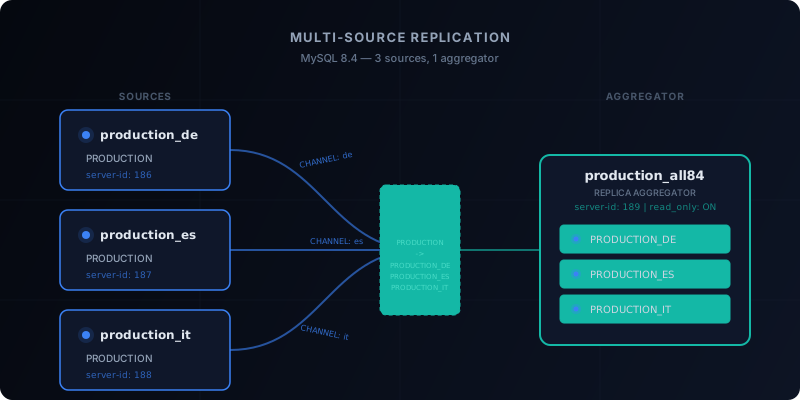
Simple example with three sources and one aggregator:
production_de  ─┐
production_es  ─┼──> production_all84
production_it  ─┘
In this example:
production_decontains aPRODUCTIONdatabaseproduction_esalso contains aPRODUCTIONdatabaseproduction_italso contains aPRODUCTIONdatabaseproduction_all84receives all three streams but remaps them to different databases:PRODUCTION_DEPRODUCTION_ESPRODUCTION_IT
This remapping prevents the three streams from writing to the same database on the replica.
Prerequisites
On each source:
- unique
server-id - binary logging enabled
- TCP/IP access to the MySQL port
- dedicated replication user
On the multi-source replica:
- unique
server-id relay_logconfigured- MySQL 8.4
- initial data restore before starting replication
Typical source configuration
Minimal configuration example on a source:
[mysqld]
bind-address = 0.0.0.0
server-id = 186
log_bin = mysql-bin
binlog_format = ROW
binlog_row_image = FULL
sync_binlog = 1
innodb_flush_log_at_trx_commit = 1
Same logic on the other sources, with a different server-id on each server.
Typical aggregator replica configuration
Example:
[mysqld]
bind-address = 0.0.0.0
server-id = 189
log_bin = mysql-bin
relay_log = mysql-relay-bin
binlog_format = ROW
binlog_row_image = FULL
skip_replica_start = ON
read_only = ON
super_read_only = ON
skip_replica_start=ON is useful during the setup or maintenance phase, as it prevents automatic channel restart before validation.
Creating the replication account
On each source:
CREATE USER 'repl'@'10.68.68.%' IDENTIFIED BY 'Repl84Geo2026x';
GRANT REPLICATION SLAVE, REPLICATION CLIENT ON *.* TO 'repl'@'10.68.68.%';
The REPLICATION SLAVE privilege remains the one documented by MySQL for this type of setup in 8.4.
Initial data load
Before attaching a channel, you need to load the initial data onto the replica.
Example with dumps taken from the sources:
mysqldump --single-transaction --set-gtid-purged=OFF PRODUCTION > PRODUCTION_de.sql
mysqldump --single-transaction --set-gtid-purged=OFF PRODUCTION > PRODUCTION_es.sql
mysqldump --single-transaction --set-gtid-purged=OFF PRODUCTION > PRODUCTION_it.sql
Then on the replica:
CREATE DATABASE PRODUCTION_DE;
CREATE DATABASE PRODUCTION_ES;
CREATE DATABASE PRODUCTION_IT;
And import the three dumps into their corresponding target databases.
Retrieving binlog coordinates
If you are not using GTID, you need to retrieve for each source:
- the binlog file name
- the starting position
Example:
SHOW BINARY LOG STATUS;The replica will then start from these coordinates using SOURCE_LOG_FILE and SOURCE_LOG_POS.
Creating the channels
In MySQL 8.4, each source is configured with CHANGE REPLICATION SOURCE TO ... FOR CHANNEL.
Example for the German source:
CHANGE REPLICATION SOURCE TO
  SOURCE_HOST='10.68.68.186',
  SOURCE_PORT=3306,
  SOURCE_USER='repl',
  SOURCE_PASSWORD='Repl84Geo2026x',
  SOURCE_LOG_FILE='mysql-bin.000001',
  SOURCE_LOG_POS=158,
  SOURCE_AUTO_POSITION=0,
  GET_SOURCE_PUBLIC_KEY=1
FOR CHANNEL 'production_de';
Same approach for:
production_esproduction_it
Per-channel filters
The power of multi-source comes from per-channel filtering.
If all three sources have a PRODUCTION database, you can rewrite them on the replica side:
CHANGE REPLICATION FILTER
  REPLICATE_REWRITE_DB=((PRODUCTION,PRODUCTION_DE))
FOR CHANNEL 'production_de';

CHANGE REPLICATION FILTER
  REPLICATE_REWRITE_DB=((PRODUCTION,PRODUCTION_ES))
FOR CHANNEL 'production_es';

CHANGE REPLICATION FILTER
  REPLICATE_REWRITE_DB=((PRODUCTION,PRODUCTION_IT))
FOR CHANNEL 'production_it';
Important note:
- the channel must exist before applying
CHANGE REPLICATION FILTER ... FOR CHANNEL - if the channel does not yet exist, MySQL returns an error
Starting the channels
START REPLICA FOR CHANNEL 'production_de';
START REPLICA FOR CHANNEL 'production_es';
START REPLICA FOR CHANNEL 'production_it';
Then, if the replica should remain passive:
SET GLOBAL read_only = ON;
SET GLOBAL super_read_only = ON;
Verification
Per-channel check:
SHOW REPLICA STATUS FOR CHANNEL 'production_de'\G
SHOW REPLICA STATUS FOR CHANNEL 'production_es'\G
SHOW REPLICA STATUS FOR CHANNEL 'production_it'\G
Expected indicators:
Replica_IO_Running: YesReplica_SQL_Running: YesSeconds_Behind_Source: 0or close to0Replicate_Rewrite_DBcorrectly set
Functional check:
SELECT * FROM PRODUCTION_DE.germany_feed;
SELECT * FROM PRODUCTION_ES.spain_feed;
SELECT * FROM PRODUCTION_IT.italy_feed;
Common operations
Stop a single channel:
STOP REPLICA FOR CHANNEL 'production_es';Restart a single channel:
START REPLICA FOR CHANNEL 'production_es';Reset a channel:
RESET REPLICA ALL FOR CHANNEL 'production_es';Remove a rewrite filter on a channel:
CHANGE REPLICATION FILTER REPLICATE_REWRITE_DB=() FOR CHANNEL 'production_es';What to avoid
- routing multiple sources to the same target database without data partitioning
- assuming MySQL will resolve key or ordering conflicts
- using different MySQL versions without strict compatibility control
- forgetting that
SOURCE_PASSWORDinCHANGE REPLICATION SOURCE TOhas a length limit - applying filters before creating the channel
Technical positioning
MySQL 8.4 multi-source is suitable for:
- multi-country consolidation
- centralised reporting
- reconciliation
- resuming multiple independent streams
It is not suitable, on its own, for:
- true concurrent multi-master writing
- a consensus architecture
- automatic conflict resolution
Conclusion
With MySQL 8.4, multi-source replication is clean, mature, and production-ready for aggregating multiple source servers into a single replica.
The recommended pattern is straightforward:
- clearly separate source and aggregator roles
- enforce a unique
server-ideverywhere - load an initial snapshot
- create one channel per source
- apply rewrite filters per channel
- verify each channel independently
If the source databases share identical names, REPLICATE_REWRITE_DB per channel is the most practical mechanism for keeping the final replica readable and usable.
Comments (0)
No comments yet.
Leave a comment