 PmaControl
Performance Schema: The Untapped Gold Mine
performance_schema has been enabled by default in MariaDB / MySQL for years. And yet, most DBAs do not use it daily. The reason is simple: the raw data is hard to read. Dozens of tables, millions of rows, cumulative counters -- without an aggregation tool, it is noise.
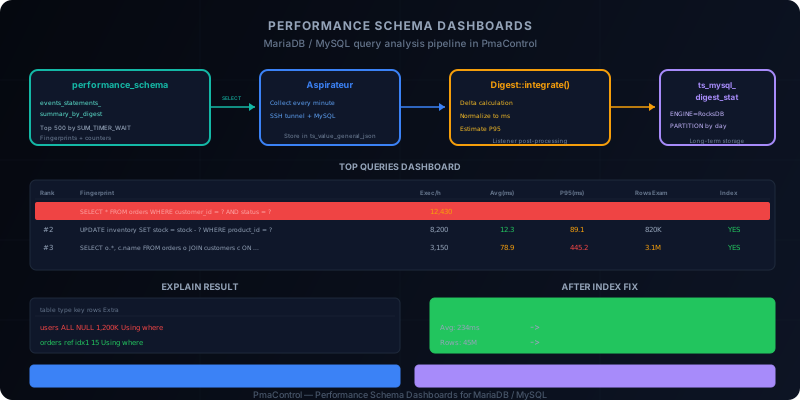
PmaControl transforms this noise into signal. It collects performance_schema data via the Aspirateur, aggregates it via the Listener (Digest::integrate), and presents it in actionable dashboards. This article explains the complete pipeline, from source to dashboard.
Verify That performance_schema Is Enabled
MariaDB
SHOW GLOBAL VARIABLES LIKE 'performance_schema';
+--------------------+-------+
| Variable_name      | Value |
+--------------------+-------+
| performance_schema | ON    |
+--------------------+-------+
If OFF, add to the configuration file:
[mysqld]
performance_schema = ON
A restart is required -- this variable is not dynamic.
MySQL
Same on MySQL. The variable is read-only and requires a restart:
[mysqld]
performance_schema = ON
Performance Impact
The classic question: "does performance_schema slow down my server?" The answer in 2026 is no, not measurably. The overhead is in the range of 1-3% on typical workloads. The visibility benefit far outweighs this cost.
The only exception: servers with extreme workloads (>100,000 queries/second) where every percentage counts. In that case, disable unnecessary instruments rather than performance_schema entirely.
The Source: events_statements_summary_by_digest
The key table that PmaControl exploits is:
SELECT * FROM performance_schema.events_statements_summary_by_digest
ORDER BY SUM_TIMER_WAIT DESC
LIMIT 10\G
This table contains a summary by fingerprint (normalized signature) of each executed query. Here are the most useful columns:
| Column | Description |
|---|---|
DIGEST |
Unique hash of the fingerprint |
DIGEST_TEXT |
Normalized query text (parameters replaced with ?) |
COUNT_STAR |
Total execution count |
SUM_TIMER_WAIT |
Total execution time (in picoseconds) |
AVG_TIMER_WAIT |
Average time per execution |
SUM_ROWS_EXAMINED |
Total rows examined |
SUM_ROWS_SENT |
Total rows returned |
FIRST_SEEN |
First execution |
LAST_SEEN |
Last execution |
The fingerprint is the cornerstone: it normalizes SELECT * FROM users WHERE id = 42 and SELECT * FROM users WHERE id = 1337 into a single fingerprint SELECT * FROM users WHERE id = ?. This allows aggregating statistics regardless of parameter values.
The PmaControl Pipeline
Step 1: Collection by the Aspirateur
The Aspirateur periodically executes the following query on each monitored server:
SELECT
    DIGEST,
    DIGEST_TEXT,
    COUNT_STAR,
    SUM_TIMER_WAIT,
    AVG_TIMER_WAIT,
    SUM_ROWS_EXAMINED,
    SUM_ROWS_SENT,
    SUM_NO_INDEX_USED,
    SUM_NO_GOOD_INDEX_USED,
    FIRST_SEEN,
    LAST_SEEN
FROM performance_schema.events_statements_summary_by_digest
WHERE DIGEST IS NOT NULL
ORDER BY SUM_TIMER_WAIT DESC
LIMIT 500;
The LIMIT 500 is intentional: PmaControl focuses on the 500 most expensive queries by cumulative time. Fast, infrequent queries are not interesting for optimization.
Results are stored in ts_value_general_json with a timestamp.
Step 2: Processing by the Listener
When the Listener detects new digest data, it triggers Digest::integrate(). This function:
-
Calculates deltas: since
performance_schemaprovides cumulative counters (since the lastTRUNCATEor restart), Digest::integrate calculates the difference between two collections to get period metrics. -
Normalizes times: picoseconds are converted to milliseconds for display.
-
Calculates percentiles: the P95 (95th percentile) execution time is estimated from distributions.
-
Stores in ts_mysql_digest_stat: the dedicated digest statistics table, partitioned by day and using the RocksDB engine for compression.
Aspirateur
  -> SELECT FROM performance_schema (every minute)
  -> INSERT INTO ts_value_general_json

Listener
  -> Detect new data (ts_max_date changed)
  -> Digest::integrate()
     -> Delta calculation (current - previous)
     -> Normalize to milliseconds
     -> Estimate P95
     -> INSERT INTO ts_mysql_digest_stat
The ts_mysql_digest_stat Table
This is the long-term storage for digest statistics:
CREATE TABLE ts_mysql_digest_stat (
    id BIGINT UNSIGNED AUTO_INCREMENT,
    server_id INT UNSIGNED,
    digest VARCHAR(64),
    digest_text TEXT,
    period_start DATETIME,
    period_end DATETIME,
    exec_count BIGINT UNSIGNED,
    total_time_ms DECIMAL(20,3),
    avg_time_ms DECIMAL(15,3),
    p95_time_ms DECIMAL(15,3),
    rows_examined BIGINT UNSIGNED,
    rows_sent BIGINT UNSIGNED,
    no_index_used BIGINT UNSIGNED,
    PRIMARY KEY (id),
    KEY idx_server_digest (server_id, digest, period_start)
) ENGINE=ROCKSDB
PARTITION BY RANGE (TO_DAYS(period_start)) (
    PARTITION p20260413 VALUES LESS THAN (TO_DAYS('2026-04-14')),
    PARTITION p20260414 VALUES LESS THAN (TO_DAYS('2026-04-15')),
    ...
);
Partitioning by day enables:
- Fast cleanup:
ALTER TABLE ts_mysql_digest_stat DROP PARTITION p20260401; - Fast queries on date ranges
- Fine-grained retention control
The Dashboards
Top Queries View
The main dashboard displays the most expensive queries, sorted by cumulative time:
Rank  Fingerprint                              Exec/h    Avg(ms)   P95(ms)  Rows Exam
----- ---------------------------------------- --------  --------  -------- ---------
  1   SELECT * FROM orders WHERE customer_id    12,430     45.2     234.5   1,245,000
      = ? AND status = ?
  2   UPDATE inventory SET stock = stock - ?     8,200     12.3      89.1     820,000
      WHERE product_id = ?
  3   SELECT o.*, c.name FROM orders o JOIN      3,150     78.9     445.2   3,150,000
      customers c ON o.customer_id = c.id
  4   INSERT INTO audit_log (...)                45,600      1.2       5.3          0
  5   SELECT COUNT(*) FROM sessions WHERE         980    234.5     890.1  98,000,000
      last_active < ?
Each row is clickable to access the details.
Fingerprint Detail View
Clicking on a fingerprint, PmaControl displays:
- The full text of the normalized query
- History: evolution of average execution time and P95 over the last 30 days
- The ratio rows_examined / rows_sent -- a high ratio (>100:1) indicates a table scan or missing index
- The no_index_used flag -- how many executions used no index
Identifying Missing Indexes
The rows_examined / rows_sent ratio is the most powerful indicator. Consider an example:
Fingerprint: SELECT * FROM orders WHERE customer_id = ?
Rows examined: 1,245,000 (total)
Rows sent: 12,430 (total)
Ratio: 100:1
This 100:1 ratio means MariaDB / MySQL examines 100 rows to return 1. This is the classic sign of a full table scan or an ineffective index.
Action: check for an index on customer_id:
SHOW INDEX FROM orders WHERE Column_name = 'customer_id';If the index does not exist:
ALTER TABLE orders ADD INDEX idx_customer_id (customer_id);The SUM_NO_INDEX_USED Flag
PmaControl displays in red any queries where SUM_NO_INDEX_USED is high. This flag is set when MariaDB / MySQL performs a full table scan -- this is often the number one performance problem.
EXPLAIN from PmaControl
For queries identified as problematic, PmaControl can execute an EXPLAIN directly:
EXPLAIN SELECT * FROM orders WHERE customer_id = 42 AND status = 'pending';The result is displayed with color coding:
- Green:
type = refortype = eq_ref-- index usage, good - Amber:
type = range-- range scan, acceptable - Red:
type = ALL-- full table scan, needs fixing
Integration with Marina+ Agent
Marina+ is PmaControl's automatic optimization agent. It analyzes digest data and proposes suggestions:
- Missing indexes: detects queries with high rows_examined/rows_sent ratio and suggests indexes to create
- Queries to rewrite: identifies inefficient patterns (SELECT *, correlated subqueries, ORDER BY on non-indexed column)
- Configuration: adjusts server parameters based on query patterns (sort_buffer_size, join_buffer_size, etc.)
Marina+ does not modify anything automatically -- it generates recommendations that the DBA validates and applies.
Comparison with PMM (Percona Monitoring and Management)
PMM and PmaControl exploit the same data source (performance_schema), but with different approaches:
| Aspect | PmaControl | PMM |
|---|---|---|
| Source | performance_schema | performance_schema + slowlog |
| Agent | Aspirateur (SSH + MySQL) | mysqld_exporter + QAN |
| Storage | ts_mysql_digest_stat (RocksDB) | ClickHouse (QAN) |
| Fingerprinting | Server-side (MariaDB / MySQL native) | Client-side (Percona agent) |
| P95 | Estimated from distributions | Calculated from slowlog |
| History | Partitioned by day, configurable retention | ClickHouse, configurable retention |
| Actions | Integrated EXPLAIN, Marina+ suggestions | Query Analytics + PMM UI |
The main difference: PMM combines performance_schema and slowlog for more precise percentiles. PmaControl relies solely on performance_schema, which is lighter but less granular.
PmaControl's advantage: integration with the rest of the ecosystem (replication, topology, alerts, actions). PMM is better for pure query analysis, PmaControl is better for the global infrastructure view.
Practical Case: Find and Fix a Slow Query
Scenario: the PmaControl dashboard shows a query consuming 40% of the server's total time.
Step 1: Identify
In the Top Queries dashboard:
#1  SELECT u.*, p.* FROM users u
    JOIN purchases p ON u.id = p.user_id
    WHERE p.created_at > ? AND u.country = ?

    Exec/h: 5,200   Avg: 234ms   P95: 1,200ms   Rows exam: 45M
Step 2: Analyze
The rows_examined / rows_sent ratio is catastrophic: 45 million rows examined for approximately 5,200 results per hour.
EXPLAIN from PmaControl:
+----+------+----------+------+------+------+----------+
| id | type | table    | key  | rows | filt | Extra    |
+----+------+----------+------+------+------+----------+
|  1 | ALL  | users    | NULL | 1.2M | 10%  | where    |
|  1 | ref  | purchases| idx1 | 15   | 33%  | where    |
+----+------+----------+------+------+------+----------+
The problem: users is full table scanned (type = ALL). There is no index on country.
Step 3: Fix
ALTER TABLE users ADD INDEX idx_country (country);Step 4: Verify
After adding the index, the PmaControl dashboard shows improvement within the hour:
#1  SELECT u.*, p.* FROM users u
    JOIN purchases p ON u.id = p.user_id
    WHERE p.created_at > ? AND u.country = ?

    Exec/h: 5,200   Avg: 12ms   P95: 45ms   Rows exam: 78K
Average time dropped from 234ms to 12ms (19x), and rows examined from 45M to 78K (577x).
Best Practices
1. Do Not TRUNCATE performance_schema Manually
PmaControl calculates deltas between two collections. If you run TRUNCATE TABLE performance_schema.events_statements_summary_by_digest, counters restart at zero and the first delta will be incorrect. Let PmaControl handle it.
2. Increase performance_schema_digests_size If Needed
By default, MariaDB / MySQL stores the first N fingerprints. If your application has more distinct queries than the limit, the least frequent ones are evicted:
[mysqld]
performance_schema_digests_size = 10000  ; default ~5000
3. Correlate with the Slow Query Log
PmaControl via performance_schema gives the "what" (which queries are slow). The slow query log gives the "when" (at what exact moment). The two are complementary.
4. Watch the rows_examined / rows_sent Ratio
This is the most actionable indicator. A ratio > 100:1 is almost always a missing index. A ratio > 1000:1 is an urgent problem.
5. Use P95, Not the Average
The average hides outliers. A query with an average of 10ms but a P95 of 500ms has an intermittent problem (lock contention, cold cache, unstable execution plan). The P95 reveals these problems.
Conclusion
Performance_schema is the best data source for MariaDB / MySQL query optimization. PmaControl automates the collection, aggregation, and presentation of this data via the Aspirateur -> Digest::integrate -> ts_mysql_digest_stat -> dashboard pipeline.
The result: continuous visibility into the most expensive queries, missing indexes, and performance trends over time. Combined with Marina+ for automated suggestions, it is a complete performance optimization workflow -- from detection to correction.
Comments (0)
No comments yet.
Leave a comment