 PmaControl
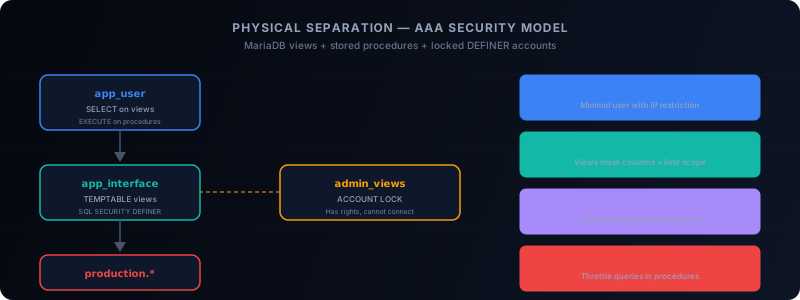
The AAA Model Applied to Databases
In information security, the AAA model (Authentication, Authorization, Accounting) is a fundamental pillar. You find it in RADIUS, TACACS+, firewalls, VPNs... but it is rarely applied rigorously to relational databases.
Yet MariaDB / MySQL offers native mechanisms that allow implementing genuine physical separation between sensitive data and application users. No additional middleware needed, no expensive proxy required. Everything is already there, in the engine.
The core idea is simple: an application user should never have direct access to tables containing sensitive data. They should interact only with views and stored procedures carefully designed to expose only the strict minimum.
Why Physical Separation?
The classic model consists of giving the application user a GRANT SELECT, INSERT, UPDATE, DELETE ON mydb.*. It is quick to set up, but a security disaster:
- The user has access to all columns of all tables
- A SQL injection in the application exposes the entire database
- No fine-grained traceability of access to sensitive data
- No way to mask certain columns (card numbers, emails, hashed passwords)
Physical separation solves these problems by interposing a SQL abstraction layer between the application and the data.
Step 1: Create an Interface Schema
CREATE DATABASE app_interface;This schema will contain no tables. Only views and stored procedures. It is the "attack surface" visible to the application.
Step 2: Create Views with ALGORITHM=TEMPTABLE
The key to physical separation lies in the view algorithm choice:
CREATE
  ALGORITHM = TEMPTABLE
  DEFINER = 'admin_views'@'localhost'
  SQL SECURITY DEFINER
VIEW app_interface.v_customers AS
SELECT
    customer_id,
    first_name,
    last_name,
    city,
    country
FROM production.customers;
Three critical elements here:
- ALGORITHM=TEMPTABLE: MariaDB materializes the view into a temporary table. The user cannot "trace back" to the underlying table via
SHOW CREATE VIEWto build a direct query. - DEFINER: The view executes with the privileges of the
admin_viewsaccount, not those of the application user. - SQL SECURITY DEFINER: Privilege checks are performed on the DEFINER, not the INVOKER. The application user only needs rights on the view, not on the source table.
Note what is missing from the view: no email, no phone number, no full address. Data masking is intrinsic to the view design.
Step 3: Stored Procedures for Writes
For write operations, stored procedures offer even finer control:
DELIMITER //
CREATE PROCEDURE app_interface.sp_update_customer_city(
    IN p_customer_id INT,
    IN p_city VARCHAR(100)
)
SQL SECURITY DEFINER
BEGIN
    -- Business validation
    IF p_city IS NULL OR LENGTH(TRIM(p_city)) = 0 THEN
        SIGNAL SQLSTATE '45000'
        SET MESSAGE_TEXT = 'City cannot be empty';
    END IF;

    UPDATE production.customers
    SET city = p_city,
        updated_at = NOW()
    WHERE customer_id = p_customer_id;

    -- Audit trail
    INSERT INTO production.audit_log(
        table_name, record_id, field_name,
        action, performed_by, performed_at
    )
    VALUES (
        'customers', p_customer_id, 'city',
        'UPDATE', CURRENT_USER(), NOW()
    );
END //
DELIMITER ;
The application user can only modify the city. Not the name, not the email, not the account status. And every modification is automatically audited.
Step 4: The Locked Administrator Account
The DEFINER account for views and procedures should never be used to connect:
CREATE USER 'admin_views'@'localhost'
    IDENTIFIED BY 'impossible_to_guess_random_string';

GRANT SELECT, INSERT, UPDATE ON production.* TO 'admin_views'@'localhost';

ALTER USER 'admin_views'@'localhost' ACCOUNT LOCK;
A locked account (ACCOUNT LOCK) cannot connect, but its privileges remain active for views and procedures in SQL SECURITY DEFINER mode. This is the crucial point of the architecture: the account that holds the rights cannot connect, and the account that connects does not have direct rights.
Step 5: The Minimal Application User
CREATE USER 'app_user'@'10.0.%'
    IDENTIFIED BY 'strong_password_here';

GRANT SELECT ON app_interface.v_customers TO 'app_user'@'10.0.%';
GRANT EXECUTE ON PROCEDURE app_interface.sp_update_customer_city
    TO 'app_user'@'10.0.%';

-- No GRANT on production.*
The application user has no access to anything in the production schema. Even with a successful SQL injection, the attacker can only see data exposed by the views and can only execute the authorized procedures.
Advanced Data Masking
Views also enable sophisticated masking techniques:
CREATE VIEW app_interface.v_customer_contacts AS
SELECT
    customer_id,
    CONCAT(LEFT(email, 3), '***@***.',
           SUBSTRING_INDEX(email, '.', -1)) AS masked_email,
    CONCAT('***-***-', RIGHT(phone, 4)) AS masked_phone
FROM production.customers;
Customer support can identify a client by the last 4 digits of their phone number without ever seeing the complete number.
Query Rate Limiting
An often overlooked technique: using stored procedures to implement rate limiting at the database level:
CREATE PROCEDURE app_interface.sp_search_customers(
    IN p_search_term VARCHAR(100)
)
SQL SECURITY DEFINER
BEGIN
    DECLARE v_count INT;

    SELECT COUNT(*) INTO v_count
    FROM production.rate_limit
    WHERE user = CURRENT_USER()
      AND action = 'search'
      AND created_at > NOW() - INTERVAL 1 MINUTE;

    IF v_count > 10 THEN
        SIGNAL SQLSTATE '45000'
        SET MESSAGE_TEXT = 'Rate limit exceeded: max 10 searches/minute';
    END IF;

    INSERT INTO production.rate_limit(user, action, created_at)
    VALUES (CURRENT_USER(), 'search', NOW());

    SELECT customer_id, first_name, last_name, city
    FROM production.customers
    WHERE last_name LIKE CONCAT(p_search_term, '%')
    LIMIT 50;
END;
Architecture Summary
| Layer | Component | Role |
|---|---|---|
| Application | app_user |
Connects, executes views/procedures |
| Interface | app_interface (schema) |
Exposes only necessary data |
| Security | admin_views (locked) |
Holds the rights, cannot connect |
| Production | production (schema) |
Actual tables, not directly accessible |
Limitations
This approach is not perfect:
- Performance:
ALGORITHM=TEMPTABLEcreates a temporary copy. For large tables, this can be expensive. - Complexity: Each new application feature potentially requires a new view or procedure.
- Maintenance: Views must evolve with the schema of underlying tables.
But these constraints are the price of security. And in a context where data breaches cost an average of $4.5 million per incident, it is a reasonable investment.
Conclusion
Physical separation via TEMPTABLE views and DEFINER stored procedures is not an obscure feature of MariaDB / MySQL. It is a robust, native security architecture that is often underutilized.
Five steps are enough: an interface schema, views with the right algorithm, procedures for writes, a locked DEFINER account, and a minimal application user. The result is a database where even a successful SQL injection only grants access to a controlled fraction of the data.
This article was originally published on Medium.
Comments (0)
No comments yet.
Leave a comment