 PmaControl
Why a REST API?
PmaControl started as a web interface tool. You add a MariaDB / MySQL server by clicking buttons, configure tags with the mouse, manage environments through forms.
This works for 10 servers. At 50, it becomes tedious. At 200, it is impossible.
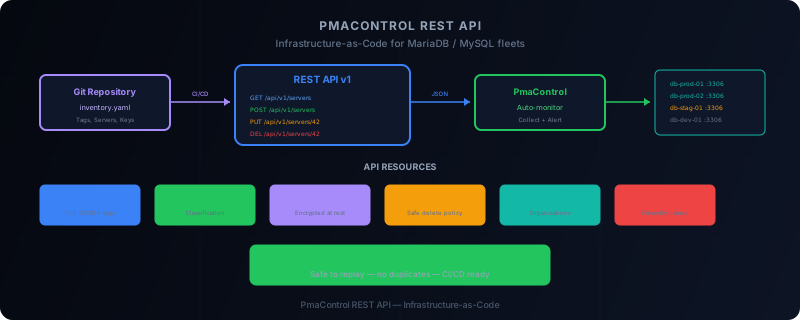
PmaControl's REST API transforms the tool into a programmable platform. Every action available in the web interface is accessible via a JSON endpoint. This opens the door to Infrastructure-as-Code: describe your database inventory in YAML or JSON files, and apply it automatically.
Authentication
The API uses webservice user authentication. This is a dedicated PmaControl account, without web interface access, whose token serves as an API key.
curl -H "Authorization: Bearer <token>" \
     -H "Content-Type: application/json" \
     https://pmacontrol.example.com/api/v1/servers
The webservice user inherits ACLs from its profile. A "read-only" profile can only list resources. An "admin" profile can create, modify and delete.
API Resources
Tags
Tags are PmaControl's classification system. Each server can carry one or more tags (production, staging, client-acme, dc-paris, etc.).
# List all tags
GET /api/v1/tags

# Create a tag
POST /api/v1/tags
{"name": "production", "color": "#22c55e"}

# Update a tag
PUT /api/v1/tags/42
{"name": "prod", "color": "#22c55e"}

# Delete a tag
DELETE /api/v1/tags/42
Tags are the building block of organization. They allow filtering dashboards, scoping alerts, and restricting access by profile.
Clients
Clients represent the organizations or projects that own servers.
# List clients
GET /api/v1/clients

# Create a client
POST /api/v1/clients
{"name": "Acme Corp", "contact_email": "dba@acme.com"}

# Update a client
PUT /api/v1/clients/7
{"name": "Acme Corporation"}

# Delete a client
DELETE /api/v1/clients/7
Environments
Environments (production, staging, development, etc.) have a special deletion policy: when an environment is deleted, its servers are not destroyed but reassigned to a default environment.
# List environments
GET /api/v1/environments

# Create an environment
POST /api/v1/environments
{"name": "staging", "description": "Pre-production environment"}

# Delete — servers are reassigned
DELETE /api/v1/environments/3
# Response: {"reassigned_servers": 12, "target_environment": "default"}
This policy prevents accidental server deletions when reorganizing environments.
Aliases
Aliases let you reference a server by a readable name instead of its IP or internal hostname.
# List aliases
GET /api/v1/aliases

# Create an alias
POST /api/v1/aliases
{"alias": "db-writer-prod", "server_id": 42}
Storage Areas
Storage areas represent storage zones (datacenters, cloud regions, etc.).
# List storage areas
GET /api/v1/storage-areas

# Create a storage area
POST /api/v1/storage-areas
{"name": "dc-paris-1", "provider": "OVH", "location": "Paris, France"}
SSH Keys
PmaControl uses SSH keys to connect to servers and collect metrics. The API manages the key lifecycle.
# List SSH keys
GET /api/v1/ssh-keys

# Create an SSH key
POST /api/v1/ssh-keys
{
  "name": "pmacontrol-collector-2026",
  "public_key": "ssh-ed25519 AAAA...",
  "private_key": "-----BEGIN OPENSSH PRIVATE KEY-----\n..."
}

# Delete a key
DELETE /api/v1/ssh-keys/5
Security note: private keys are encrypted at rest in the PmaControl database. The API never returns the private key on a GET request.
Servers
The main resource. Full CRUD for monitored MariaDB / MySQL instances.
# List all servers
GET /api/v1/servers

# List with filters
GET /api/v1/servers?tag=production&environment=staging

# Server detail
GET /api/v1/servers/42

# Create a server
POST /api/v1/servers
{
  "hostname": "db-prod-01.acme.com",
  "ip": "10.0.1.10",
  "port": 3306,
  "ssh_key_id": 5,
  "client_id": 7,
  "environment_id": 1,
  "tags": ["production", "galera", "dc-paris"]
}

# Update a server
PUT /api/v1/servers/42
{"port": 3307}

# Assign tags
POST /api/v1/servers/42/tags
{"tags": ["production", "critical"]}

# Assign an SSH key
PUT /api/v1/servers/42/ssh-key
{"ssh_key_id": 5}

# Delete a server
DELETE /api/v1/servers/42
Infrastructure-as-Code Workflows
The main benefit of the API is being able to describe the complete inventory in a versioned file and apply it automatically.
Example: YAML Inventory File
# pmacontrol-inventory.yaml
tags:
  - name: production
    color: "#22c55e"
  - name: staging
    color: "#f59e0b"
  - name: galera
    color: "#14b8a6"

environments:
  - name: production
  - name: staging
  - name: development

ssh_keys:
  - name: collector-2026
    public_key_file: ./keys/collector-2026.pub

servers:
  - hostname: db-prod-01.acme.com
    ip: 10.0.1.10
    port: 3306
    ssh_key: collector-2026
    environment: production
    tags: [production, galera]

  - hostname: db-prod-02.acme.com
    ip: 10.0.1.11
    port: 3306
    ssh_key: collector-2026
    environment: production
    tags: [production, galera]

  - hostname: db-staging-01.acme.com
    ip: 10.0.2.10
    port: 3306
    ssh_key: collector-2026
    environment: staging
    tags: [staging]
Apply Script
A Python or Bash script reads this file and calls the PmaControl API to synchronize state:
#!/bin/bash
API="https://pmacontrol.example.com/api/v1"
TOKEN="your-webservice-token"

# Create tags
for tag in production staging galera; do
  curl -s -X POST "$API/tags" \
    -H "Authorization: Bearer $TOKEN" \
    -H "Content-Type: application/json" \
    -d "{\"name\": \"$tag\"}"
done

# Create servers
curl -s -X POST "$API/servers" \
  -H "Authorization: Bearer $TOKEN" \
  -H "Content-Type: application/json" \
  -d @server-prod-01.json
CI/CD Integration
The natural pattern is to integrate this into a CI/CD pipeline:
- The DBA modifies the
pmacontrol-inventory.yamlfile in Git - The merge request is reviewed by the team
- The CI pipeline validates syntax and constraints (no duplicate IPs, valid SSH keys)
- The CD pipeline applies the changes via the PmaControl API
- PmaControl starts monitoring new servers automatically
Idempotence
All creation endpoints are idempotent: if the resource already exists (same hostname, same IP), the API returns the existing resource instead of creating a duplicate. This allows replaying the inventory script without side effects.
# First call: creates the server, returns 201
POST /api/v1/servers  → 201 Created

# Second identical call: returns existing server, 200
POST /api/v1/servers  → 200 OK (existing)
Response Codes
| Code | Meaning |
|---|---|
| 200 | Success (read or update) |
| 201 | Resource created |
| 204 | Deletion successful |
| 400 | Invalid payload |
| 401 | Missing or invalid token |
| 403 | Insufficient permissions |
| 404 | Resource not found |
| 409 | Conflict (uniqueness constraint) |
Current Limitations
The v1 API covers CRUD operations on inventory. It does not yet cover:
- Metrics (time-series reads) — planned for v2
- Alerts (threshold configuration) — planned for v2
- Backups (triggering and status) — planned for v2
- Configuration export (my.cnf, ProxySQL rules) — under discussion
Conclusion
PmaControl's REST API transforms the management of a MariaDB / MySQL fleet from a manual process into a programmable, versioned workflow.
Describe your inventory in Git. Apply it via the API. Let PmaControl monitor automatically. This is Infrastructure-as-Code applied to database monitoring.
Comments (0)
No comments yet.
Leave a comment