 PmaControl
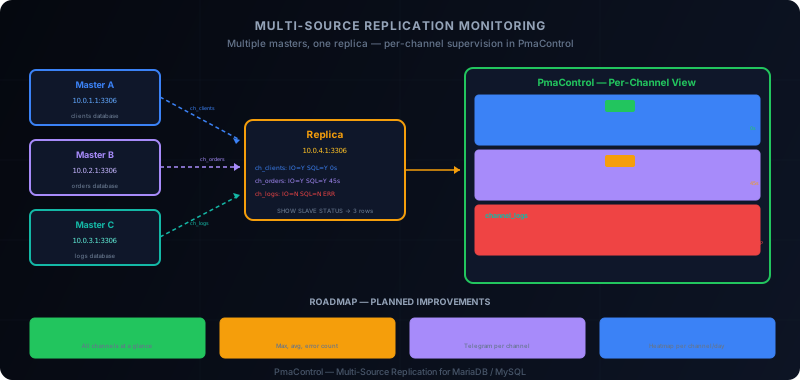
Multi-Source: Multiple Masters, One Replica
Multi-source replication allows a single replica server to receive data from multiple masters simultaneously. Each master connection is a distinct channel, with its own IO thread, its own SQL thread, and its own replication state.
This is a powerful pattern for:
- Consolidation: aggregating data from multiple business databases onto an analytics replica
- Migration: receiving data from both the old and new system during transition
- Data warehouse: feeding a warehouse from multiple MariaDB / MySQL sources
In our previous article on MySQL 8.4 multi-source replication, we covered the configuration. Here, we focus on monitoring: how PmaControl detects, displays, and monitors these multiple channels.
Quick Setup (Recap)
MariaDB
MariaDB has supported multi-source natively since version 10.0:
-- Channel 1: clients database
CHANGE MASTER 'channel_clients' TO
  MASTER_HOST = '10.0.1.1',
  MASTER_USER = 'repl',
  MASTER_PASSWORD = 'secret',
  MASTER_USE_GTID = slave_pos;
START SLAVE 'channel_clients';

-- Channel 2: orders database
CHANGE MASTER 'channel_orders' TO
  MASTER_HOST = '10.0.2.1',
  MASTER_USER = 'repl',
  MASTER_PASSWORD = 'secret',
  MASTER_USE_GTID = slave_pos;
START SLAVE 'channel_orders';
MySQL 8.0+
MySQL uses the FOR CHANNEL clause:
-- Channel 1
CHANGE REPLICATION SOURCE TO
  SOURCE_HOST = '10.0.1.1',
  SOURCE_USER = 'repl',
  SOURCE_PASSWORD = 'secret',
  SOURCE_AUTO_POSITION = 1
  FOR CHANNEL 'channel_clients';
START REPLICA FOR CHANNEL 'channel_clients';

-- Channel 2
CHANGE REPLICATION SOURCE TO
  SOURCE_HOST = '10.0.2.1',
  SOURCE_USER = 'repl',
  SOURCE_PASSWORD = 'secret',
  SOURCE_AUTO_POSITION = 1
  FOR CHANNEL 'channel_orders';
START REPLICA FOR CHANNEL 'channel_orders';
How PmaControl Detects Multi-Source
The Detection Query
When the Aspirateur collects replication data, it executes:
SHOW SLAVE STATUS;
-- or in MySQL 8.0+:
SHOW REPLICA STATUS;
In classic replication (single master), this query returns a single row. In multi-source, it returns one row per channel.
PmaControl automatically detects multi-source when SHOW SLAVE STATUS returns more than one row. No special configuration is needed on the PmaControl side.
Internal Storage
Each channel is stored as an independent replication entry in the time series tables. The channel name is preserved and used as a discriminator:
ts_value_general_json:
  server_id = 42
  variable  = slave_status
  channel   = 'channel_clients'
  value     = { "Slave_IO_Running": "Yes", "Seconds_Behind_Master": 3, ... }

  server_id = 42
  variable  = slave_status
  channel   = 'channel_orders'
  value     = { "Slave_IO_Running": "Yes", "Seconds_Behind_Master": 0, ... }
The Slave Page in Multi-Source Mode
When PmaControl detects multiple channels on a server, the slave page displays each channel independently. In practice:
One Block Per Channel
Each channel has its own block with:
- Channel name displayed in the header (e.g.,
channel_clients) - IO/SQL status: the
Slave_IO_RunningandSlave_SQL_Runningindicators specific to the channel - Lag:
Seconds_Behind_Masterspecific to the channel - GTID: the GTID state specific to the channel
- Last error:
Last_SQL_Errorfor the channel
One Lag Chart Per Channel
Each channel has its own Chart.js graph with 5-day lag history. Charts are stacked vertically on the page.
This allows visual comparison: if channel_clients has stable lag at 0 seconds but channel_orders shows recurring spikes, the problem is clearly localized to the orders master.
Health Strip Per Channel
Each channel has its own health strip. One channel in green and another in red immediately tells you: the problem is on a single channel, not on the replica itself.
Per-Channel Actions
Actions (START, STOP, SKIP) are available per channel:
-- Stop a single channel
STOP SLAVE 'channel_orders';

-- Skip an error on a channel
SET GLOBAL sql_slave_skip_counter = 1;
START SLAVE 'channel_orders';

-- MariaDB: stop a specific channel
STOP SLAVE 'channel_clients';
REPLICATE_REWRITE_DB Per Channel
In multi-source setups, it is common to use REPLICATE_REWRITE_DB to remap database names:
CHANGE REPLICATION SOURCE TO
  SOURCE_HOST = '10.0.1.1',
  ...
  FOR CHANNEL 'channel_clients';

-- Remap 'clients' to 'dw_clients' on the replica
CHANGE REPLICATION FILTER
  REPLICATE_REWRITE_DB = ((clients, dw_clients))
  FOR CHANNEL 'channel_clients';
PmaControl detects and displays these filters in the channel details. This is important for debugging: if a table does not appear on the replica, checking the rewrite filters is the first instinct.
Current Limitations
PmaControl handles multi-source well at the individual channel level. However, some features are missing for truly unified monitoring.
No "All Channels Healthy" View
Currently, there is no consolidated page showing the health status of all channels on a replica at a single glance. You need to scroll the slave page to check each channel individually.
What is missing: a summary table at the top of the page with a green/red indicator per channel, like:
channel_clients  OK   IO: Yes  SQL: Yes  Lag: 0s
channel_orders   WARN IO: Yes  SQL: Yes  Lag: 45s
channel_logs     ERR  IO: No   SQL: No   Error: 1062
No Aggregated Lag
PmaControl monitors each channel's lag separately but does not compute an aggregated metric. For example:
- Maximum lag among all channels
- Average lag
- Number of channels in error out of total
These aggregated metrics would be useful for alerts: "at least one channel has more than 60 seconds of lag" is more relevant than per-channel alerts when you have 10 channels.
No Channel Dependency Graph
In multi-source, channels are independent. But in some architectures, there are logical dependencies: channel A must be applied before channel B (for example, reference tables before transactional tables).
PmaControl does not model these dependencies. The DBA must manage application order manually if needed.
No Per-Channel Alerting
Current alerts are at the server level, not the channel level. If channel_clients stops but channel_orders is working, the alert simply indicates "replication error on server X" without specifying the channel.
Practical Use Cases
Analytics Consolidation
Typical architecture:
Master A (clients)  --- channel_clients -->
                                             Analytics Replica
Master B (orders)   --- channel_orders  -->  (MariaDB / MySQL)

Master C (logs)     --- channel_logs    -->
The replica consolidates all three databases. PmaControl monitors all three channels. If Master C (logs) is slow, the channel_logs lag increases without impacting the other two.
In PmaControl, you will see three blocks on the replica's slave page, with three independent lag charts. The channel_logs channel will have its own health strip in amber or red, while the other two remain green.
Migration by Channel
During a migration, you may temporarily have:
Old master  --- channel_legacy  -->
                                     New Replica
New master  --- channel_new     -->
The channel_legacy channel will be removed once the migration is complete. During the transition, PmaControl monitors both channels and lets you verify the new channel has caught up before cutting the old one.
Per-Database Filtering
With REPLICATE_DO_DB or REPLICATE_REWRITE_DB, each channel can be filtered to replicate only certain databases:
CHANGE REPLICATION FILTER
  REPLICATE_DO_DB = (clients, clients_archive)
  FOR CHANNEL 'channel_clients';

CHANGE REPLICATION FILTER
  REPLICATE_DO_DB = (orders, order_items)
  FOR CHANNEL 'channel_orders';
PmaControl displays active filters for each channel, making it easier to diagnose when an expected table does not appear on the replica.
Roadmap
Planned improvements for multi-source support in PmaControl:
Unified Multi-Source Dashboard
A dedicated multi-source dashboard with:
- Matrix view: one replica per row, its channels as columns
- Global health indicator (green if all channels OK, red if at least one KO)
- Aggregated lag (max, average, error count)
Channel Health Matrix
A compact heatmap-style visualization:
               Mon  Tue  Wed  Thu  Fri  Sat  Sun
ch_clients     [G]  [G]  [G]  [G]  [G]  [G]  [G]
ch_orders      [G]  [G]  [A]  [G]  [G]  [G]  [G]
ch_logs        [G]  [A]  [R]  [A]  [G]  [G]  [G]
Per-Channel Alerting
Telegram alerts specific to each channel:
Warning — Replication
Server: replica-analytics (10.0.3.1:3306)
Channel: channel_orders
Lag: 120s (threshold: 60s)
Status: IO=Yes, SQL=Yes
Automatic Dependency Detection
Analysis of cross-channel foreign keys to detect potential dependencies and alert if a dependent channel falls behind.
Multi-Source Best Practices
1. Name Channels Clearly
Use descriptive names: channel_clients, channel_orders, not ch1, ch2. PmaControl displays names as-is — clear names make diagnosis easier.
2. One Channel = One Database (or Logical Group)
Avoid mixing unrelated databases in the same channel. If a channel stops on an error, everything it contains is blocked.
3. Monitor Relay Log Space
With multiple channels, relay log disk space can explode. Each channel has its own relay log. Monitor Relay_Log_Space per channel in PmaControl.
4. Test Individual Channel Stops
Make sure stopping one channel does not impact others. PmaControl lets you STOP/START each channel independently — use this capability to validate isolation.
5. Document the Architecture
Multi-source adds complexity. Document which channel carries which database, from which master, with which filters. PmaControl displays this information, but external documentation remains useful for onboarding.
Conclusion
Multi-source replication is a powerful tool for MariaDB / MySQL data consolidation. PmaControl automatically detects multiple channels and monitors them individually with lag charts, health strips, and per-channel corrective actions.
Current limitations — no unified view, no per-channel alerting, no aggregated lag — are identified and part of the roadmap. In the meantime, per-channel monitoring covers the essential needs: knowing which channel has lag, which channel is in error, and being able to act on them individually.
For DBAs managing multi-source architectures in production, PmaControl remains the most suitable tool — even imperfect — because no competitor offers this per-channel visibility out of the box.
Comments (0)
No comments yet.
Leave a comment