 PmaControl
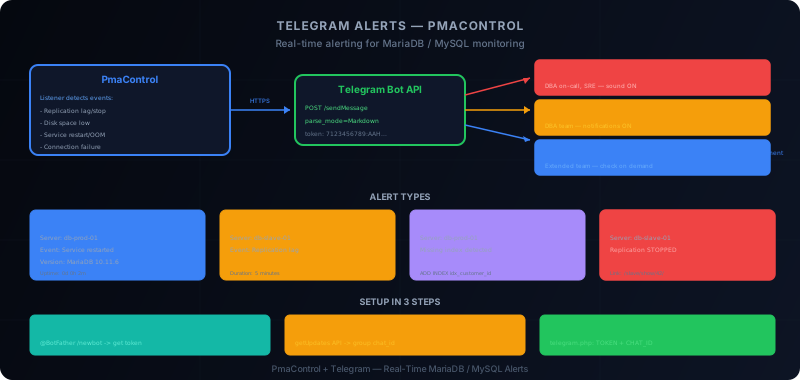
Why Telegram and Not Email?
Email alerts have a fundamental problem: nobody reads them in real time. An alert email at 3 AM will be buried in the next morning's inbox. A Telegram alert vibrates in the on-call DBA's pocket -- the latency between incident and reaction drops from hours to seconds.
PmaControl uses Telegram as its primary alert channel. This is not a gimmick: it is a technical choice. Telegram bots are free, the API is simple, messages support Markdown, and groups allow routing alerts by severity.
Create a Telegram Bot
Step 1: Contact @BotFather
Open Telegram and search for @BotFather. This is Telegram's official bot for creating other bots.
You: /newbot
BotFather: Alright, a new bot. How are we going to call it?
You: PmaControl Alerts
BotFather: Good. Now let's choose a username for your bot.
You: pmacontrol_alerts_bot
BotFather: Done! [...] Use this token to access the HTTP API:
            7123456789:AAHxxxxxxxxxxxxxxxxxxxxxxxxxxxxxxxx
Save this token -- it is your bot's API key. Do not commit it to a Git repository, do not share it in plain text.
Step 2: Get the chat_id
The bot needs to know who to send messages to. For a group:
- Create a Telegram group (e.g., "PmaControl - Production Alerts")
- Add your bot to the group
- Send a message in the group
- Call the
getUpdatesAPI:
curl -s "https://api.telegram.org/bot7123456789:AAHxxxx/getUpdates" | python3 -m json.toolIn the response, look for the group's chat_id (it is negative for groups):
{
    "result": [{
        "message": {
            "chat": {
                "id": -1001234567890,
                "title": "PmaControl - Production Alerts",
                "type": "supergroup"
            }
        }
    }]
}
The chat_id is -1001234567890.
Step 3: Test
curl -s -X POST "https://api.telegram.org/bot7123456789:AAHxxxx/sendMessage" \
  -d chat_id=-1001234567890 \
  -d parse_mode=Markdown \
  -d text="*Test*: PmaControl alert system is working."
If the message appears in the group, the configuration is working.
Configure PmaControl
The Configuration File
PmaControl's Telegram configuration is located at:
/srv/www/pmacontrol/configuration/telegram.php<?php
// configuration/telegram.php
define('TELEGRAM_TOKEN', '7123456789:AAHxxxxxxxxxxxxxxxxxxxxxxxxxxxxxxxx');
define('TELEGRAM_CHAT_ID', '-1001234567890');
// Optional: separate channels by severity
define('TELEGRAM_CHAT_ID_CRITICAL', '-1001234567891');
define('TELEGRAM_CHAT_ID_WARNING', '-1001234567890');
define('TELEGRAM_CHAT_ID_INFO', '-1001234567892');Important: this file contains a secret (the token). Apply appropriate permissions:
chmod 640 /srv/www/pmacontrol/configuration/telegram.php
chown root:www-data /srv/www/pmacontrol/configuration/telegram.php
Alert Types
PmaControl sends four types of alerts, each with a severity level:
Info
Informational alerts notify about normal but notable events:
Info — PmaControl
Server: db-prod-01 (10.0.1.1:3306)
Event: Service restarted
Version: MariaDB 10.11.6
Uptime: 0 days 0 hours 2 minutes
Time: 2026-04-13 14:32:15
Example Info events:
- MariaDB / MySQL service restart
- Version change detected
- New server added to monitoring
- Schema export completed
Warning
Warnings signal situations to watch:
Warning — PmaControl
Server: db-prod-slave-01 (10.0.1.2:3306)
Event: Replication lag exceeds threshold
Lag: 120 seconds (threshold: 60s)
Status: IO=Yes, SQL=Yes
Duration: 5 minutes
Time: 2026-04-13 14:32:15
Example Warning events:
- Replication lag > configurable threshold
- Disk space < 20%
- Connection count > 80% of max
- Slow queries increasing
Improvement
Improvement suggestions are generated by Marina+ or internal rules:
Improvement — PmaControl
Server: db-prod-01 (10.0.1.1:3306)
Suggestion: Missing index detected
Query: SELECT * FROM orders WHERE customer_id = ?
Rows examined/sent ratio: 450:1
Recommended: ALTER TABLE orders ADD INDEX idx_customer_id (customer_id)
Action Required
Critical alerts require immediate intervention:
Action Required — PmaControl
Server: db-prod-slave-01 (10.0.1.2:3306)
Event: Replication stopped
Slave_IO_Running: No
Slave_SQL_Running: No
Last_SQL_Error: Error 'Duplicate entry' on table 'users'
Time: 2026-04-13 14:32:15
Link: https://pmacontrol.example.com/en/slave/show/42/
Example Action Required events:
- Replication stopped (IO or SQL thread)
- Server unreachable (SSH or MySQL connection failed)
- OOM killer detected in logs
- Disk space < 5% (critical)
- Persistent connectivity error (>3 attempts)
RBAC: Route by Severity
In production, not all alerts have the same audience. PmaControl supports routing by severity to different Telegram groups.
Recommended Architecture
Group "PmaControl - Critical"    <-- Action Required only
  Members: on-call DBA, tech lead, SRE

Group "PmaControl - Operations"  <-- Warning + Action Required
  Members: DBA team, SRE

Group "PmaControl - All"         <-- Info + Warning + Improvement + Action Required
  Members: extended team, senior developers
Configuration
// configuration/telegram.php

// Main group (all levels)
define('TELEGRAM_CHAT_ID', '-1001234567890');

// Groups by severity
define('TELEGRAM_CHAT_ID_CRITICAL', '-1001234567891');  // Action Required
define('TELEGRAM_CHAT_ID_WARNING',  '-1001234567890');  // Warning
define('TELEGRAM_CHAT_ID_INFO',     '-1001234567892');  // Info + Improvement

// Enable severity-based routing
define('TELEGRAM_ROUTE_BY_SEVERITY', true);
When TELEGRAM_ROUTE_BY_SEVERITY is true, each alert is sent only to the group matching its severity. The main group (TELEGRAM_CHAT_ID) receives a copy of everything.
Alert Events
Service Restart
PmaControl detects restarts via the Uptime variable. If uptime drops from X hours to a few minutes between two collections, it is a restart:
if ($current_uptime < $previous_uptime) {
    Telegram::sendInfo(
        "Service restarted",
        $server,
        "Previous uptime: " . formatDuration($previous_uptime) .
        "\nCurrent uptime: " . formatDuration($current_uptime)
    );
}
Replication Lag
Lag is monitored continuously. The alert triggers when lag exceeds the threshold for a configurable duration (not an isolated spike):
// Alert only if lag > threshold for 5 minutes
if ($lag > $threshold && $lag_duration > 300) {
    Telegram::sendWarning(
        "Replication lag exceeds threshold",
        $server,
        "Lag: {$lag}s (threshold: {$threshold}s)\n" .
        "Duration: " . formatDuration($lag_duration)
    );
}
Disk Space
PmaControl collects disk usage via SSH. Thresholds:
- Warning: < 20% free
- Critical: < 5% free
Action Required — PmaControl
Server: db-prod-01 (10.0.1.1:3306)
Event: Disk space critical
Partition: /var/lib/mysql
Usage: 96% (used 458GB / 480GB)
Free: 22GB
OOM Killer
PmaControl analyzes syslog and dmesg to detect OOM events:
Action Required — PmaControl
Server: db-prod-01 (10.0.1.1:3306)
Event: OOM Killer invoked
Process killed: mysqld (PID 1234)
Memory at kill: RSS 14.2GB, limit 16GB
Time: 2026-04-13 03:42:15
Connectivity
If PmaControl cannot connect to a server (SSH timeout or MySQL connection refused):
Action Required — PmaControl
Server: db-prod-03 (10.0.1.3:3306)
Event: Connection failed
Error: SSH timeout after 30s
Attempts: 3/3 failed
Last successful: 2026-04-13 14:25:00 (7 min ago)
The alert is only sent after 3 failed attempts to avoid false positives on a network glitch.
Sending Custom Reports
PmaControl agents can send formatted Markdown messages:
// Weekly report
$report = "*Weekly Report — PmaControl*\n\n";
$report .= "Servers monitored: 142\n";
$report .= "Healthy: 138\n";
$report .= "Warnings: 3\n";
$report .= "Critical: 1\n\n";
$report .= "*Top issues this week:*\n";
$report .= "1. db-prod-slave-03: lag spike (max 340s) — resolved\n";
$report .= "2. db-staging-01: disk 87% — cleanup scheduled\n";
$report .= "3. db-prod-02: 12 slow queries > 10s — indexes added\n";

Telegram::send($report, TELEGRAM_CHAT_ID, 'Markdown');
Telegram's Markdown format supports:
- Bold:
*text* - Italic:
_text_ Inline code:`text`- Code blocks:
```text``` - Links:
[text](url)
Integration with Releem Agent
Releem is an external MariaDB / MySQL optimization agent. When integrated with PmaControl, its recommendations are sent via Telegram:
Improvement — Releem via PmaControl
Server: db-prod-01 (10.0.1.1:3306)
Recommendation: Increase innodb_buffer_pool_size
Current: 4GB
Recommended: 8GB
Reason: Buffer pool hit ratio 91.2% (target: >99%)
Impact: Estimated 15% improvement in read performance
The integration happens at the Listener level: when Releem sends a recommendation via the API, PmaControl processes it and routes it to Telegram with the standard format.
Best Practices
1. Do Not Flood the Groups
Configure realistic thresholds. A Telegram group receiving 50 alerts per day will be ignored. Aim for:
- Critical: 0-2 messages per week (ideally 0)
- Warning: 5-10 messages per day maximum
- Info: in a separate group that people check on demand
2. Include Action Links
Every alert should contain a direct link to the corresponding PmaControl page. The on-call DBA clicks and lands directly on the problematic server's dashboard.
3. Add Context
"Replication lag: 120s" is less useful than "Replication lag: 120s (was 5s an hour ago, threshold: 60s, 3rd alert this week)". Context helps prioritize.
4. Test the Bot Regularly
Send a daily test message ("PmaControl heartbeat: all systems operational"). If the message stops arriving, you know the bot is broken BEFORE a real incident.
# Daily heartbeat cron
0 8 * * * curl -s -X POST "https://api.telegram.org/bot$TOKEN/sendMessage" \
  -d chat_id=$CHAT_ID \
  -d text="PmaControl heartbeat: $(date) — all systems operational"
5. Protect the Token
- Never commit it to Git
- Store it in a configuration file with restrictive permissions
- Use a secret manager in production
- Revoke and regenerate the token if compromised (
/revokeon @BotFather)
6. Configure Mobile Notifications
Telegram allows configuring notifications per group:
- Critical: notifications enabled, sound enabled, always visible
- Operations: notifications enabled, sound disabled
- All: notifications disabled (check on demand)
Troubleshooting
The Bot Does Not Send Messages
- Verify the token:
curl "https://api.telegram.org/bot$TOKEN/getMe" - Verify the chat_id:
curl "https://api.telegram.org/bot$TOKEN/getUpdates" - Verify the bot is a member of the group
- Verify permissions on the
telegram.phpfile - Check PHP logs for connection errors
Duplicate Messages
If every alert arrives twice, check that TELEGRAM_ROUTE_BY_SEVERITY is configured correctly. Without routing, the alert goes to the default group. With routing, it goes to the specific group. If both are the same group, the message arrives twice.
Rate Limiting
The Telegram API limits to approximately 30 messages per second per bot. If PmaControl monitors 200 servers and all have a simultaneous issue, messages may be throttled. The solution: batch alerts together:
Action Required — PmaControl (batch)
Multiple servers affected:
- db-prod-01: Connection failed
- db-prod-02: Connection failed
- db-prod-03: Connection failed
Possible cause: Network outage in DC-1
Conclusion
Telegram is the ideal alert channel for PmaControl: real-time, mobile, Markdown formatting, severity-based groups. Configuration is simple (10 minutes) and the result is immediate: MariaDB / MySQL incidents are detected and notified in real time, with the context needed to act.
The classic trap is over-alerting. A Telegram group flooded with notifications is worse than no alerts at all -- people mute it. Calibrate thresholds, separate severities, and regularly test that the bot is working.
Comments (0)
No comments yet.
Leave a comment