 PmaControl
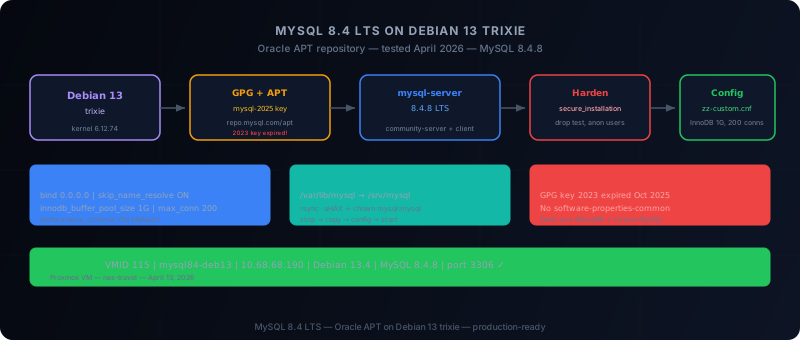
Objectif
Cette documentation explique de A à Z comment installer MySQL 8.4 sur Debian 13 avec la méthode officielle Oracle via APT, puis comment :
- vérifier que MySQL fonctionne
- sécuriser l'instance
- ajuster la configuration de base
- déplacer le datadir si besoin
- gérer le service avec
systemd
Point important sur Debian 13
Au 13 avril 2026, le dépôt APT MySQL publie bien des paquets pour Debian 13 trixie, y compris mysql-8.4-lts.
- Debian 13 peut être utilisée directement avec le dépôt Oracle MySQL
- la méthode recommandée reste le dépôt APT MySQL
- il n'est pas nécessaire de partir sur des paquets Debian natifs si l'objectif est Oracle MySQL 8.4
Architecture recommandée
Pour une installation propre :
- OS minimal Debian 13
- hostname correct
- IP fixe
- timezone cohérente
- disque de données séparé si la machine est destinée à la production
Configuration minimale raisonnable :
| Composant | Minimum |
|---|---|
| vCPU | 2 |
| RAM | 4 Go |
| Disque système | 20 Go |
| Disque données | 50 Go+ (datadir séparé) |
1. Préparer Debian 13
apt-get update
apt-get -y upgrade
apt-get install -y \
  curl wget gnupg lsb-release ca-certificates \
  apt-transport-https net-tools dnsutils sudo
Attention : le paquet software-properties-common n'existe pas sur Debian 13 (c'est un paquet Ubuntu). Ne pas l'inclure.
timedatectl set-timezone Europe/Paris
cat /etc/os-release
Vérifier que VERSION_CODENAME=trixie.
2. Ajouter le dépôt APT MySQL Oracle
Option A — Avec mysql-apt-config (méthode officielle)
cd /tmp
wget https://dev.mysql.com/get/mysql-apt-config_0.8.36-1_all.deb
dpkg -i mysql-apt-config_0.8.36-1_all.deb
apt-get update
Option B — Fichier APT manuel (recommandé)
Important : la clé GPG RPM-GPG-KEY-mysql-2023 a expiré en octobre 2025. Utiliser RPM-GPG-KEY-mysql-2025.
mkdir -p /etc/apt/keyrings
wget -O /etc/apt/keyrings/mysql.gpg https://repo.mysql.com/RPM-GPG-KEY-mysql-2025

cat >/etc/apt/sources.list.d/mysql.list <<'EOF'
deb [signed-by=/etc/apt/keyrings/mysql.gpg] http://repo.mysql.com/apt/debian/ trixie mysql-8.4-lts mysql-tools
EOF

apt-get update
3. Installer MySQL 8.4
DEBIAN_FRONTEND=noninteractive apt-get install -y mysql-serverCela installe le serveur (mysql-community-server), le client (mysql-community-client), les plugins et les fichiers communs.
dpkg -l | grep -E 'mysql-(server|client|community)'4. Vérifier le service
systemctl status mysql --no-pager
systemctl is-active mysql
systemctl is-enabled mysql
mysql --version
mysql -Nse "SELECT VERSION();"
5. Première connexion
Avec DEBIAN_FRONTEND=noninteractive, MySQL 8.4 sur Debian 13 configure l'authentification root via le socket Unix (pas de mot de passe) :
mysqlou :
sudo mysql6. Sécuriser l'instance
Via l'outil officiel :
mysql_secure_installationOu manuellement :
DELETE FROM mysql.user WHERE User='';
DROP DATABASE IF EXISTS test;
DELETE FROM mysql.db WHERE Db='test' OR Db='test\\_%';
FLUSH PRIVILEGES;
7. Emplacement des fichiers
| Fichier | Chemin |
|---|---|
| Configuration | /etc/mysql/ |
| Binaire serveur | /usr/sbin/mysqld |
| Client | /usr/bin/mysql |
| Datadir | /var/lib/mysql |
| Service systemd | mysql.service |
| Config custom | /etc/mysql/mysql.conf.d/zz-*.cnf |
8. Configuration de base recommandée
Ajouter un fichier dédié plutôt que de modifier les fichiers existants :
cat >/etc/mysql/mysql.conf.d/zz-custom.cnf <<'EOF'
[mysqld]
bind-address = 0.0.0.0
mysqlx-bind-address = 0.0.0.0
skip_name_resolve = ON
max_connections = 200
innodb_buffer_pool_size = 1G
log_error_verbosity = 2
EOF

systemctl restart mysql
Vérifier :
mysql -Nse "SHOW VARIABLES LIKE 'bind_address';"
mysql -Nse "SHOW VARIABLES LIKE 'innodb_buffer_pool_size';"
9. Ouvrir le port 3306
Si le serveur doit accepter des connexions distantes :
CREATE USER 'admin'@'10.68.68.%' IDENTIFIED BY 'StrongPasswordHere';
GRANT ALL PRIVILEGES ON *.* TO 'admin'@'10.68.68.%' WITH GRANT OPTION;
FLUSH PRIVILEGES;
ss -lntp | grep 330610. Déplacer le datadir vers /srv/mysql
systemctl stop mysql
mkdir -p /srv/mysql
rsync -aHAX /var/lib/mysql/ /srv/mysql/
chown -R mysql:mysql /srv/mysql
chmod 750 /srv/mysql

cat >/etc/mysql/mysql.conf.d/zz-datadir.cnf <<'EOF'
[mysqld]
datadir = /srv/mysql
EOF

systemctl start mysql
mysql -Nse "SELECT @@datadir;"
Résultat attendu : /srv/mysql/
11. Activer performance_schema
Déjà actif par défaut sur MySQL 8.4.8 :
mysql -Nse "SELECT @@performance_schema;"Si nécessaire :
cat >/etc/mysql/mysql.conf.d/zz-performance.cnf <<'EOF'
[mysqld]
performance_schema = ON
EOF

systemctl restart mysql
12. Créer un utilisateur d'administration
Éviter d'utiliser root pour tout :
CREATE USER 'dba'@'10.68.68.%' IDENTIFIED BY 'VeryStrongPassword';
GRANT ALL PRIVILEGES ON *.* TO 'dba'@'10.68.68.%' WITH GRANT OPTION;
FLUSH PRIVILEGES;
13. Sauvegarder la configuration
tar czf /root/mysql-config-backup.tar.gz /etc/mysql
dpkg -l | grep mysql > /root/mysql-packages.txt
14. Commandes d'exploitation courantes
systemctl start mysql
systemctl stop mysql
systemctl restart mysql
journalctl -u mysql -n 100 --no-pager
15. Vérification finale
systemctl is-active mysql
mysql --version
mysql -Nse "SELECT VERSION();"
mysql -Nse "SELECT @@datadir;"
mysql -Nse "SELECT @@performance_schema;"
ss -lntp | grep 3306
16. Pièges fréquents
- Ne pas mélanger MariaDB et MySQL Oracle — choisir une seule filière
- Clé GPG expirée —
RPM-GPG-KEY-mysql-2023expirée → utiliserRPM-GPG-KEY-mysql-2025 software-properties-commoninexistant — spécifique à Ubuntu, pas disponible sur Debian 13- Mauvaise source APT — utiliser
trixie, pasbookworm - Modifier
mysqld.cnfdirectement — préférer un fichierzz-*.cnfdans/etc/mysql/mysql.conf.d/ - Déplacer le datadir sans arrêter MySQL — toujours arrêter le service avant copie
- Exposer 3306 sans filtrage — limiter les hôtes, filtrer au firewall
Procédure compacte
apt-get update && apt-get -y upgrade
apt-get install -y wget gnupg ca-certificates curl sudo

mkdir -p /etc/apt/keyrings
wget -O /etc/apt/keyrings/mysql.gpg https://repo.mysql.com/RPM-GPG-KEY-mysql-2025

cat >/etc/apt/sources.list.d/mysql.list <<'EOF'
deb [signed-by=/etc/apt/keyrings/mysql.gpg] http://repo.mysql.com/apt/debian/ trixie mysql-8.4-lts mysql-tools
EOF

apt-get update
DEBIAN_FRONTEND=noninteractive apt-get install -y mysql-server
systemctl enable --now mysql

mysql -e "DELETE FROM mysql.user WHERE User=''; DROP DATABASE IF EXISTS test; DELETE FROM mysql.db WHERE Db='test' OR Db='test\\_%'; FLUSH PRIVILEGES;"
Résultat de l'installation testée
Installation réalisée le 13 avril 2026 sur VM Proxmox :
- VM : VMID 115,
mysql84-deb13, IP10.68.68.190 - OS : Debian 13.4 (trixie), kernel 6.12.74
- MySQL : 8.4.8 (MySQL Community Server - GPL)
- Service : actif, activé au boot
- Config : bind 0.0.0.0, skip_name_resolve ON, innodb_buffer_pool_size 1G, max_connections 200
- performance_schema : actif
- Port 3306 : écoute sur 0.0.0.0
Conclusion
Sur Debian 13, la bonne méthode pour installer MySQL 8.4 est d'utiliser le dépôt APT Oracle MySQL.
Corrections par rapport à la doc initiale :
- Clé GPG :
RPM-GPG-KEY-mysql-2023expirée → utiliserRPM-GPG-KEY-mysql-2025 - Prérequis : retirer
software-properties-common(inexistant sur Debian 13) - Connexion root : avec
DEBIAN_FRONTEND=noninteractive, root se connecte via socket sans mot de passe - performance_schema : déjà actif par défaut sur MySQL 8.4.8
Commentaires (0)
Aucun commentaire pour le moment.
Laisser un commentaire