 PmaControl
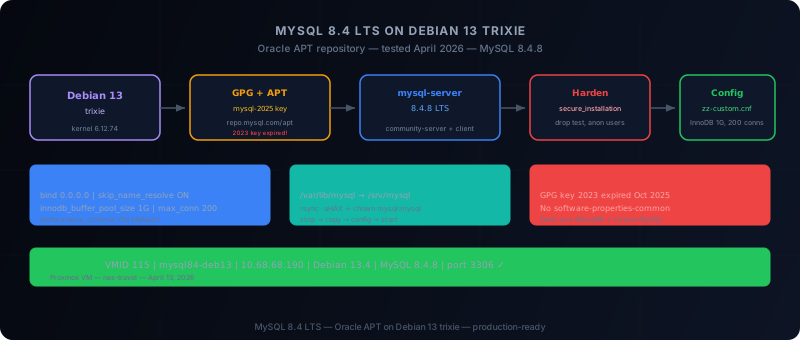
Goal
This documentation explains from A to Z how to install MySQL 8.4 on Debian 13 using the official Oracle APT method, then how to:
- verify that MySQL is working
- harden the instance
- adjust the base configuration
- move the datadir if needed
- manage the service with
systemd
Important note about Debian 13
As of April 13, 2026, the MySQL APT repository does publish packages for Debian 13 trixie, including mysql-8.4-lts.
- Debian 13 can be used directly with the Oracle MySQL repository
- the recommended method remains the MySQL APT repository
- there is no need to use native Debian packages if the goal is Oracle MySQL 8.4
Recommended architecture
For a clean installation:
- minimal Debian 13 OS
- proper hostname
- static IP
- consistent timezone
- separate data disk if the machine is intended for production
Reasonable minimum configuration:
| Component | Minimum |
|---|---|
| vCPU | 2 |
| RAM | 4 GB |
| System disk | 20 GB |
| Data disk | 50 GB+ (separate datadir) |
1. Prepare Debian 13
apt-get update
apt-get -y upgrade
apt-get install -y \
  curl wget gnupg lsb-release ca-certificates \
apt-transport-https net-tools dnsutils sudoWarning: the software-properties-common package does not exist on Debian 13 (it's an Ubuntu package). Do not include it.
timedatectl set-timezone Europe/Paris
cat /etc/os-release
Verify that VERSION_CODENAME=trixie.
2. Add the Oracle MySQL APT repository
Option A — Using mysql-apt-config (official method)
cd /tmp
wget https://dev.mysql.com/get/mysql-apt-config_0.8.36-1_all.deb
dpkg -i mysql-apt-config_0.8.36-1_all.deb
apt-get update
Option B — Manual APT file (recommended)
Important: the RPM-GPG-KEY-mysql-2023 GPG key expired in October 2025. Use RPM-GPG-KEY-mysql-2025.
mkdir -p /etc/apt/keyrings
wget -O /etc/apt/keyrings/mysql.gpg https://repo.mysql.com/RPM-GPG-KEY-mysql-2025

cat >/etc/apt/sources.list.d/mysql.list <<'EOF'
deb [signed-by=/etc/apt/keyrings/mysql.gpg] http://repo.mysql.com/apt/debian/ trixie mysql-8.4-lts mysql-tools
EOF

apt-get update
3. Install MySQL 8.4
DEBIAN_FRONTEND=noninteractive apt-get install -y mysql-serverThis installs the server (mysql-community-server), client (mysql-community-client), plugins and common files.
dpkg -l | grep -E 'mysql-(server|client|community)'4. Verify the service
systemctl status mysql --no-pager
systemctl is-active mysql
systemctl is-enabled mysql
mysql --version
mysql -Nse "SELECT VERSION();"
5. First connection
With DEBIAN_FRONTEND=noninteractive, MySQL 8.4 on Debian 13 configures root authentication via Unix socket (no password):
mysqlor:
sudo mysql6. Harden the instance
Using the official tool:
mysql_secure_installationOr manually:
DELETE FROM mysql.user WHERE User='';
DROP DATABASE IF EXISTS test;
DELETE FROM mysql.db WHERE Db='test' OR Db='test\\_%';
FLUSH PRIVILEGES;
7. Important file locations
| File | Path |
|---|---|
| Configuration | /etc/mysql/ |
| Server binary | /usr/sbin/mysqld |
| Client | /usr/bin/mysql |
| Datadir | /var/lib/mysql |
| systemd service | mysql.service |
| Custom config | /etc/mysql/mysql.conf.d/zz-*.cnf |
8. Recommended base configuration
Add a dedicated file rather than modifying existing ones:
cat >/etc/mysql/mysql.conf.d/zz-custom.cnf <<'EOF'
[mysqld]
bind-address = 0.0.0.0
mysqlx-bind-address = 0.0.0.0
skip_name_resolve = ON
max_connections = 200
innodb_buffer_pool_size = 1G
log_error_verbosity = 2
EOF

systemctl restart mysql
Verify:
mysql -Nse "SHOW VARIABLES LIKE 'bind_address';"
mysql -Nse "SHOW VARIABLES LIKE 'innodb_buffer_pool_size';"
9. Open port 3306
If the server needs to accept remote connections:
CREATE USER 'admin'@'10.68.68.%' IDENTIFIED BY 'StrongPasswordHere';
GRANT ALL PRIVILEGES ON *.* TO 'admin'@'10.68.68.%' WITH GRANT OPTION;
FLUSH PRIVILEGES;
ss -lntp | grep 330610. Move the datadir to /srv/mysql
systemctl stop mysql
mkdir -p /srv/mysql
rsync -aHAX /var/lib/mysql/ /srv/mysql/
chown -R mysql:mysql /srv/mysql
chmod 750 /srv/mysql

cat >/etc/mysql/mysql.conf.d/zz-datadir.cnf <<'EOF'
[mysqld]
datadir = /srv/mysql
EOF

systemctl start mysql
mysql -Nse "SELECT @@datadir;"
Expected result: /srv/mysql/
11. Enable performance_schema
Already enabled by default on MySQL 8.4.8:
mysql -Nse "SELECT @@performance_schema;"If needed:
cat >/etc/mysql/mysql.conf.d/zz-performance.cnf <<'EOF'
[mysqld]
performance_schema = ON
EOF

systemctl restart mysql
12. Create a proper admin user
Avoid using root for everything:
CREATE USER 'dba'@'10.68.68.%' IDENTIFIED BY 'VeryStrongPassword';
GRANT ALL PRIVILEGES ON *.* TO 'dba'@'10.68.68.%' WITH GRANT OPTION;
FLUSH PRIVILEGES;
13. Back up the configuration
tar czf /root/mysql-config-backup.tar.gz /etc/mysql
dpkg -l | grep mysql > /root/mysql-packages.txt
14. Common operating commands
systemctl start mysql
systemctl stop mysql
systemctl restart mysql
journalctl -u mysql -n 100 --no-pager
15. Final verification
systemctl is-active mysql
mysql --version
mysql -Nse "SELECT VERSION();"
mysql -Nse "SELECT @@datadir;"
mysql -Nse "SELECT @@performance_schema;"
ss -lntp | grep 3306
16. Common pitfalls
- Do not mix MariaDB and Oracle MySQL — pick one
- Expired GPG key —
RPM-GPG-KEY-mysql-2023expired → useRPM-GPG-KEY-mysql-2025 software-properties-commonmissing — Ubuntu-specific, not available on Debian 13- Wrong APT source — use
trixie, notbookworm - Editing
mysqld.cnfdirectly — prefer azz-*.cnffile in/etc/mysql/mysql.conf.d/ - Moving the datadir without stopping MySQL — always stop the service first
- Exposing 3306 without filtering — restrict hosts, filter at firewall level
Compact procedure
apt-get update && apt-get -y upgrade
apt-get install -y wget gnupg ca-certificates curl sudo

mkdir -p /etc/apt/keyrings
wget -O /etc/apt/keyrings/mysql.gpg https://repo.mysql.com/RPM-GPG-KEY-mysql-2025

cat >/etc/apt/sources.list.d/mysql.list <<'EOF'
deb [signed-by=/etc/apt/keyrings/mysql.gpg] http://repo.mysql.com/apt/debian/ trixie mysql-8.4-lts mysql-tools
EOF

apt-get update
DEBIAN_FRONTEND=noninteractive apt-get install -y mysql-server
systemctl enable --now mysql

mysql -e "DELETE FROM mysql.user WHERE User=''; DROP DATABASE IF EXISTS test; DELETE FROM mysql.db WHERE Db='test' OR Db='test\\_%'; FLUSH PRIVILEGES;"
Tested installation results
Installation performed on April 13, 2026 on Proxmox VM:
- VM: VMID 115,
mysql84-deb13, IP10.68.68.190 - OS: Debian 13.4 (trixie), kernel 6.12.74
- MySQL: 8.4.8 (MySQL Community Server - GPL)
- Service: active, enabled at boot
- Config: bind 0.0.0.0, skip_name_resolve ON, innodb_buffer_pool_size 1G, max_connections 200
- performance_schema: active
- Port 3306: listening on 0.0.0.0
Conclusion
On Debian 13, the proper method for installing MySQL 8.4 is to use the Oracle MySQL APT repository.
Corrections compared to initial documentation:
- GPG key:
RPM-GPG-KEY-mysql-2023expired → useRPM-GPG-KEY-mysql-2025 - Prerequisites: remove
software-properties-common(not available on Debian 13) - Root connection: with
DEBIAN_FRONTEND=noninteractive, root connects via socket without password - performance_schema: already active by default on MySQL 8.4.8
Comments (0)
No comments yet.
Leave a comment