 PmaControl
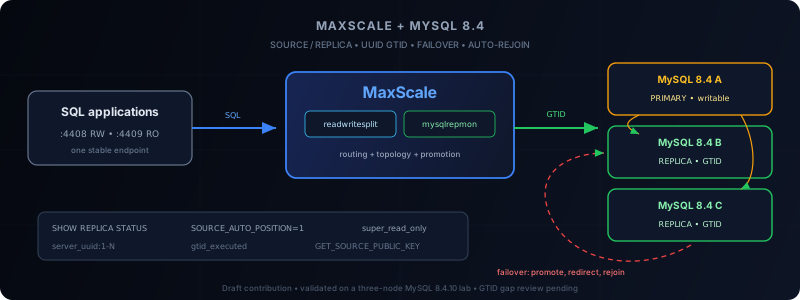
Project status — July 27, 2026. Upstream PR #421 proposes the
mysqlrepmonmodule described in this article for MaxScale. The PR is intentionally a draft: the code has been built and tested on a MySQL 8.4.10 lab, but it is not yet included in an official MaxScale release. Do not present it as a vendor-supported production feature.
The Problem in One Sentence
MaxScale has historically monitored MariaDB / MySQL replication topologies with mariadbmon. But MySQL 8.4 removed the old SLAVE / MASTER commands, uses UUID-based GTIDs, and requires a different grammar to reconfigure replication.
The outcome is deceptive: a proxy can keep accepting SQL connections while its monitor can no longer read the topology correctly, promote a replica, or attach the former primary.
Three separate functions must be considered:
- observe the topology and replication thread state;
- change the topology during a switchover, failover, or rejoin;
- route application sessions to the current primary and available replicas.
MySQL 8.4 compatibility must be correct in all three areas. Replacing only SHOW SLAVE STATUS with SHOW REPLICA STATUS is not enough.
Why MySQL 8.4 Breaks the Historical Assumption
MySQL 8.0.22 introduced Source/Replica terminology while keeping several historical aliases. MySQL 8.4 completes that transition: deprecated commands have been removed.
| Operation | MariaDB / old dialect | MySQL 8.4 |
|---|---|---|
| Read replica state | SHOW SLAVE STATUS |
SHOW REPLICA STATUS |
| Configure the source | CHANGE MASTER TO |
CHANGE REPLICATION SOURCE TO |
| Start replication | START SLAVE |
START REPLICA |
| Stop replication | STOP SLAVE |
STOP REPLICA |
| Clear the configuration | RESET SLAVE |
RESET REPLICA |
| Read binary log status | SHOW MASTER STATUS |
SHOW BINARY LOG STATUS |
| Reset GTIDs | RESET MASTER |
RESET BINARY LOGS AND GTIDS |
Returned column names also change:
| Old name | MySQL 8.4 name |
|---|---|
Master_Host |
Source_Host |
Master_Port |
Source_Port |
Master_Server_Id |
Source_Server_Id |
Slave_IO_Running |
Replica_IO_Running |
Slave_SQL_Running |
Replica_SQL_Running |
Seconds_Behind_Master |
Seconds_Behind_Source |
Master_Log_File |
Source_Log_File |
Read_Master_Log_Pos |
Read_Source_Log_Pos |
Exec_Master_Log_Pos |
Exec_Source_Log_Pos |
Channel_Name |
Channel_Name |
A monitor that still sends SHOW SLAVE STATUS immediately fails with a syntax error. A monitor that sends the correct query but still looks for Slave_IO_Running incorrectly concludes that replication is not running.
The Real Difference: The GTID Model
SQL vocabulary is not the most structural difference. Transaction representation is.
MariaDB GTIDs
MariaDB represents a GTID as:
domain_id-server_id-sequenceExample:
0-101-7842The domain is part of the model. The MariaDB monitor knows how to compare those positions and uses MASTER_USE_GTID, among other mechanisms.
MySQL GTIDs
MySQL represents a GTID set using server UUIDs and intervals:
155fa720-7623-11f1-9a78-bc241174cab8:1-76A history can contain multiple UUIDs and discontinuous intervals:
155fa720-7623-11f1-9a78-bc241174cab8:1-10:20-30,
7fd8c42a-7630-11f1-99af-bc241174cab8:1-8
MySQL exposes, among other values:
@@global.server_uuidto identify the origin;@@global.gtid_executedfor applied transactions;@@global.gtid_purgedfor GTIDs whose binary logs have been purged;Retrieved_Gtid_SetinSHOW REPLICA STATUSfor received transactions.
Changing source uses automatic positioning:
CHANGE REPLICATION SOURCE TO
    SOURCE_HOST = '10.0.0.12',
    SOURCE_PORT = 3306,
    SOURCE_USER = 'repl',
    SOURCE_PASSWORD = 'secret',
    SOURCE_AUTO_POSITION = 1,
    GET_SOURCE_PUBLIC_KEY = 1
FOR CHANNEL '';
The server then selects the correct restart point from GTID sets without receiving a binary log file and position.
Why a mysqlrepmon Module
Next to mariadbmon, the contribution adds a monitor dedicated to MySQL. It reuses the proven cluster decision and manipulation engine while replacing server-specific leaves:
- reading
SHOW REPLICA STATUSandSource_*/Replica_*columns; - reading
server_uuid,gtid_executed, andgtid_purged; - using
CHANGE REPLICATION SOURCE TO ... SOURCE_AUTO_POSITION=1; - issuing
START,STOP, andRESET REPLICA ... FOR CHANNEL; - enabling
super_read_only=1when demoting a server; - using
RESET BINARY LOGS AND GTIDSfor the manual reset command; - checking
enforce_gtid_consistencyandlog_replica_updates.
The module retains the operational parameters known from mariadbmon: auto_failover, auto_rejoin, enforce_read_only_slaves, and switchover, failover, and rejoin commands.
Reference Architecture
The tested architecture uses three MySQL 8.4 servers and one MaxScale node:
                              +----------------------+
SQL applications ----------> | MaxScale             |
port 4408 (RW)                | readwritesplit       |
port 4409 (RO)                | mysqlrepmon          |
                              +----------+-----------+
                                         |
                       topology, health, GTID, routing
                                         |
               +-------------------------+-------------------------+
               |                         |                         |
       +-------v--------+        +-------v--------+        +-------v--------+
       | mysql84-a      |        | mysql84-b      |        | mysql84-c      |
       | Primary        |------->| Replica        |        | Replica        |
       | 10.0.0.11      |------->| 10.0.0.12      |        | 10.0.0.13      |
       +----------------+        +----------------+        +----------------+
Applications never know the primary address. They use a MaxScale listener. The monitor decides which server carries MaxScale's internal Master role; readwritesplit sends writes to that server and distributes reads.
MaxScale itself must be redundant. Perfect database failover is of no use if the only SQL proxy is a single point of failure. In production, plan at least two active/passive MaxScale nodes, a VIP or load balancer, and the appropriate cooperative locking mechanism.
1. Prepare Every MySQL 8.4 Server
Every server that may be promoted must be able to produce its own binary logs and relay received transactions.
Baseline configuration:
[mysqld]
server_id=101
log_bin=mysql-bin
binlog_format=ROW

gtid_mode=ON
enforce_gtid_consistency=ON
log_replica_updates=ON

relay_log_recovery=ON
Use a different server_id on each node: 101, 102, and 103, for example.
The server_uuid must also be unique. It is stored in the datadir's auto.cnf file. If you clone a machine or datadir, never deploy multiple servers with the same server_uuid.
On replicas:
read_only=ON
super_read_only=ON
On the primary:
read_only=OFF
super_read_only=OFF
After restarting, check the invariants:
SELECT
    @@hostname,
    @@server_id,
    @@server_uuid,
    @@gtid_mode,
    @@enforce_gtid_consistency,
    @@log_bin,
    @@log_replica_updates,
    @@read_only,
    @@super_read_only\G

SELECT @@global.gtid_executed\G
SHOW BINARY LOG STATUS\G
SHOW REPLICA STATUS\G
A promotable replica must have log_bin=1, log_replica_updates=1, both replication threads running, and controlled lag.
2. Create Separate Accounts
At a minimum, separate:
- the topology monitoring and manipulation account;
- the account replicas use to read binary logs;
- application accounts that go through the proxy.
Monitor Account
For observation only:
CREATE USER 'maxscale_mon'@'10.0.0.10'
    IDENTIFIED BY 'a-long-random-password';

GRANT REPLICATION CLIENT
    ON *.* TO 'maxscale_mon'@'10.0.0.10';
For failover, switchover, and rejoin, the monitor must also be able to stop and reconfigure replication, change read-only variables, and control connections:
GRANT REPLICATION SLAVE,
      REPLICATION CLIENT,
      PROCESS,
      SUPER,
      SYSTEM_VARIABLES_ADMIN,
      REPLICATION_SLAVE_ADMIN,
      CONNECTION_ADMIN
    ON *.* TO 'maxscale_mon'@'10.0.0.10';
The historical SUPER privilege is still requested by some compatibility paths. On a finalized module version, reassess the exact list and remove any privilege that is no longer required.
Replication Account
CREATE USER 'repl'@'10.0.0.%'
    IDENTIFIED BY 'another-long-random-password'
    REQUIRE SSL;

GRANT REPLICATION SLAVE
    ON *.* TO 'repl'@'10.0.0.%';
Prefer TLS. With MySQL 8.4's default caching_sha2_password authentication over an unencrypted connection, the source change command must supply GET_SOURCE_PUBLIC_KEY=1 or a path to the RSA public key. The module adds this option when TLS is not enabled.
Service Account for Client Authentication
A MaxScale service's user is not the account under which every application query runs. It allows MaxScale's User Account Manager to load accounts and privileges from the backends:
CREATE USER 'maxscale_route'@'10.0.0.10'
    IDENTIFIED BY 'route-password';

GRANT SELECT ON mysql.user
    TO 'maxscale_route'@'10.0.0.10';
GRANT SELECT ON mysql.db
    TO 'maxscale_route'@'10.0.0.10';
GRANT SELECT ON mysql.tables_priv
    TO 'maxscale_route'@'10.0.0.10';
GRANT SELECT ON mysql.columns_priv
    TO 'maxscale_route'@'10.0.0.10';
GRANT SELECT ON mysql.procs_priv
    TO 'maxscale_route'@'10.0.0.10';
GRANT SELECT ON mysql.proxies_priv
    TO 'maxscale_route'@'10.0.0.10';
GRANT SHOW DATABASES ON *.*
    TO 'maxscale_route'@'10.0.0.10';
Application accounts must still exist on the MySQL servers with the same secret and consistent grants. Since the backends see connections arrive from MaxScale, their @host part must allow the proxy address.
3. Build the Contribution at a Reproducible SHA
Because the PR is still a draft, the standard MaxScale package does not contain mysqlrepmon. For a lab only, build the exact public SHA:
git clone https://github.com/mariadb-corporation/MaxScale.git
cd MaxScale

git fetch https://github.com/Esysteme/MaxScale.git \
  aurelien/mysql-8.4-replication-support
git checkout --detach f61776a5b19cf295636c94a8a3dea6d81fcd61fb

cmake -S . -B build \
  -DCMAKE_BUILD_TYPE=Release \
  -DCMAKE_INSTALL_PREFIX=/usr/local/maxscale-mysql84

cmake --build build --target mariadbmon mysqlrepmon test_cycle_find -j2
ctest --test-dir build --output-on-failure \
  -R '^test_mariadbmon_cycle_find$'

cmake --build build -j2
sudo cmake --install build
The targeted build must produce libmysqlrepmon.so. The contribution's CMake fix explicitly reuses LIBSSH_LIBRARY and LIBSSH_INCLUDE_DIR detected by MaxScale instead of assuming an internal libssh target exists.
Start the Isolated Build
The /usr/local/maxscale-mysql84 prefix avoids overwriting the installed package. In return, the package's maxscale.service still starts /usr/bin/maxscale and will not load the new module. For the lab, create /etc/systemd/system/maxscale-mysql84.service:
[Unit]
Description=MaxScale MySQL 8.4 compiled build
After=network-online.target
Wants=network-online.target

[Service]
Type=simple
User=maxscale
Group=maxscale
RuntimeDirectory=maxscale
RuntimeDirectoryMode=0755
ExecStart=/usr/local/maxscale-mysql84/bin/maxscale --nodaemon --config=/etc/maxscale.cnf --logdir=/var/log/maxscale --datadir=/var/lib/maxscale --cachedir=/var/cache/maxscale --libdir=/usr/local/maxscale-mysql84/lib/maxscale --piddir=/run/maxscale
Restart=on-failure
RestartSec=5s
LimitNOFILE=65535

[Install]
WantedBy=multi-user.target
The maxscale system account and data directories must exist; they are normally created by the installed MaxScale package that provides the runtime environment. Then reload systemd:
sudo install -d -o maxscale -g maxscale -m 0755 \
  /var/lib/maxscale /var/cache/maxscale /var/log/maxscale
sudo systemctl daemon-reload
4. Configure MaxScale
Complete minimal example:
[maxscale]
threads=auto
admin_host=127.0.0.1
admin_port=8989

[mysql84-a]
type=server
address=10.0.0.11
port=3306
protocol=MariaDBBackend

[mysql84-b]
type=server
address=10.0.0.12
port=3306
protocol=MariaDBBackend

[mysql84-c]
type=server
address=10.0.0.13
port=3306
protocol=MariaDBBackend

[MySQL84-Monitor]
type=monitor
module=mysqlrepmon
servers=mysql84-a,mysql84-b,mysql84-c
user=maxscale_mon
password=a-long-random-password
monitor_interval=2000ms

assume_unique_hostnames=true
auto_failover=safe
auto_rejoin=true
enforce_read_only_slaves=true

replication_user=repl
replication_password=another-long-random-password
replication_master_ssl=true

[MySQL84-RW-Service]
type=service
router=readwritesplit
servers=mysql84-a,mysql84-b,mysql84-c
user=maxscale_route
password=route-password

master_reconnection=true
master_failure_mode=fail_on_write

[MySQL84-RW-Listener]
type=listener
service=MySQL84-RW-Service
protocol=MariaDBClient
port=4408

[MySQL84-RO-Service]
type=service
router=readconnroute
servers=mysql84-a,mysql84-b,mysql84-c
user=maxscale_route
password=route-password
router_options=slave

[MySQL84-RO-Listener]
type=listener
service=MySQL84-RO-Service
protocol=MariaDBClient
port=4409
Passwords are left in clear text here only to keep the example readable. In operations, use MaxScale's secret encryption, strict permissions on the configuration file, and a documented rotation process.
assume_unique_hostnames=true is required to enable auto_failover and auto_rejoin. Each backend must therefore expose a unique, stable address or hostname matching the source recorded by the replicas; use private_address when the replication network uses a different address.
Why start with auto_failover=safe? This mode refuses the operation when the monitor detects that promotion would clearly lose transactions. It does not turn asynchronous replication into synchronous replication, but it adds a useful barrier during evaluation.
Why master_reconnection=true and master_failure_mode=fail_on_write? A readwritesplit session can preserve its context and reconnect to the new primary as long as no write arrives during the no-primary window and no transaction is open. Without those settings, database failover can succeed while every application session is still disconnected.
5. Verify Before the First Test
Validate the configuration and start MaxScale:
sudo /usr/local/maxscale-mysql84/bin/maxscale \
  --config=/etc/maxscale.cnf \
  --libdir=/usr/local/maxscale-mysql84/lib/maxscale \
  --config-check

sudo systemctl disable --now maxscale.service 2>/dev/null || true
sudo systemctl enable --now maxscale-mysql84.service
systemctl --no-pager --full status maxscale-mysql84.service
Check that the module and topology are visible:
maxctrl list modules | grep -E 'mariadbmon|mysqlrepmon'
maxctrl list servers
maxctrl list monitors
maxctrl show monitor MySQL84-Monitor
Expected state:
- one
Master, Runningserver; - two
Slave, Runningservers; - no
Downserver; - an active monitor;
- open listeners on
4408and4409.
Also check MySQL directly:
mysql -h 10.0.0.12 -e "SHOW REPLICA STATUS\\G"
mysql -h 10.0.0.13 -e "SHOW REPLICA STATUS\\G"
The essential fields are:
Replica_IO_Running: Yes
Replica_SQL_Running: Yes
Seconds_Behind_Source: 0
Auto_Position: 1
6. Understand the Failover Sequence
When the primary disappears, the monitor does more than change a label:
- it waits for the number of cycles defined by
failcountand verifies the failure as far as possible; - it compares replica state and selects a promotable candidate;
- it stops replication on the candidate;
- it disables
read_onlyon the new primary; - it redirects the other replicas using
CHANGE REPLICATION SOURCE TO ... SOURCE_AUTO_POSITION=1; - it restarts their replication threads;
readwritesplitdetects the new role and routes subsequent writes to the new primary.
To demote a primary, mysqlrepmon uses:
SET GLOBAL super_read_only = 1;This is stronger than read_only=1: even an account with administrative privileges must not accidentally keep writing to the former primary.
7. Test a Controlled Switchover
Before simulating a hard failure, validate a switchover:
maxctrl call command mysqlrepmon switchover \
  MySQL84-Monitor mysql84-b mysql84-a
Then check:
maxctrl list servers

mysql -h 10.0.0.11 -e \
  "SELECT @@hostname, @@read_only, @@super_read_only, @@global.gtid_executed\\G"
mysql -h 10.0.0.12 -e \
  "SELECT @@hostname, @@read_only, @@super_read_only, @@global.gtid_executed\\G"
mysql -h 10.0.0.13 -e \
  "SELECT @@hostname, @@read_only, @@super_read_only, @@global.gtid_executed\\G"
The new primary must be writable. Both other nodes must have super_read_only=1 and replicate from it.
8. Test a Real Failure Without Cheating
First create data through MaxScale:
CREATE DATABASE maxscale_ha_test;
CREATE TABLE maxscale_ha_test.events (
    id BIGINT UNSIGNED NOT NULL AUTO_INCREMENT,
    source_hostname VARCHAR(255) NOT NULL,
    created_at TIMESTAMP(6) NOT NULL DEFAULT CURRENT_TIMESTAMP(6),
    PRIMARY KEY (id)
) ENGINE=InnoDB;

INSERT INTO maxscale_ha_test.events(source_hostname)
VALUES (@@hostname);
Verify that it exists on the replicas, then stop the primary at the service or machine level. Do not merely place the server in maintenance mode in MaxScale: that tests an administrative decision, not failure detection.
During the test:
watch -n 1 'maxctrl list servers'In another terminal:
journalctl -u maxscale -fSuccess criteria:
- exactly one new primary is elected;
- the other replicas point to it;
- a write through listener
4408succeeds after promotion; - reads through
4409remain consistent; - the former primary rejoins as a replica after it returns;
gtid_executedsets converge.
What the MySQL 8.4.10 Lab Validated
The scenario was executed on three MySQL 8.4.10 nodes:
- initial detection of the primary and two replicas;
- primary shutdown;
- promotion of one replica;
- redirection of the remaining replica to the new source;
- return of the former primary and automatic rejoin as a replica;
- a second failover in the opposite direction;
- final convergence to the same
gtid_executedset on all three servers; - valid read/write routing through MaxScale;
- writes rejected on the read-only listener.
This test validates the functional path on contiguous GTID histories. It does not yet prove every edge case required for upstream integration.
Authentication: Do Not Confuse Two Failures
The MaxScale build deployed in the lab rejected application accounts using MySQL 8.4's caching_sha2_password hash:
Stored password hash length is 70 when 40 was expectedThis message comes from the MaxScale protocol authenticator used in that build, not from the replication monitor. Replication and routing can be healthy while client authentication fails.
In the lab, an explicitly dedicated mysql_native_password probe account isolated the issue. This is not a general recommendation: MySQL 8.4 disables that historical plugin by default. In production, use a MaxScale build and authenticator compatible with caching_sha2_password, or an officially supported authentication method, rather than globally weakening the MySQL configuration.
The same rule applies to:
401 Unauthorizedon the REST port: it means maxctrl does not have the correct administrative credentials. It is not evidence that the monitor or SQL routing is down.
Diagnostic Table
| Symptom | Likely cause | Check |
|---|---|---|
Syntax error on SHOW SLAVE STATUS |
old module or MariaDB dialect used against MySQL 8.4 | MaxScale log, query actually sent |
| Server shown without replica role | Replica_* columns not mapped |
direct SHOW REPLICA STATUS\G |
| Replica cannot be promoted | log_bin, log_replica_updates, or GTID disabled |
global variables and monitor log |
| Rejoin refused | errant transactions or incompatible history | compare gtid_executed / gtid_purged |
Stored password hash length is 70... |
authenticator incompatible with caching_sha2_password |
MaxScale log, account plugin |
401 Unauthorized with maxctrl |
incorrect REST credentials | MaxScale admin configuration |
| Session disconnected despite promotion | router cannot reconnect, open transaction, or exhausted session-command history | master_reconnection, master_failure_mode, router log |
| Two writable primaries | insufficient fencing/read-only enforcement or concurrent monitors | super_read_only, cooperative locks, network state |
Known Limitation: Gaps in GTID Sets
To reuse the internal mariadbmon engine, the proposal maps each MySQL UUID to a synthetic domain and converts its intervals to the existing internal representation.
In its current state, it keeps the highest transaction number for each UUID. Therefore:
uuid:1-10:20-30is summarized as though the position reached 30. The information that transactions 11 through 19 are absent is not represented faithfully.
Lab histories were contiguous. On infrastructure with injected, filtered, purged, or errant GTIDs, this approximation can distort candidate comparison.
This is the main reason the PR remains a draft. Before the module can be considered production-ready, it needs:
- correct representation or comparison of discontinuous intervals;
- unit tests with multiple UUIDs and gaps;
- coverage for errant GTIDs and purged histories;
- the complete upstream CI;
- review by MaxScale maintainers.
What Failover Does Not Guarantee
A monitor does not abolish the properties of asynchronous replication.
- Zero RPO is not guaranteed: a transaction acknowledged by the former primary might not have reached a replica.
- Open transactions: an in-transaction session cannot always be moved without an error.
- Split brain: if the former primary remains reachable by some applications, real network or system fencing is required.
- Complex topologies: multi-source, circular replication, and relays need a specific strategy.
- Divergent data:
auto_rejoinmust not silently overwrite errant transactions. - Single proxy: MaxScale must be made redundant separately.
A proper high-availability test therefore measures four separate things: detection, promotion, data convergence, and application continuity.
Pre-Production Checklist
- [ ] a tested, restorable backup;
- [ ] three unique
server_idandserver_uuidvalues; - [ ] GTID and
log_replica_updatesenabled everywhere; - [ ] TLS between MaxScale and backends;
- [ ] separate monitor, replication, and application accounts;
- [ ]
super_read_only=1verified on every replica; - [ ] controlled switchover validated before a hard failover;
- [ ] write test through MaxScale after promotion;
- [ ] former-primary rejoin test;
- [ ] final comparison of
gtid_executedsets; - [ ] documented behavior for application transactions;
- [ ] tested fencing and MaxScale redundancy;
- [ ] alerting on every promotion and GTID divergence;
- [ ] upstream module finalized, reviewed, and supported before production.
Why Publish This Contribution
MySQL 8.4 is an LTS release. Historical commands are not coming back. Keeping aliases indefinitely in monitoring tools does not solve the GTID model difference or the reconfiguration grammar.
A dedicated module makes the boundary explicit:
mariadbmonstays native to the MariaDB dialect and GTIDs;mysqlrepmoncarries MySQL 8.x-specific rules;- the common failover engine remains shared;
- tests can verify each family without multiplying scattered conditions.
MaxScale PR #421 contains the code, documentation, validation commands, lab results, and the known GTID limitation. The purpose of the draft is precisely to obtain review of this representation before claiming that every MySQL history is safe.
Further Reading
- MySQL 8.4 — new features and removed replication commands
- MySQL 8.4 — replication configuration
- MySQL 8.4 — changing source and
GET_SOURCE_PUBLIC_KEY - MaxScale — MariaDB Monitor parameters
- MaxScale — readwritesplit router
- Install MySQL 8.4 on Debian 13
- Understand the move from Master/Slave to Source/Replica
Want to See This Support in MaxScale?
If this MySQL 8.4 compatibility would be useful to you, read the proposal, test the branch, and show your support directly on the PR. Field feedback, complex GTID cases, and technical reviews will help turn this draft into a contribution that can genuinely be integrated:
Comments (0)
No comments yet.
Leave a comment